You can log in to our site only via STEAM. If you don’t have a STEAM account, please register a free one on the official site steamcommunity.com, then click the button below to log in. Logged-in users have access to many features that make browsing our store more convenient. To purchase plugins, change your IP, or recover a key, logging in is not required.
By logging in to our website, you agree to the terms of our Privacy Policy
This map manager has quite a lot of functionality. I will describe everything point by point:
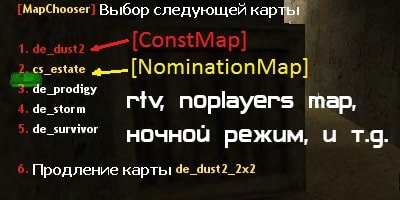
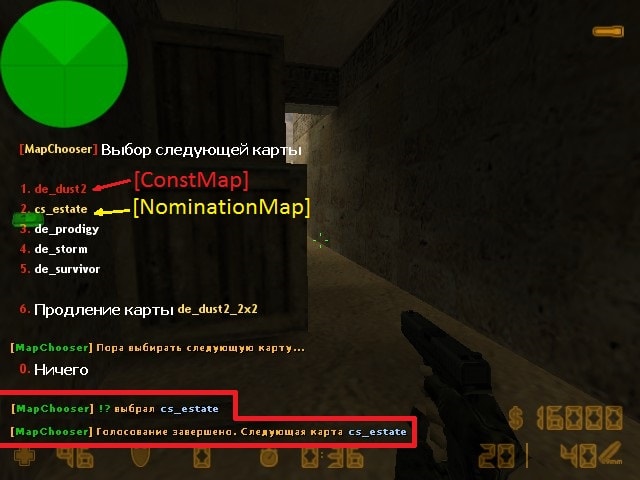
1. Voting and map change Before voting starts, a 5-second countdown with sound plays, after which the map selection menu opens. The menu will not show the previous map or the current map, and you can also extend the map for a few more minutes. All values can be changed in the config.
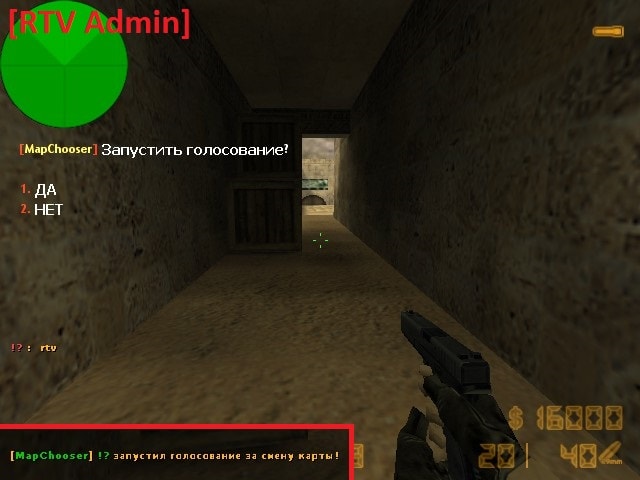
2. RTV (call a vote) Type the chat command rtv to call a vote for a map change. If a certain number of players type rtv, a vote with map choices will be triggered. If you are an admin, the rtv command will open a menu (see screenshots), asking whether to call a vote or not. That is, the admin can trigger voting at any time.
3. Const Map This is a map that will always be at the first position in the menu and highlighted in red. Why is this needed? You can place the most popular map here (usually de_dust2). If there is no worthy map in the menu, you can always select the one that everyone likes, so as not to lose precious online players. If no one votes for a map, the next map will be the one highlighted in red.
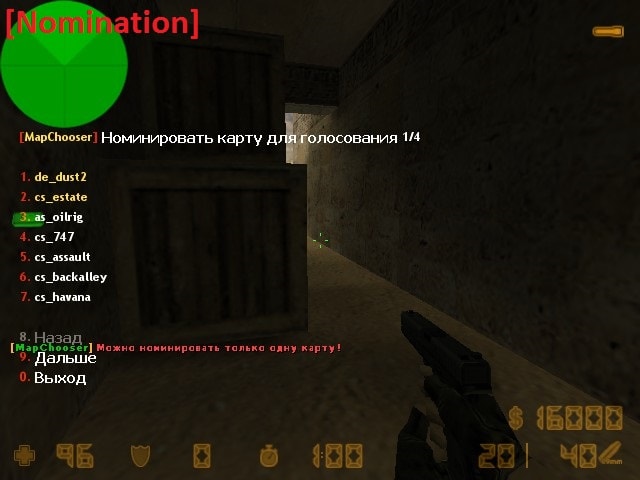
4. Map nomination Players can nominate maps for the upcoming vote. Using the chat command /maps or /nomination opens a menu showing already nominated maps and maps that can be nominated. In the voting menu, these maps will be highlighted in yellow. You can also nominate a map simply by typing it in chat: de_inferno
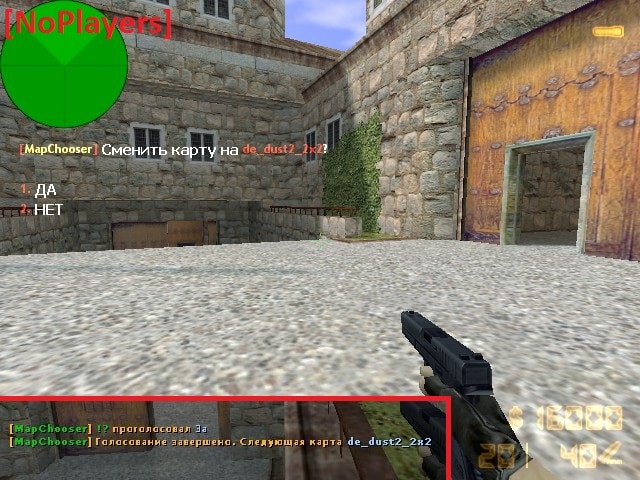
5. No Players When there are few players on the server, this feature will offer a menu saying: change map to de_dust2_2x2 (or any other, see config) For some reason, everyone loves this map, so the online count immediately rises. If players vote against it, the menu will not appear for 15 minutes. If there is no one on the server, the plugin will automatically change the map to de_dust2_2x2 after some time.
6. Night mode At night, fewer people play, and it is reasonable not to display large and unpopular maps in the voting list. This feature was made for that purpose. Choose the period: from 23:00 to 8:00, and during this time only maps from maps_night.ini will appear in the vote.
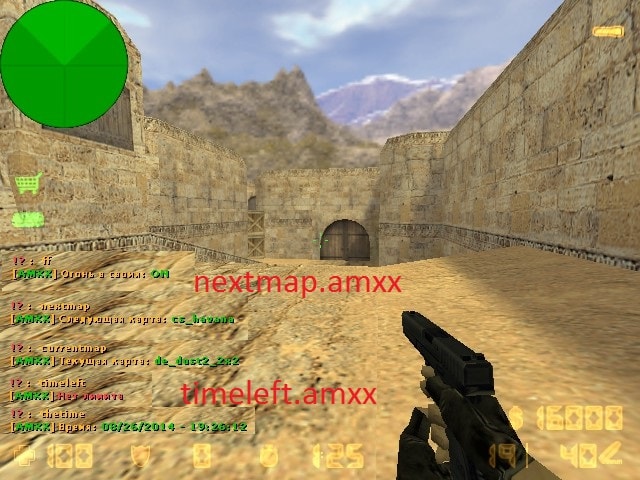
7. nextmap.amxx and timeleft.amxx Two standard AMXX plugins are included. Installing them is not mandatory; they are slightly modified and closely linked to map voting. That is why I decided to include them here.
8. Canceling a vote Admins can forcibly start or cancel a vote. To do this, type rtv in chat, and a menu will appear asking: Cancel the current vote? Yes No. You can also simply type sv_restart 1.
9. Recently played maps You can specify the number of recently played maps that will not appear in the voting menu. To view recently played maps, type /last
26.08.06BETA - обновить .amxx - fix multilangs 26.07.24BETA - обновить .amxx - теперь можно закомментировать квар map_speak для отключения звуков - при вызове rtv теперь не учитываются спектаторы и боты - боты замораживаются при голосовании, отдельная поддержка yapb - fix квара map_load - map_noplayers_num не учитывает ботов и спектаторов - если игрок зашел во время голосования, теперь к нему применяются эффекты 26.06.28BETA - обновить ВСЕ ФАЙЛЫ - обновлено ядро плагина - добавлена полная мультиязычность, даже в конфигах (серверная команда fg_lang) - добавлены форварды - требуется убедится, что плагин работает не хуже предыдущей версии, после чего будем корректировать его дальше 20.08.02 - обновить .amxx - релиз бета версии - исправлено пропадание худа меню при голосовании 20.07.20BETA - обновить .amxx - исправлен косяк с двойным голосованием
20.06.06 - обновить .amxx - исправления, связанные с mp_timelimit. Ранее могли были быть с ним глюки(тестировали на форуме, выкладываю вот только сейчас)
20.03.16 - обновить .amxx - исправили ошибку с noplayersmap - добавили логирование для тестов 19.12.12 - обновить .amxx и .cfg - исправили ночной режим - исправили затемнение экрана - добавили квар map_enable - остальные нововведения и исправления будем делать в БЕТА версиях
18.10.05 - обновить .amxx - исправили косяк с map_noplayers_map, который случайно сделали в предыдущей обнове 18.09.25 - обновить .amxx - Просто обновление привязки, ничего нового пока не было добавлено
15.07.15 - обновить .amxx - Немного изменена технология проверки ключей - Теперь есть отдельный файл настроек в amxmodx/data/fg_settings.ini(файл сам создастся при первом включении). В файле присутствует описание кваров, если хотите, можете изменить настройки. В этом же файле теперь прописывается почта для плагина FunGunUpdater - Всего 6 зеркал для проверки ключей
15.04.22 - обновить .amxx - исправлены ошибки в логах - еще немного поправлен черный экран - отображение имени игрока при NoPlayersMap
15.03.30 - обновить .amxx - возвращен метод подсчета NoPlayersMap - исправлена ошибка с черным экраном (тестим)
15.03.26 - обновить .amxx - исправлены ошибки в логах - исправлена отмена голосования, дубль два
15.02.08 - обновить .amxx - добавлена серверная команда map_govote, которая запустит голосование(сделана для модов типа GunGame)
15.02.03 - обновить .amxx и по желанию .cfg - подсветка неактивных карт в /nomination - баг с map_automenu - бета тест квара map_prefix, который сортирует карты... - остальные баги
15.01.05 - обновить .amxx - исправлены различные баги
15.01.03 - обновить .amxx - Исправлен баг с nomination(игрок мог бесконечно номинировать карты)
15.01.02 - обновить .amxx, .cfg и lang файл! - Переработана система - Устранено много ошибок - Добавлена возможность отменить голосование - Добавлен квар на время смены карты - Добавлен квар на старт голосования только в начале раунда - Добавлен квар, который запоминает последние N сыгранных карт - Добавлена команда /last
14.11.15 - обновить .amxx и lang файл - Убран квар map_rtv_min
14.11.03 - обновить .amxx - Стабильная работа плагина, не смотря на технические проблемы с нашей стороны(проверка лицензии) - Наши зеркала: RU(два зеркала), UA, BY, DE, KZ. - В консоли сервера не пишется: Sockets. Connecting... Чтобы отображалось, как и раньше напишите fg_debug "1" в amxx.cfg
14.10.5 - обновить .amxx - Исправлены баги с вылетом игроков - ДОБАВЛЕНО: Плагины соединяются с нашими серверами для проверки лицензии. Они сами выберут ближайший сервер для проверки. Если это не произошло, то Вы можете указать сами, какой сервер будут использовать плагины. Для этого впишите в amxx.cfg квар: fg_location "UA", где UA это страна. На данный момент у нас есть 4 зеркала: RU, UA, BY, KZ
14.10 - обновить .amxx - исправление бага связанное с вылетом игроков - поправлен баг с rtv после голосования - map_noplayers_map "0" теперь можно выключить
14.09.2 - обновить все файлы - Переход на новый модуль sockets2. Исправление (_0_) и улучшена авторизация плагина. - Добавлен натив для ночного режима - Меню голосования не закрывается после выбора и наглядно показывается сколько процентов игроков проголосовало за карту - Админы могу номинировать и отменять номинацию карт - Стало возможно изменить все звуки на свои
14.09 - обновить все файлы - Добавлено замораживание - Добавлено затемнение экрана - Добавлено квары на цвет и координаты HUD сообщений - исправлен баг с ML_NOTFOUND и с показом процентов RTV - Исправлен баг с зависанием сервера
// RU: Для перевода файлов плагина используйте серверную консольную команду: fg_lang
// Лицензионный ключ вводить в файл amxmodx/data/fg_keys.ini (если файла нет, он создастся сам при рестарте/смены карты сервера)


// Серверная команда "map_govote" запустит голосование за смену карты
// Нужна для модов типа GunGame, где голосование выскакивает не при окончании mp_timelimit


////////////////////////
// ОСНОВНЫЕ НАСТРОЙКИ //
////////////////////////

// Включить плагин? (можно отключать плагином Cvar On Map при необходимости)
map_enable "1"

// Откуда брать список карт
//	0 - из amxmodx/maps.ini
//	1 - из квара mapcyclefile
//	2 - из mapcycle.txt
//	-1 - автоматически (из amxmodx/maps.ini, если файла нет, то из mapcyclefile, если нет, то из mapcycle.txt)
map_load "-1"

// Длительность голосования(в секундах)
map_vote_time "15"

// На сколько можно продлить карту(в минутах)
map_extendmap_step "15"

// На сколько максимум(в минутах) можно продлить карту
// После этого времени, в меню голосования не будет пункта "Продлить карту"
map_extendmap_max "45"

// Сколько последних сыгранных карт не выводить в меню
// Учтите, что если это значение будет сильно приближено к общему количеству карт, то возникнет ERROR
map_lastmaps "2"

// #BETA TEST#
// Показывать карты в меню фильтруя префиксы, т.е. чтобы не было такого, что выведется 5 awp_ карт
map_prefix "0"

// Запускать голосование только в начале раунда?
map_startround "0"

// Замораживать игроков в начале голосования
map_freeze "0"

// Затемнять экран в начале голосования
map_screen "0"

// Не закрывать меню после выбора карты
// (будет показано сколько процентов людей проголосовало за карту)
map_automenu "1"

// Менять карту только тогда, когда доиграли раунд?
map_lastround "1"

// Показывает кто, за что проголосовал
//	0 - не показывать
//	1 - без именем игрока
//	2 - с именем игрока
map_showname "2"

// Количество карт в меню голосования (не больше 8-ми)
map_menu_maps "5"

// Время смены карты в секундах
map_changetime "5.0"

// Цвет и координаты HUD сообщений (последний раунд, ожидается последний раунд)
map_hud_color "255 0 0"
map_hud_pos "-1.0 0.1"

// Звуки отсчета голосования
//	Пути к файлам должны писать раздельно через пробел
//	Не нужно указывать в начале пути папку sound!
//	Звуки могут быть формата wav и mp3
//	Всего должно быть 6 файлов, не больше и не меньше. Первые 5 звуки отсчета, 6-ой звук: Time to choose...
map_speak "fvox/one.wav fvox/two.wav fvox/three.wav fvox/four.wav fvox/five.wav Gman/Gman_Choose2.wav"


// Карта, которая всегда будет стоять на первом месте в меню голосования (она же должна быть в списке карт map_load)
//	0 - выключить
map_const_map "de_dust2"


// Ночной режим
// Промежуток времени, когда плагин будет брать карты из amxmodx/configs/maps_night.ini
//	"час_с_которого - до_какого_часа"
// Закомментируйте для отключения
map_night "23-08"


////////////////////
// Номинация карт //
////////////////////

// Дать возможность игрокам номинировать карты для предстоящего голосования
// Команда /maps или /nomination или просто написать в чат название карты: de_inferno
map_nomination "1"

// Флаг админа, который может неограниченное количество раз номинировать карту
//	0 - отключить
map_nomination_flag "f"

// Через сколько минут можно будет номинировать карты
map_nomination_time "1"

////////////////////////////////////////
// RTV (вызвать меню для смены карты) //
// чат команды: rtv или rockthevote   //
////////////////////////////////////////

// Через сколько минут после начала карты, можно использовать rtv
//	-1 - отключить RTV
map_rtv_delay "3"

// Процент проголосовавших игроков, после которого вызывается меню голосования
map_rtv_percent "50"

// Флаг админа, который может сразу вызвать голосование чат командой rtv
// Так же если голосование включено, то админ может его отменить введя rtv или сделать sv_restart 1
//	0 - отключить
map_rtv_flag "f"


/////////////////////////////////////////////////////////////////////////////////////////
// NoPlayers (Если на сервере станет мало игроков, появится голосование о смене карты) //
/////////////////////////////////////////////////////////////////////////////////////////

// За какую карту голосовать
//	0 - выключить
map_noplayers_map "de_dust2_2x2"

// Количество человек, до которого вызовется голосование
map_noplayers_num "4"


//////////////////////////////////
// nextmap.amxx & timeleft.amxx //
//////////////////////////////////

// Настройки этих плагинов продублированы в amxx.cfg

// Отображение окончания времени карты
//	a - Отображение текстом на экране
//	b - Голосовое оповещение
//	c - Не говорить слово Remaining (только для голосового оповещения)
//	d - Не воспроизводить часы\минуты\секунды
//	e - Обратный отсчет, в случае если остается мало секунд до конца карты
amx_time_display "ab 1200" "ab 600" "ab 300" "ab 180" "ab 60" "bcde 11"

// Звуковое сопровождение команд thetime и timeleft. 0 - выключить.
amx_time_voice "0"