You can log in to our site only via STEAM. If you don’t have a STEAM account, please register a free one on the official site steamcommunity.com, then click the button below to log in. Logged-in users have access to many features that make browsing our store more convenient. To purchase plugins, change your IP, or recover a key, logging in is not required.
By logging in to our website, you agree to the terms of our Privacy Policy
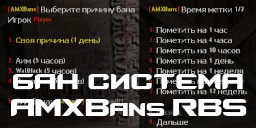
AMXBans RBS is an advanced ban system, an analogue of FreshBans and standard AMXBans. It is based on the old good gmbans version 1.6. It has very flexible settings, extensive functionality, and is not too resource-intensive for the server.
Advantages
Beauty and convenience.
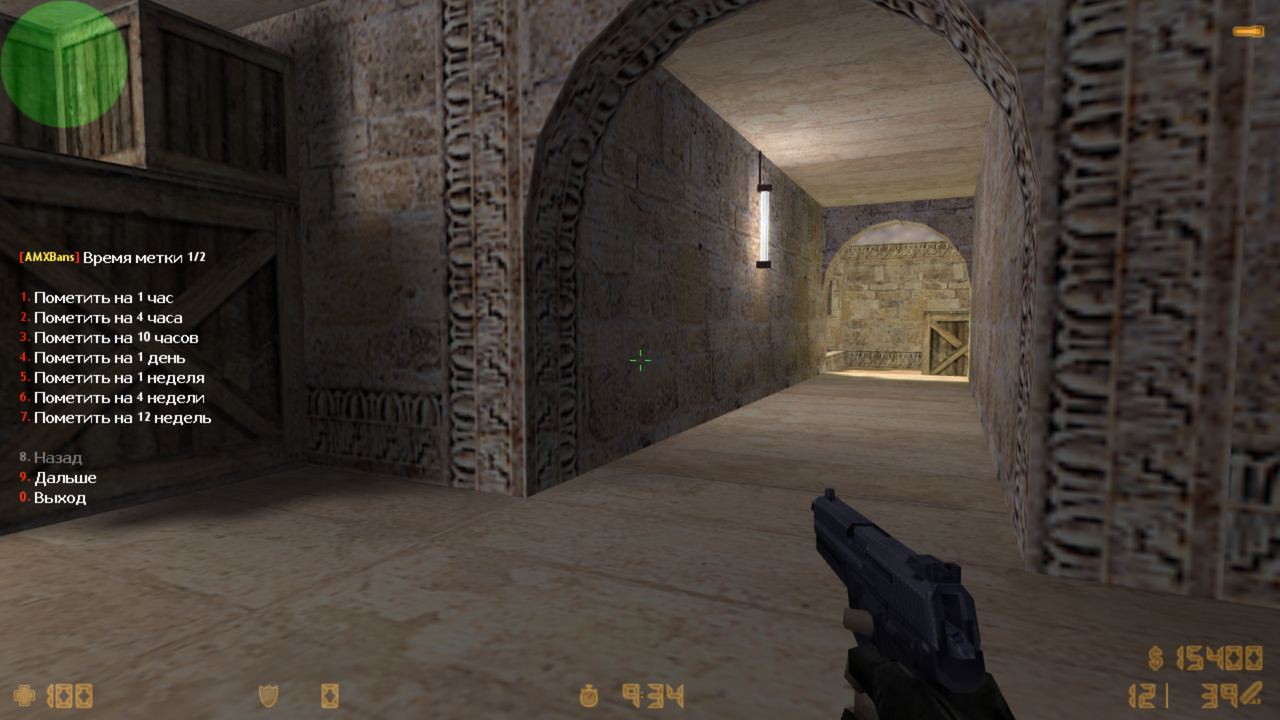
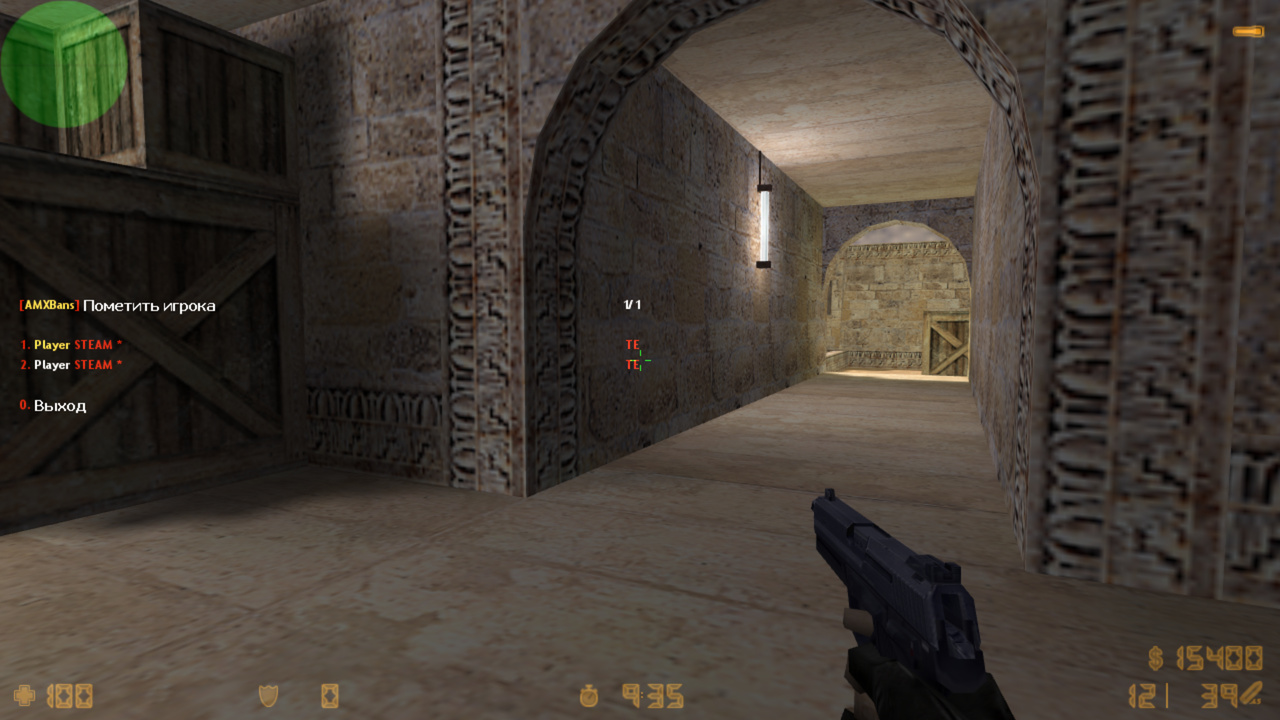
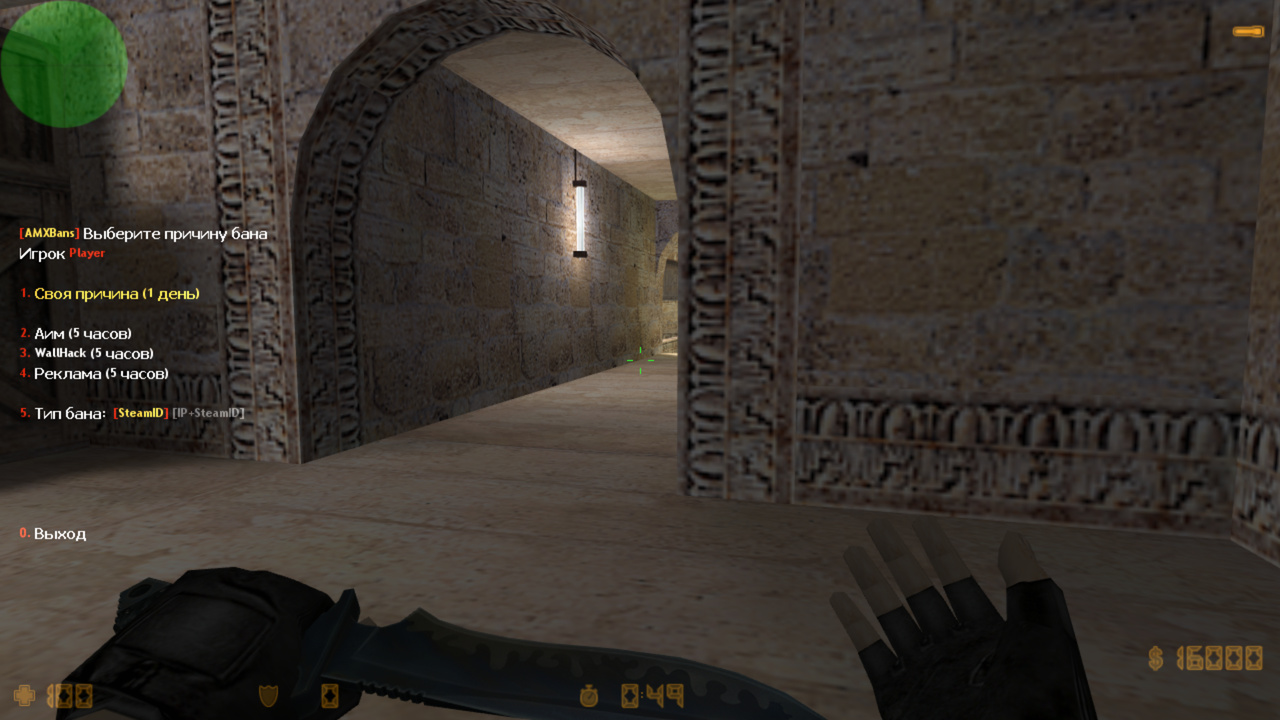
Beautiful and convenient menus. Players are sorted in the menu by team and frags, allowing faster banning.
Colored chat messages. As with all our plugins, clear and attractive messages.
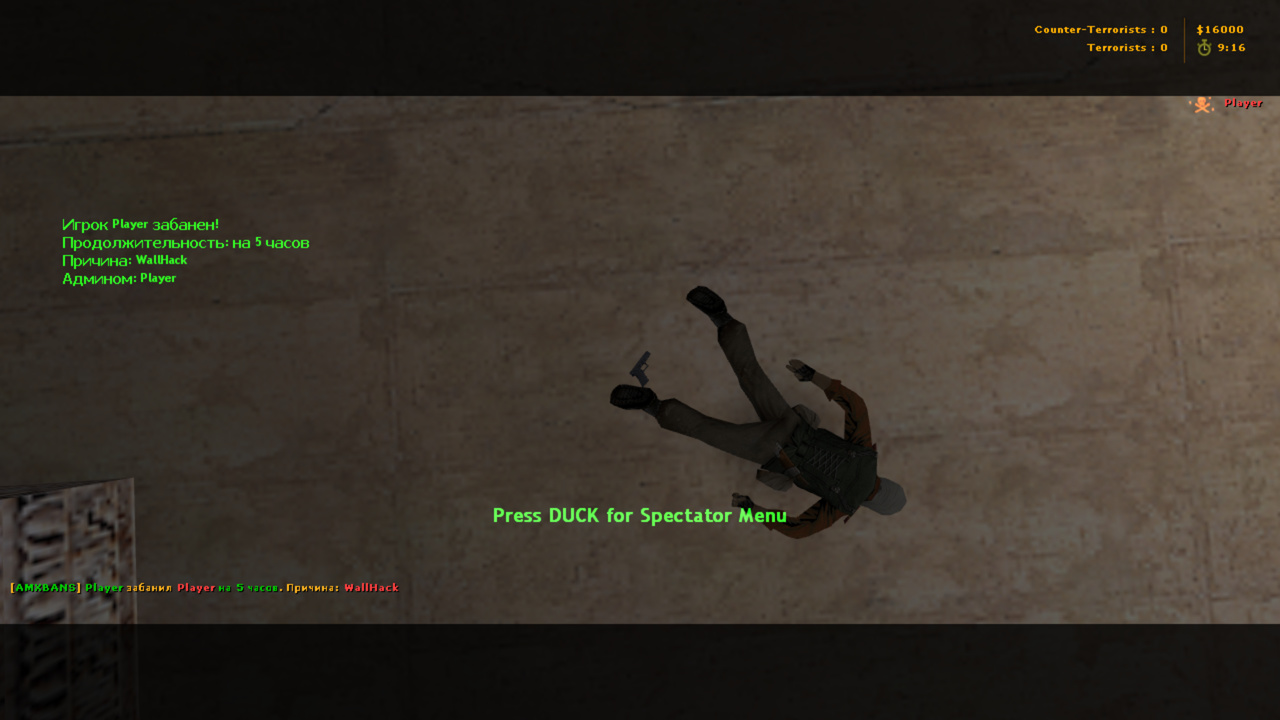
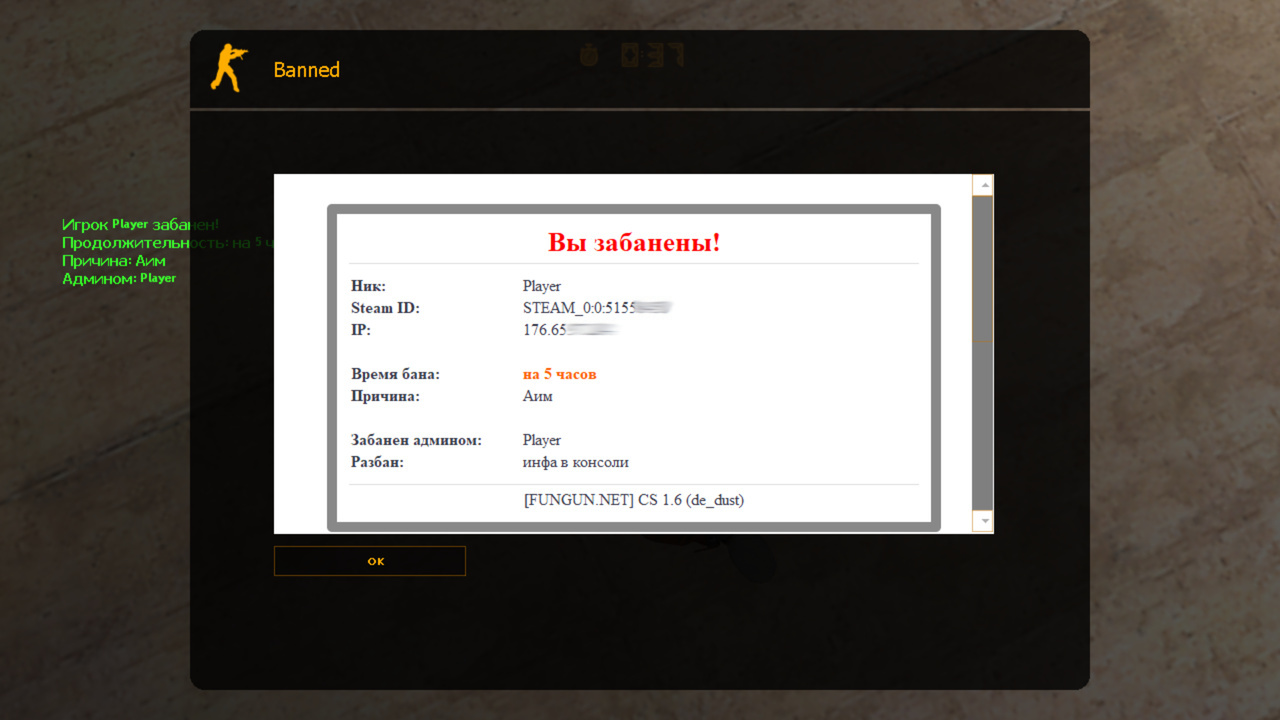
HUD on ban. You can configure the color, coordinates, or completely disable it in amxbans_rbs.ini.
MOTD window on ban. You can take it from the web part or use the built-in or your own, also very nice.
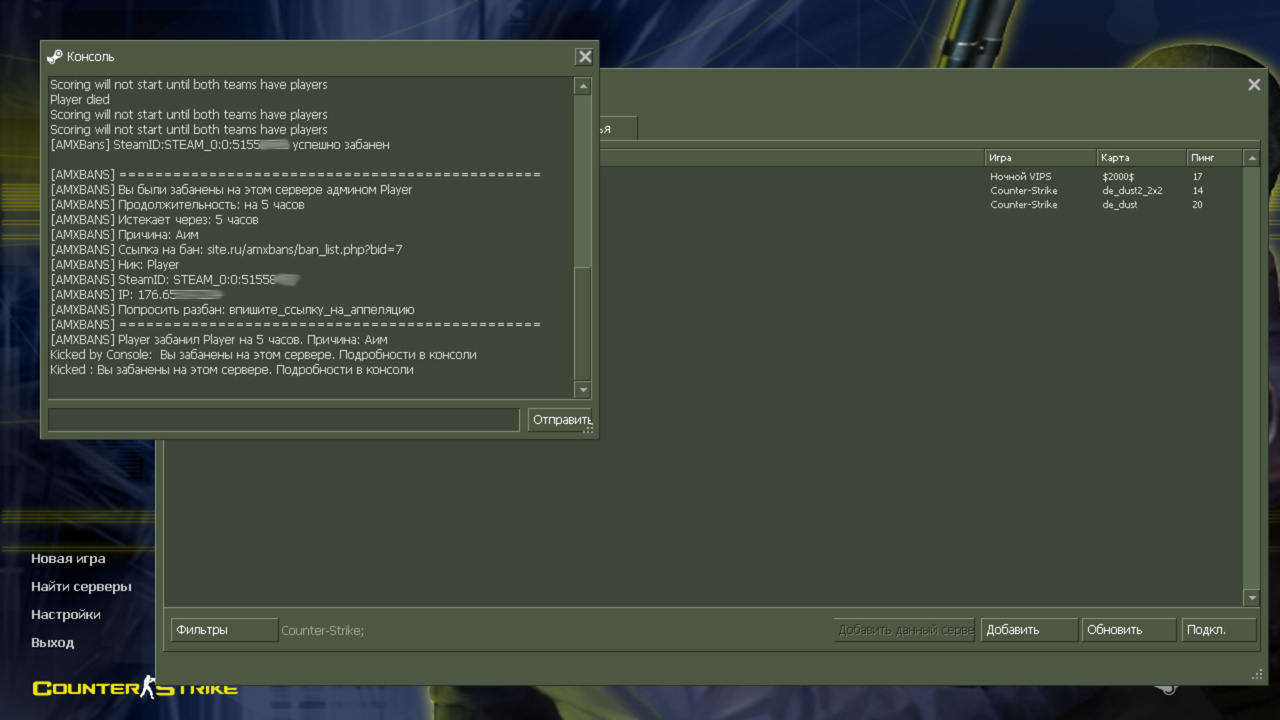
Normal informational message to the player in the console on ban. Who banned, when, for how long, reason, link to the ban, etc.
Ease of setup and installation.
Only one .amxx plugin, which includes the ban system and admin loading. No additional loaders or amxbans_freeze needed, everything is included.
Only 3 configuration files: amxbans_rbs.cfg - main config, amxbans_rbs.ini - settings for messages in console, chat, HUD, MOTD, etc., and amxbans_rbs.txt - language file, where you can configure all plugin messages.
Fixing old bugs and optimization. GMBans and AMXBans had many bugs, errors, and inconsistencies. We fixed all bugs, accelerated database queries, removed unnecessary variables, and optimized every line of code.
Configurability. The plugin has many flexible settings; see the "Configuration Files" for details.
Quick ban. Type in chat: /ban "part_of_player_name" "ban_duration" or without a duration. If one player is found, it will immediately ask to ban; if multiple, it will show a menu of found players. Very convenient feature.
Logging. Records admin logins, failed logins, admin bans, and more in standard logs. You can configure exactly what will be logged. See the config.
Disconnected players. The plugin records players who left the server and adds them to the amx_bandisconnectedmenu. This way, even if the player left, you can still easily ban them. You can ban via menu or using amx_ban; the function will automatically search in the disconnected players database.
Subnet ban.
Allows banning an entire subnet, sometimes necessary as a last resort. You can make it so Steam players and players with any flags can access the server even if the subnet is banned.
Convenient menu to view banned subnets: amx_bansubnetmenu
Only admins with L(ADMIN_RCON) flag or the server can ban a subnet. Example: amx_ban "60" "192.168.1.0" "ban bypass" That is, a player with IP 192.168.1.77 will not be able to connect to the server.
Unban players.
Allows unbanning players directly in-game.
Regular admins can only unban their own bans, while super admins can unban everyone (as configured in the config)
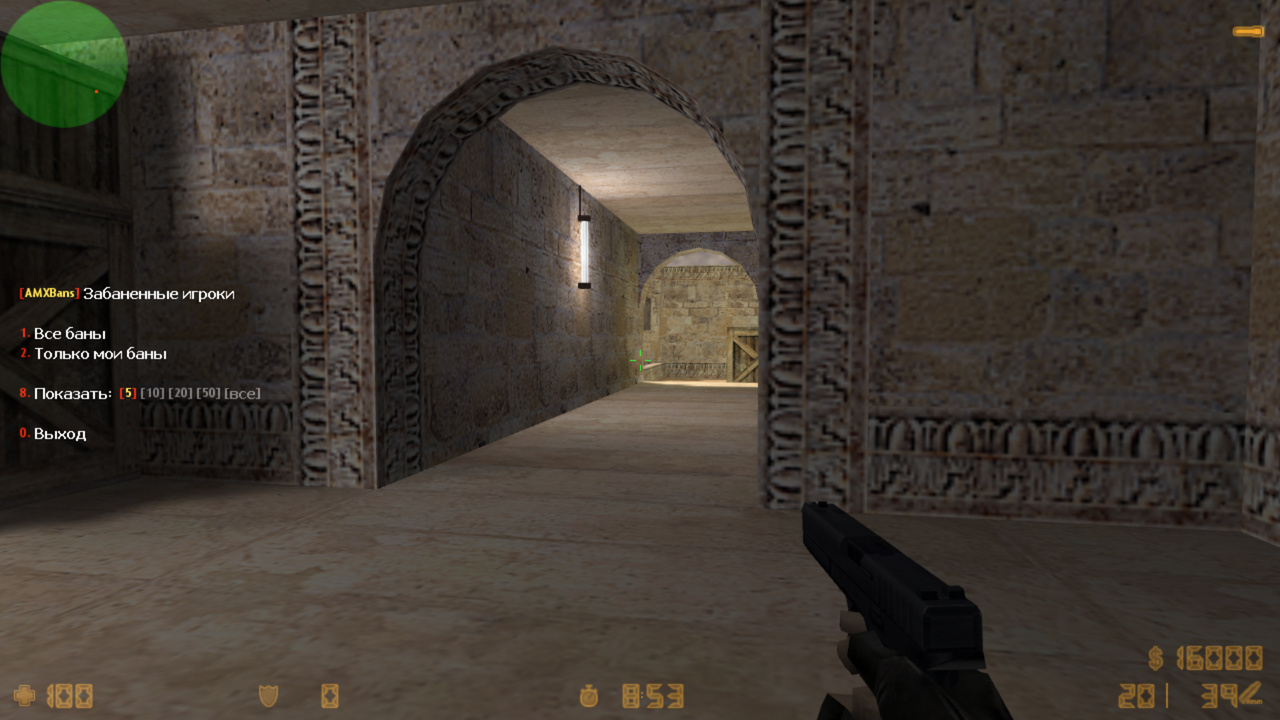
Unban menu: amx_unbanmenu
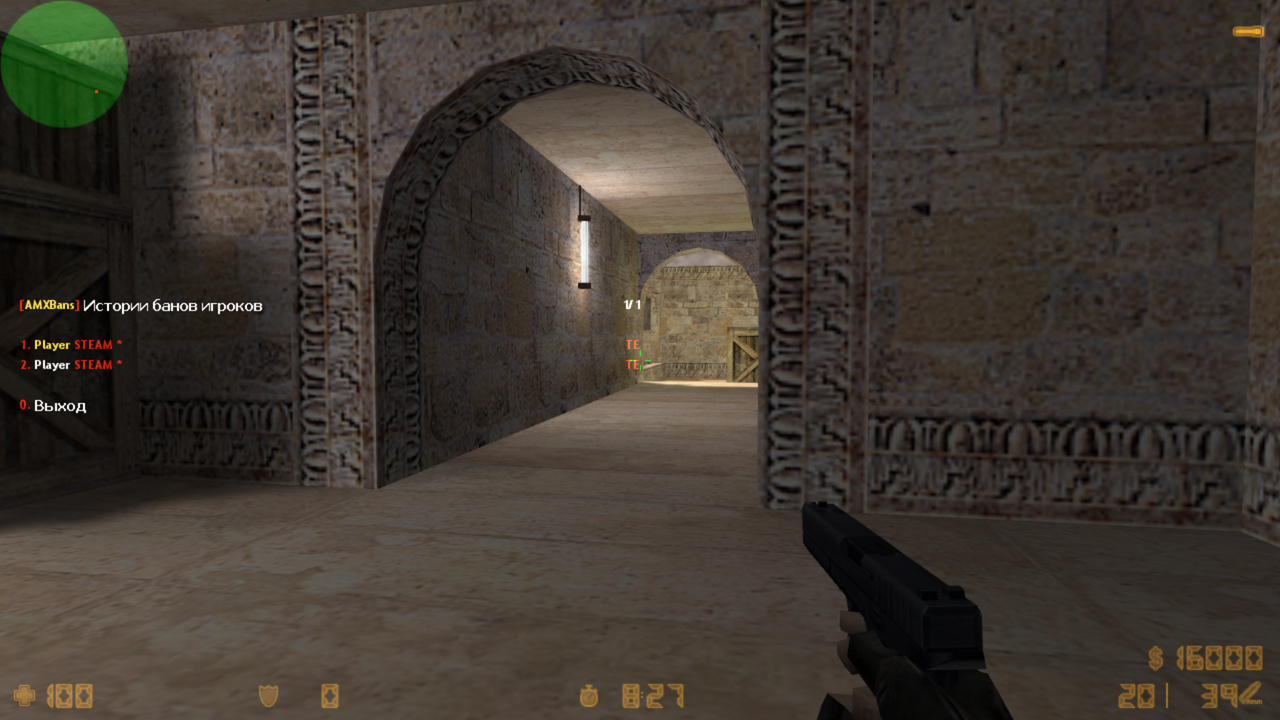
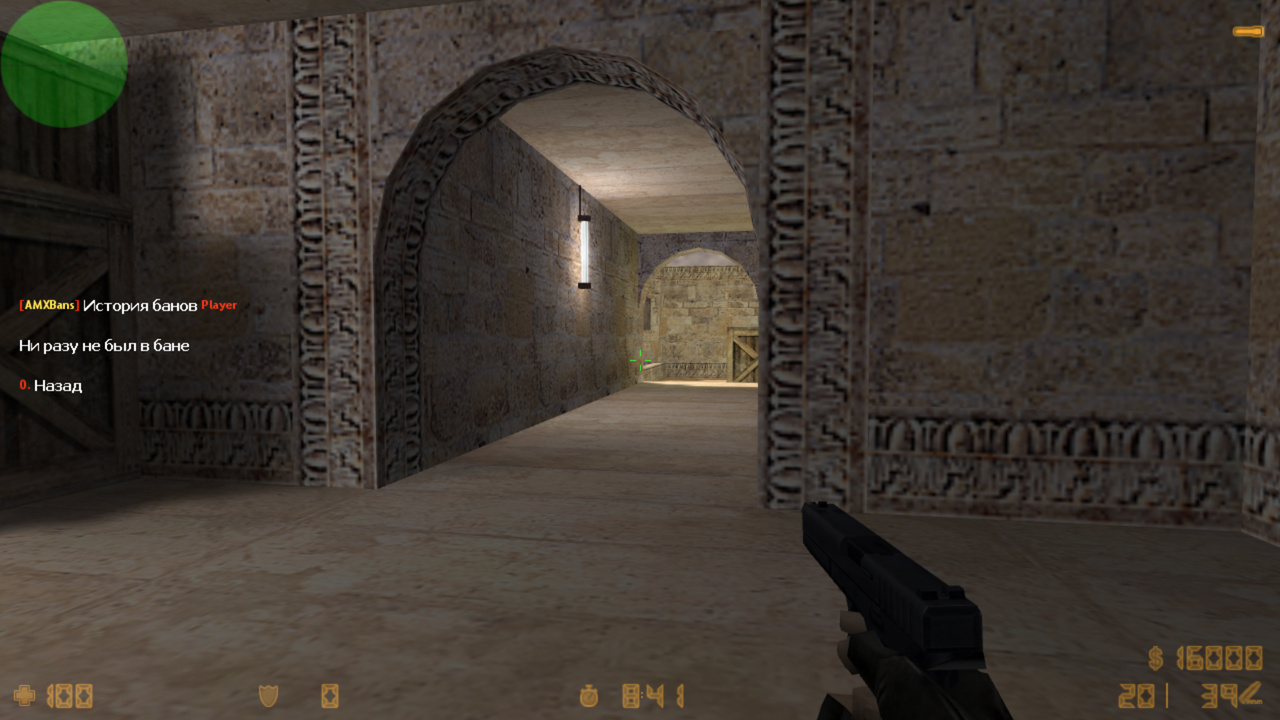
Ban history. In amx_banhistorymenu you can select a player and see how many times they were banned, by whom, and for what.
Mark a player. Old AMXBans feature: you can mark a player without banning them. For example, if you suspect a player of cheating, mark them so other admins can see it. We never used this feature ourselves, but you can enable it in settings if needed.
Number of times banned. When a player connects, admins see how many times they were banned (message shown in chat).
Choice of ban type. Certain admins can choose the ban type (Steam only or IP+Steam). A minor complication for those trying to bypass bans.
Ban reasons. Can be set in the config or loaded from the web panel. You can specify your own reason directly in the menu.
Main admin. Cannot be banned and can ban even immune players. The main admin flag can be set in the config.
Ban duration. Certain admins can set their own ban duration via the AMXBans web panel. Usually, the duration is tied to the ban reason, but you can allow custom duration.
Kill with lightning or freeze. You can freeze a player or strike them with lightning upon banning.
Add admins via amx_addadmin. As in standard admin.amxx, we also added this feature.
Supports DopBan and DopBan2. These plugins from mazdan make bans harder to bypass.
Screenshots. Automatic and optional screenshots are taken by a separate plugin: Screen Player
These are the main advantages of the plugin. We recommend checking the plugin’s configuration files for a clearer picture.
25.12.21 - обновить .amxx - исправлена ошибка в логах 25.12.01 - обновить .amxx - фикс запроса для установки таблиц через amxbans_install - фикс уведомления о том, что нужно установить таблицы через amxbans_install - фикс переменных для motd
25.11.05 - обновить ВСЕ ФАЙЛЫ - релиз BETA версии - добавлена серверная команда бана amx_ban_from (позволяет банить от лица админа) 25.01.26BETA - обновить .amxx - исправлено чтение lang файла (баг прошлой версии) 24.09.07BETA - обновить ВСЕ ФАЙЛЫ - обновлено ядро плагина - добавлена полная мультиязычность, даже в конфигах (серверная команда fg_lang) - добавлены новые аргументы в: forward amxbans_ban_pre(id, admin, bantime, bantype[], banreason[]); - выведен весь текст в lang файл - добавлена поддержка ByPass Guard Supervisor (удобный бан по ASN) - сделали так, что сервер может банить любой STEAMID и IP, даже если игрока нет на сервера и даже, если его нет в базе "вышедших" игроков - добавили команду amx_bans_install для создании таблиц (если нет вебчасти) - разные фиксы
20.06.06 - обновить .amxx - релиз бета версии 20.03.19BETA - обновить .amxx - исправили ошибку бана от консоли сервера 20.03.16BETA - обновить .amxx - модифицирован квар amxbans_flag_main, теперь можно указать несколько флагов с приоритетом (смотрите новое описание в конфиге) - исправлен нюанс, когда админы через amx_ban могли банить на более долгие сроки (смотрите описание в конфиге в секции ВРЕМЯ БАНА) - исправлен квар amxbans_established_time (не работал у юзеров gamecms) - исправлены mysql ошибки - добавлен развернутый лог на случай, если mysql ошибки будут повторяться - исправлены прочие проблемы
19.11.29 - обновить .amxx - исправили ошибки в логах - добавили фикс, исправляющий %s в сообщении по центру экрана на amx190 - добавили .amxx под 190
19.11.04 - обновить .amxx - добавлена поддержка модуля authemu (в меню игроков показывает кто с GSCLIENT) - добавлены квары amx_menu_steam и amx_menu_gsclient (вписывать в amxx.cfg), они включают/выключают в меню игроков надпись STEAM и GSCLIENT соответственно - немного оптимизировали запросы в БД
18.10.13 - обновить .amxx - при amxbans_load_admins "2" теперь не регистрируется команда amx_reloadadmins - исправили отображение своей причины бана
18.09.15 - обновить ОБЯЗАТЕЛЬНО ВСЕ ФАЙЛЫ - куча всего нового, прочтите ниже описания БЕТА версий - для юзеров БЕТА версии достаточно обновить .amxx и amxbans_rbs.cfg - добавили квар amxbans_established_time - добавили квар amxbans_disable_bans (если хотите использовать amxbans_rbs ТОЛЬКО как загрузчик админов, а за бан систему отвечает например fresh bans) - добавлен квар amxbans_bantype_server - добавлен квар amxbans_custom_place - добавлен параметр к квару amxbans_custom_statictime 18.04.29BETA - обновить ОБЯЗАТЕЛЬНО ВСЕ ФАЙЛЫ - добавили логирование, квар amxbans_logs - добавить причины для банов можно теперь в конфиге - теперь можно легко в amxbans_rbs.ini редактировать сообщения в консоль, hud, chat и motd - выставить ссылку на мотд можно теперь в кваре amxbans_motd_link - ссылка на бан лист для свой системы бана указывается в новом кваре amxbans_ban_link - удален квар amxbans_websystem (не нужен) - удален квар amxbans_url (теперь настраивается в amxbans_rbs.ini) - удален квар amxbans_show_messages (теперь настраивается в amxbans_rbs.ini) - консольная команда amx_unban теперь принимает значение bid(бан айди) - небольшой фикс, чтобы отображались русские причины бана в консоли, но будет писаться не всегда, чтобы было все норм, используйте amx1.8.3 - меню "история банов" полностью переработана и теперь функционирует с любыми веб частями и даже без них - квар amxbans_freeze переименован в amxbans_punish. Позволяет либо обездвижить игрока перед баном, либо убить его молнией. - исправили баг, при котором забаненный игрок успевал зайти на сервер - привели в порядок lang файл - исправили косяки и недочеты в разбан меню и в консольной команде amx_unban - исправили бан отключившихся игроков, и исправили недочеты в меню - командой amx_ban теперь можно банить и отключившихся игроков, и подсети - добавлено наказание при бане в виде удара молнией - добавили квар amxbans_custom_flag 18.02.18BETA - обновить .amxx, .cfg и lang файл - Добавили квар amxbans_freeze - Добавили квар amxbans_motd_delay - Добавили amxbans_kick_delay - Исправили квар amxbans_add_menus - Добавили квар amxbans_passowrd_md5 - Добавили квар amxbans_timeout - Оптимизировали SQL и много функций плагина - Сделали четкий вывод информации в консоль клиенту, без всяких глюков - Добавили сортировку в меню игроков и другие классные штуки - Очень много кода было перепилено, все исправления не вспомнить, есть еще идеи, но пока что надо протестить это
17.10.30 - обновить .amxx - Доработка привязки для поддержки некоторых хостингов
17.10.20 - обновить .amxx - Немного улучшили привязку плагинов
17.08.28 - обновить .amxx - Релиз стабильной версии. Описание изменений смотрите ниже. 17.08.05 BETA - обновить .amxx - добавлена поддержка utf8 в амх1.8.3 - исправлен баг с повторным баном после разбана - исправлен ML_NOTFOUND
17.07.05 BETA - обновить .amxx - Оптимизация привязки и в целом кода плагина. Плагин cкомпилирован для AMXX 1.8.2, AMXX 1.8.3 и для ReAMXX. Ключ от плагина сам перезапишется в файл fg_keys.ini и в нем будут находится все ключи от других плагинов. Все логи теперь пишутся на русском языке. - исправлены все баги, но мог что то упустить, нужно потестить
15.09.28 - обновить .amxx - исправлен ложный бан игроков со STEAM_ID_LAN, HLTV, BOT и прочих не сгенерированных стим айди
15.09.25 - обновить .amxx - исправлен 1 натив для Screen Player
15.09.24 - обновить .amxx, .cfg и lang файл - Добавили отдельное изменение префикса в ланг файл - Добавили квар amxbans_show_messages - Теперь бан по Steam+IP учитывает SteamID тоже - Оптимизировали запросы в базу, они стали гораздо легче - Поправили текст в консоли при бане
15.07.22 - обновить .amxx - Исправлена ошибка в "Отключенные игроки"
15.07.15 - обновить .amxx и .cfg - Немного изменена технология проверки ключей - Теперь есть отдельный файл настроек в amxmodx/data/fg_settings.ini(файл сам создастся при первом включении). В файле присутствует описание кваров, если хотите, можете изменить настройки. В этом же файле теперь прописывается почта для плагина FunGunUpdater - Всего 6 зеркал для проверки ключей - Добавлен квар amxbans_add_menus
15.06.26 - обновить .amxx - Исправлено добавления админа по айпи
15.06.22 - обновить .amxx - Исправлено добавления админа для некоторых веб частей
15.06.15 - обновить .amxx, .cfg и lang файл - выбор бана по айди или айди+IP в меню - меню разбана (для своих банов и для всех) - команда amx_addadmin (можно добавить админа из консоли) - исправление ошибок
15.04.16 - обновить .amxx - Работа на ошибками в логах (пишите в баги ошибки, уверен, что исправились не все) - Исправлено добавление админов из файла users.ini
15.02.28 - обновить .amxx - Исправлены различные ошибки
14.12.30 - обновить .amxx - Исправлены иероглифы в русских никах, причинах и названии сервера
14.12.22 - обновить .amxx - Поддержка dopban и dopban2
14.12.21 - обновить .amxx - Добавлен forward для dopban
14.12.20 - обновить .amxx, .cfg и lang файл - Добавлен бан подсети - Оптимизирован плагин и запросы в базу - Добавлена поддержка Веб Части CsBans
14.11.15 - обновить .amxx - исправлен разбан из консоли
14.11.03 - обновить .amxx - Стабильная работа плагина, не смотря на технические проблемы с нашей стороны(проверка лицензии) - Наши зеркала: RU(два зеркала), UA, BY, DE, KZ. - В консоли сервера не пишется: Sockets. Connecting... Чтобы отображалось, как и раньше напишите fg_debug "1" в amxx.cfg
14.10.5 - обновить .amxx и users.ini - Синхронизация для amxmodmenu_rbs и прикреплен users.ini с новыми возможностями - ДОБАВЛЕНО: Плагины соединяются с нашими серверами для проверки лицензии. Они сами выберут ближайший сервер для проверки. Если это не произошло, то Вы можете указать сами, какой сервер будут использовать плагины. Для этого впишите в amxx.cfg квар: fg_location "UA", где UA это страна. На данный момент у нас есть 4 зеркала: RU, UA, BY, KZ
14.10.1 - обновить ланг файл - исправлено ML NOT FOUND
14.10 - обновить .amxx - Исправлен баг с баном гл. админа через /ban
14.09.3? - обновить .amxx - Промежуточная версия - Исправлен баг с Banning... - Добавлена поддержка dopban
14.09.2 - обновить .amxx и Lang file .txt - Переход на новый модуль sockets2. Исправление (_0_) и улучшена авторизация плагина. - Исправлено ML_NOTFOUND: MSG_31 - Исправлено замораживание админа - Исправлен бан через веб часть
14.09 обновить amxbans_rbs.amxx и amxbans_rbs.cfg - Исправлена проблема с русскими причинами - Баг с не удалением бана исправлен - Удалены лишнее SQL запросы - Добавлен флаг админа, который может банить всех, даже тех кто с иммунитетом
14.08.S - релиз
Category
Administrator
To see the plugin in action, go to the "Find a server with this plugin" section in the menu
// RU: Для перевода файлов плагина используйте серверную консольную команду: fg_lang
// Лицензионный ключ вводить в файл amxmodx/data/fg_keys.ini (если файла нет, он создастся сам при рестарте/смены карты сервера)

///////////////////////////////////
// Настройки подключения к MySQL //
///////////////////////////////////

// Адрес
amxbans_host "127.0.0.1"
// Логин
amxbans_user "user"
// Пароль
amxbans_pass "pass"
// Имя базы данных
amxbans_db "db"
// Префикс таблиц (обычно у всех "amx")
amxbans_prefix "amx"
// Таймаут запросов в секундах
amxbans_timeout "10"


//////////////////////
// ЗАГРУЗКА АДМИНОВ //
//////////////////////

// Откуда загружать админов
//	0 - MySQL (база данных)
//	1 - Из файла users.ini
//	2 - Не загружать админов
amxbans_load_admins "0"

// Если у Вас в БД все пароли лежат закодированы в MD5, то поставьте 1
// Поменяйте квар на 0, если при входе на сервер у Вас пишет: Неправильный пароль!
amxbans_passowrd_md5 "1"

// Отключить все Бан функции (оставить только загрузку админов)
amxbans_disable_bans "0"

///////////////////////
// Главные настройки //
///////////////////////

// Вести лог
//	0 - полностью отключить лог
//	a - логировать заходы админов(удачные и нет)
//	b - логировать баны админов
//	c - логировать попытки захода забаненных игроков
//	d - логировать разбаны
//	e - логировать пометки
amxbans_logs "abcde"

// Ссылка на бан
// Переменная %bid%, это номер бана
// Примеры для разных систем бана:
//	"site.ru/amxbans/ban_list.php?bid=%bid%" - любой amxbans
//	"site.ru/csbans/bans/%bid%.html" - csbans
//	"site.ru/banlist" - gamecms (у этой системы нет отдельной странички для конкретного бана, поэтому указываем просто ссылку на весь банлист)
amxbans_ban_link "site.ru/amxbans/ban_list.php?bid=%bid%"

// Ссылка на motd окно (показывает при бане)
//	"auto" - автоматически загрузит из Веб панели (не забудьте в веб части, в настройках сервера указать ссылку)
//	"custom" - покажет мотд окно из файла amxbans_rbs.ini
//	"http://site.ru/amxbans/motd.php?sid=%s&adm=%d&lang=%s" - или вручную укажите ссылку, обычно имеет такой вид (обязательно важна часть: sid=%s&adm=%d&lang=%s)
amxbans_motd_link "custom"

// Причины банов
// По умолчанию причины грузятся из Веб части и настраиваются там
// Если Вы хотите загружать причины из этого конфига, раскомментируйте команды ниже
//	<название причины> <время бана в минутах>
//	60:1 час  1440:1 день  10080:7 дней  43200:30 дней  525600:365 дней
//amxbans_reason_add "Читер" "43200"
//amxbans_reason_add "Не адекват" "1440"
//amxbans_reason_add "Оскорбления" "360"
//amxbans_reason_add "Кемпер" "60"

// Имя админа, если банил сервер
// Что бы использовать имя сервера, оставьте поле пустым
amxbans_server_nick ""

// IP:PORT сервера. Найдет автоматически если стоит пустое значение
// Вы можете сами указать IP и порт по примеру: "123.123.123.123:27015"
amxbans_server_address ""


/////////////////
// Бан подсети //
/////////////////

// ВАЖНО! Устаревший метод, лучше использовать amxbans_bypass_guard
// Чтобы дать бан подсети айпишника 123.123.123.123, нужно забанить 123.123.123.0
// Желательно это делать в веб панели. Выбрать ТИП БАНА по айпи и указать в конце айпишника ноль.
// Для бана и разбана подсети, требуется флаг L(ADMIN_RCON)
// Значения квара:
//	0 - выключить бан подсети
//	1 - не дает войти на сервер пользователям с забаненной подсети, кроме админов с любым флагом
//	2 - тоже что и "1", но еще дает возможность войти STEAM игрокам на сервер
amxbans_subnet "0"

// Флаг админа, который может забанить ASN игрока через плагин [ByPass Guard] Supervisor
// В меню банов появится пункт ASN, и Вы сможете в пару кликов забанить весь ASN блок игрока
// Подробнее о переобходе банов: https://forum.fungun.net/threads/Переобход-банов.4603/
//	0 - отключить
amxbans_bypass_guard "l"


/////////////////////
// Disconnect menu //
/////////////////////

// Число игроков, отображаемых в меню отключенных/последних игроков
//	0 - выключить это меню
amxbans_disconnect_players "16"

//////////////////
// Flagged menu //
//////////////////

// Включить меню наблюдения за игроком?
// вызывается командой: amx_flaggingmenu (доступ с флагом d)
//	0 - выключить
//	1 - включить
amxbans_flagged "0"


//////////////////
// History menu //
//////////////////

// Включение меню истории банов
amxbans_history "1"


////////////////
// UnBan menu //
////////////////

// Флаг админа, который может разбанивать все баны, а не только свои (в меню amx_unbanmenu)
//	0 - все админы могут разбанивать все баны
amxbans_flag_unban "l"

// Пункт выбора количества показа забаненных игроков, в меню amx_unbanmenu
//	0 - показать всех
amxbans_unban_step "5 10 20 50 0"


//////////////////////////////
// Дополнительные настройки //
//////////////////////////////

// Флаг иммунитета
amxbans_flag_immunity "a"

// Флаг главного админа.
// Главного админа никто не может забанить(кроме самого сервера),
// а сам главный админ может забанить даже тех, у кого иммунитет (amxbans_flag_immunity)
// Можно указывать несколько флагов, например lmd:
//  Админ с флагом "l" может банить админов с флагом "m", а они могут только админов с флагом "d". Админы с флагом "d" могут банить всех остальных, у кого нет иммунитета.
//	0 - отключить
amxbans_flag_main "l"

// Флаг админа, для использования команды amx_addadmin
//	0 - отключить
amxbans_flag_addadmin "l"

// Тип бана
// По умолчанию бан идет по SteamID
// Если у игрока STEAM_ID_LAN, то бан идет по IP
// Админ с флагом amxbans_flag_bantype, может выбирать тип бана сам (в меню выбора причин бана)
amxbans_bantype_option "SteamID IP+SteamID"

// Тип бана, если банит сервер (через команду amx_ban)
// Значения: "SteamID" или "IP+SteamID"
amxbans_bantype_server "SteamID"

// Флаг админа, который может выбирать тип бана (в меню выбора причин бана)
//	0 - выключить
amxbans_flag_bantype "l"

// Добавлять кики игрока в базу данных?
// То есть сколько раз игрок был кикнут с сервера(когда он был забанен и пытался войти)
// По умолчанию функция отключена, так как я считаю это лишним запросом в базу данных
amxbans_add_kick "0"

// Флаг админа, который может использовать собственную причину бана
//	0 - отключить собственные баны
amxbans_custom_flag "d"

// Время бана, используемое при собственной причине бана.
// Значение используется, если у админа статическое значение времени бана. Указывать в минутах
//	0 - навсегда
//	-1 - показывать меню с выбором времени
amxbans_custom_statictime "1440"

// Расположение в меню пункта "Своя причина"
//	0 - в начале (первым пунктом)
//	1 - в конце
amxbans_custom_place "0"

// Причина бана по-умолчанию.
amxbans_default_ban_reason "unknown"

// Если игрок ранее был забанен N раз, то при заходе его на сервер будет отображаться инфа админам в чат
//	0 - отключить
//	N - количество предыдущих банов
amxbans_show_prebanned "0"

// Наказание игрока перед баном
//	0 - отключить
//	1 - обездвижить
//	2 - убить молнией
amxbans_punish "2"

// Задержка перед киком
// ВАЖНО! В веб панеле есть пункт: "Задержка перед показом MOTD", так вот это не совсем так
// На самом деле это задержка перед киком, неизвестно почему во всех веб панелях так, но мы оставили так же
// Для задержки именно motd окна, смотрите квар ниже
//	-1 - Брать из веб панели
amxbans_kick_delay "-1"

// Задержка перед показом MOTD
//	0 - не показывать motd окно
amxbans_motd_delay "0.1"

// Добавлять пункты в меню amxmodmenu?
amxbans_add_menus "1"


//////////////////////////////
//       ВРЕМЯ БАНА         //
//////////////////////////////

// Если Вы добавляете админа без указанного срока бана (в веб часте есть пункт "Установленное время бана")
// то система покажет меню выбора времени(на сколько банить игрока)
// Тут Вы можете настроить это время

// Кому из админов будет показываться меню с выбором времени бана
//	-1 - информация будет браться из веб части ("Установленное время бана")
//	0 - никому не показывать такое меню
//	flag - укажите флаг админа(например "l"), который будет иметь возможность выставить время
//	d - всем показывать меню
amxbans_established_time "-1"

// ВАЖНО: Сначала вводите значения от меньшего к большему. Количество значений - от 1 до 12.
//	"0 m" - навсегда
// Допустимые значения:
//	1 - 59	может использоваться с флагом m (минуты)
//	1 - 23	может использоваться с флагом h (часы)
//	1 - 6	может использоваться с флагом d (дни)
//	1 - 999	может использоваться с флагом w (недели)
// Примеры:
//	"5 m" - 5 минут
//	"1 h" - 1 час
//	"1 d" - 1 день
//	"2 w" - 2 недели


// Время бана для обычных админов (с флагом "d")
amxbans_setlowbantimes "10 m" "1 h" "1 d" "1 w"

// Какой флаг доступа должен иметь админ, чтобы получить доступ к банам с большой длительностью
amxbans_hightime_flag "o"
// Время бана для админов с amxbans_hightime_flag флагом.
amxbans_sethighbantimes "10 m" "1 h" "1 d" "5 d" "4 w" "0 m"

// Время наблюдения за игроком в меню
amxbans_setflagtimes "1 h" "4 h" "10 h" "1 d" "1 w" "4 w" "12 w" "0"


// ВАЖНО! Все админы с флагов "d" имеют доступ к консольной команде amx_ban
// Соответственно они могут указать в ней более длительное время бана, чем это можно сделать в меню amx_banmenu
// Однако администраторы не смогут указать в amx_ban время бана больше, чем указано в кварах amxbans_setlowbantimes и amxbans_sethighbantimes
// Если Вы не используете меню с выбором времени бана, и не хотите, чтобы админы использовали команду amx_ban, достаточно закомментировать квар amxbans_setlowbantimes и если нужно, то и квар amxbans_sethighbantimes


//////////////////////////////////
// Консольные команды (Памятка) //
//////////////////////////////////

// Список консольных команд
// (здесь они написаны просто так, как памятка)

// say /ban <часть ника игрока> [время бана в минутах] - быстрый бан игрока
// или /fb разницы нет
//
// amx_banmenu - открыть бан меню
// amx_banhistorymenu - открыть меню истории банов
// amx_bandisconnectedmenu - открыть меню вышедших игроков
// amx_flaggingmenu - открыть меню помеченных игроков
// amx_unbanmenu - открыть меню разбана игроков
// amx_bansubnetmenu - открыть меню бана подсетей
//
// amx_ban <time in mins> <SteamID or nickname or #userid or IP or subnet> <reason> - забанить игрока или подсеть
// amx_banip и fb_ban - аналоги команды amx_ban
// amx_ban_from - <Admin authid/nick/#userid> <time in mins> <SteamID or nickname or #userid or IP or subnet> <reason> - серверная команда, бан от админа
// amx_unban <steamID or IP> - разбан игрока (доступ только для админа с флагом l(ADMIN_RCON))
// amx_addadmin <nick|authid|ip> <flags> [password] [name|authid|ip] [nick] [show (yes|no)] [expired] [comment] - добавить админа
//
// amx_reloadreasons - Перезагрузка причин
// amx_reloadsubnet - Перезагрузка банов подсети
// amx_reloadadmins - Перезагрузка админов
[ADMIN NAMES REPLACER]
; Чекер причин банов
; Ниже вписывайте причины и соответствующие им ники админов
; В формате: "Часть причины" "Ник админа, который будет в информации о бане с этой причиной"
; Действует только при серверных банах
; Причины регистрочувствительны!
; К примеру вписав "KZHack" "[Anti KZHack]", то в бане с причиной KZHack ник админа будет [Anti KZHack]
;"Team Kill" "[ATAC]"
;"NoSpread Detected" "[ANTICHEAT]"
;"Aim Detected" "[ANTICHEAT]"
[REASON REPLACER]
; Ниже вписывайте части причин банов и их заменители
; В Формате "Часть причины" "Заменитель"
; Для чистки части причины - заменитель оставьте пустым.
; Действует только при серверных банах
; Причины регистро-чуствительны!
; К примеру вписав "[CSF]" "[My Mega Server]", то в бане с причиной [CSF] CDHack мы получим причину [My Mega Server] CDHack
;"Max Team Kill Violation" "Team Kill"
[CONSOLE BAN MESSAGE]
; Сообщение в консоль игроку при бане
; Переменные:
; %admin% - ник админа
; %bantime% - на сколько забанен
; если навсегда, то примет значение из lang файла VAR_PERMANENT, то есть: НАВСЕГДА
; если на время, то примет значение из lang файла VAR_FOR_TIME, то есть: на столько часов/дней и т.п.
; %length% - через сколько истечет бан
; %reason% - причина бана
; %link% - ссылка на бан
; %player_name% - ник игрока
; %player_steamid% - SteamID игрока
; %player_ip% - IP игрока
; %hostname% - Имя сервера
; %map% - Текущая карта
; \n - символ новой строки
; Данные переменные можно использовать и в последующих настройках
; Для удобства настройки используйте команду amxbans_msg_test (напишет текст в консоль, откроет мотд окно, напишет в чат и худ)
"\n"
"[AMXBANS] ==============================================="
"[AMXBANS] Вы были забанены на этом сервере админом %admin%"
"[AMXBANS] Продолжительность: %bantime%"
"[AMXBANS] Истекает через: %length%"
"[AMXBANS] Причина: %reason%"
"[AMXBANS] Ссылка на бан: %link%"
"[AMXBANS] Ник: %player_name%"
"[AMXBANS] SteamID: %player_steamid%"
"[AMXBANS] IP: %player_ip%"
"[AMXBANS] Попросить разбан: впишите_ссылку_на_аппеляцию"
"[AMXBANS] ==============================================="
[CONSOLE SUBNET MESSAGE]
; Сообщение в консоль игроку, при бане подсети
; %subnet - айпи забаненной подсети, например 123.123.123.0
"\n"
"[AMXBANS] ==============================================="
"[AMXBANS] Бан Вашей подсети %subnet%"
"[AMXBANS] Продолжительность: %bantime%"
"[AMXBANS] Истекает через: %length%"
"[AMXBANS] Причина: %reason%"
"[AMXBANS] Ссылка на бан: %link%"
"[AMXBANS] Ник: %player_name%"
"[AMXBANS] SteamID: %player_steamid%"
"[AMXBANS] IP: %player_ip%"
"[AMXBANS] Попросить разбан: впишите_сюда_ссылку_на_аппеляцию"
"[AMXBANS] ==============================================="
[CHAT BAN MESSAGE]
; Сообщение в чат при бане.
; Если хотите отключить сообщение, то просто закомментируйте его
"!n[!gAMXBANS!n] !g%admin% !nзабанил !t%player_name% !g%bantime%!n. Причина: !t%reason%"
[HUD BAN MESSAGE]
; HUD Сообщение
; Первая строка отвечает за настройку худа, следующие это сам текст
; "r g b x y time type(1-hud 2-dhud 0-отключить)"
"0 255 0 0.05 0.30 10 1"
"Игрок %player_name% забанен!"
"Продолжительность: %bantime%"
"Причина: %reason%"
"Админом: %admin%"
[MOTD DEFAULT]
; Покажет это мотд окно при бане, если квар amxbans_motd_link "custom"
; Или если не удалось загрузить ссылку на motd из веб части
; Максимальное количество символов не должно превышать 1534! (русские символы считаются за два)
; Максимальная длина строки не должна превышать 160 символов!
<meta charset="utf-8">
<style>body{color:#334;margin-top:30px;}</style>
<body>
<div align="center"><table style="border:10px solid #888888;border-radius:5px;"><tr><td style="padding:10px;width:570px;">
<div style="border-bottom:1px solid #DDDDDD;padding-bottom:5px;margin-bottom:10px;text-align:center;color:#FF0000;font-size:170%;">
<b>Вы забанены!</b>
</div>
<table width="100%" cellpadding="0">
<tr><td><b>Ник:</b></td><td>%player_name%</td></tr>
<tr><td><b>Steam ID:</b></td><td>%player_steamid%</td></tr>
<tr><td><b>IP:</b></td><td>%player_ip%</td></tr>
<tr><td colspan="2"> </td></tr>
<tr><td><b>Время бана:</b></td><td style="color:#FF5A00;"><b>%bantime%</b></td></tr>
<tr><td><b>Причина:</b></td><td>%reason%</td></tr>
<tr><td colspan="2"> </td></tr>
<tr><td><b>Забанен админом:</b></td><td width="70%">%admin%</td></tr>
<tr><td><b>Разбан:</b></td><td width="70%">инфа в консоли</td></tr>
</table>
<div style="border-top:1px solid #DDDDDD;padding-top:5px;margin-top:10px;text-align:center;">%hostname% (%map%)</div>
</td></tr></table></div>
</body>
[ru]
AMXBANS_TAG = !n[!gAMXBans!n]
AMXBANS_TAG_CONSOLE = [AMXBans]

CONSOLE_PAS_INV				= Не правильный пароль!
CONSOLE_PAS_ACC				= Пароль верный
CONSOLE_PRIV_SET			= Привилегии установлены
CONSOLE_NO_ENTRY			= Неправильный ник или пароль
CONSOLE_LOADED_ADMINS		= Загружено %d админов
CONSOLE_ACCESS_SUBNET		= У Вас нет прав на бан подсетей!
CONSOLE_BAN_STEAM_OK		= SteamID:%s успешно забанен
CONSOLE_BAN_IP_OK			= IP:%s + SteamID:%s успешно забанены
CONSOLE_ACCESS_PERMANENT	= У Вас нет прав на вечный бан!
CONSOLE_UNBAN_SUCCESS		= %s<%s> Успешно разбанен!

BAN_ALREADY			= Игрок уже забанен! (steamid:%s ip:%s bid:%d)
BAN_DOUBLE			= Игрок уже присутствует в бан листе!
FASTBAN_NOT_ACCESS	= !tНедостаточно прав!
FASTBAN_NULL		= !tНе найдено игроков с похожими никами
FASTBAN_SELECTALL	= !tВыберете игрока из всего списка
BEFORE_BANNED		= Заходит игрок !g%s<%s><%s>!n. Был забанен !t%i раз

KICK_MESSAGE = Вы забанены на этом сервере. Подробности в консоли
VAR_PERMANENT = НАВСЕГДА
VAR_NEVER = НИКОГДА
VAR_FOR_TIME = на %s

ADDMENU_FLAGGING			= Помеченные игроки
ADDMENU_DISCONNECTED		= Отключенные игроки
ADDMENU_HISTORY				= История банов
ADDMENU_SUBNET				= Забаненные подсети
ADDMENU_UNBAN				= Разбан игроков

MENU_FASTBAN_TITLE			= \r[\yAMXBans\r]\w Игроки с частью ника \y%s
MENU_ONLINEBAN_TITLE		= \r[\yAMXBans\r]\w Меню бана
MENU_BANTIME_TITLE			= \r[\yAMXBans\r]\w Выберете время бана^nИгрок \r%s
MENU_REASON_TITLE			= \r[\yAMXBans\r]\w Выберете причину бана^nИгрок \r%s
MENU_BAN_OPTION				= Тип бана: %s
MENU_BAN_USERREASON			= \yСвоя причина
MENU_BAN_PERMANENT			= НАВСЕГДА
MENU_BAN_FORMINUTES			= %s

MENU_DISCONNECTED_TITLE		= \r[\yAMXBans\r]\w Последние \r%d \yигроков
MENU_DISCONNECTED_NOPLAYERS	= !tНет отключившихся игроков!
MENU_DISCONNECTED_SUCCESS	= !tИгрок забанен!

MENU_BANHISTORY_TITLE		= \r[\yAMXBans\r]\w Истории банов игроков
MENU_BANHISTORY_PLAYER		= \r[\yAMXBans\r]\w История банов \r%s\y\R
MENU_BANHISTORY_EMPTY		= Ни разу не был в бане
MENU_BANHISTORY_BACK		= К списку игроков

MENU_SUBNET_TITLE			= \r[\yAMXBans\r]\w Забаненные подсети
MENU_SUBNET_ITEM			= %s \y(%s)
MENU_SUBNET_NULL			= !tНет забаненных подсетей!

MENU_UNBAN_TITLE			= \r[\yAMXBans\r]\w Забаненные игроки
MENU_UNBAN_ALL				= Все баны
MENU_UNBAN_ADMIN			= Только мои баны
MENU_UNBAN_STEP				= Показать: %s
MENU_UNBAN_LOADING			= Загрузка...
MENU_UNBAN_NOBANS			= Нет забаненных игроков
MENU_UNBAN_BACK				= К выбору списка
MENU_UNBAN_PLAYER			= \r[\yAMXBans\r]\w \r%s^n\y%s \w%s^nИстекает: \y%s
MENU_UNBAN_UNBAN			= Разбанить?
MENU_UNBAN_WAITUNBAN		= Разбан...
MENU_UNBAN_CHAT				= Вы успешно разбанили игрока !g%s!t<%s>|%s
MENU_UNBAN_ERROR			= Ошибка MySQL!
MENU_UNBAN_THEIR			= Можно разбанивать только свои баны!
MENU_UNBAN_SUBNET			= Нет прав на разбан подсети!

MENU_FLAGGING_TITLE			= \r[\yAMXBans\r]\w Пометить игрока
MENU_FLAGTIME_TITLE			= \r[\yAMXBans\r]\w Время метки
MENU_FLAGREASON_TITLE		= \r[\yAMXBans\r]\w Причины
MENU_FLAGGING_ADD			= \yметка
MENU_FLAGGING_UNFLAG		= Удалить флаг \r%s
MENU_FLAGGING_PLAYERNEW		= Установить новый флаг
MENU_FLAGGING_FORMINUTES	= Пометить на %s
MENU_FLAGGING_PERMANENT		= Пометить навсегда
MENU_FLAGGING_SET			= !tВы пометили игрока !g%s
MENU_FLAGGING_DELETE		= !tВы удалили пометку у игрока !g%s
MENU_FLAGGING_ERROR			= !tНе удалось пометить игрока !g%s
MENU_UNFLAG_TITLE			= \r[\yAMXBans\r]\w Игрок уже помечен! Настройки:
MENU_UNFLAG_ERROR			= !tУдаление пометки у игрока !g%s !tне удалось
/* AMXBans Functions
*
* by SKAJIbnEJIb
*
* This file is provided as is (no warranties).
*/

#if defined _amxbans_rbs_included
	#endinput
#endif

#define _amxbans_rbs_included


// Возвратит префикс таблиц (amx)
native amxbans_get_db_prefix(output[], len = 32);

// Возвратит ник админа из веб части
native amxbans_get_admin_nick(id, output[], len = 32);

// Возвратит 1 если админ имеет статическое время бана
native amxbans_get_static_bantime(id);

// Возвратит время конца админки в формате UnixTime
//	0 - неограниченная админка
native amxbans_get_expired(id);


// Вызывается, до начала бана игрока
forward amxbans_ban_pre(id, admin);

// Вызывается, когда игроку показывается окно бана (MOTD)
forward amxbans_ban_motdopen(index);

// Вызывается, когда находится помеченный игрок
forward amxbans_player_flagged(index, sec_left, const reason[]);

// Вызывается, когда снимается метка(flagged) с игрока
forward amxbans_player_unflagged(index);

// Вызывается, когда плагин инициализировался с БД
// 	sqlTuble - кешированные данные соединения
//	dbPrefix - префикс таблиц amxbans
forward amxbans_sql_initialized(Handle:sqlTuple, const dbPrefix[]);

// Вызывается, если игрок получает права администратора
forward amxbans_admin_connect(id);

// Вызывается, когда админ выходит с сервера
forward amxbans_admin_disconnect(id);
; Пользователи и админы
; Формат ввода
; <Ник/AuthID/IP> <Пароль> <Уровни доступа> <Флаги> <Ник> <Статическое время бана> <конец админки>

; #################
; # Ник/AuthID/IP #
; #################
; Как регистрировать юзера. По нику, по SteamID или по IP

; ##########
; # Пароль #
; ##########
; Если не хотите использовать пароль оставьте поле пустым ""

; ##################
; # Уровни доступа #
; ##################
; a - иммунитет (против игрока не могут быть использованы команды: kick/ban/slay/slap и т.д)
; b - резервация (игрок сможет пользоваться резервным слотом)
; c - amx_kick - доступ к команде amx_kick
; d - amx_ban and amx_unban commands - доступ к команде amx_ban и amx_unban
; e - amx_slay and amx_slap commands - доступ к команде amx_slay и amx_slap
; f - amx_map command - доступ к команде amx_map
; g - amx_cvar command - доступ к команде amx_cvar (не все переменные могут быть доступны)
; h - amx_cfg command - доступ к команде amx_cfg
; i - amx_chat and other chat commands - доступ к команде amx_csay и другим чат командам
; j - amx_vote and other vote commands - доступ к команде amx_vote и другим командам голосования
; k - access to sv_password cvar - доступ к переменной sv_password (через команду amx_cvar)
; l - access to amx_rcon command and rcon_password cvar - доступ к переменной amx_rcon и rcon_password (через команду amx_cvar)
; m - произвольный уровень A (если вы используете нестандартные амх плагины)
; n - произвольный уровень B
; o - произвольный уровень C
; p - произвольный уровень D
; q - произвольный уровень E
; r - произвольный уровень F
; s - произвольный уровень G
; t - произвольный уровень H
; u - доступ к графическому меню управления (amxmodmenu)
; z - пользователь (не админ)

; #########
; # Флаги #
; #########
; a - не пускать игрока на сервер с неправильно введенным паролем
; b - регистрация клан тега
; c - админ зайдет на сервер только со значениями AuthID/WonID/SteamID
; d - админ зайдет только с этого IP адреса
; e - пароль не проверяется (необходимо только совпадение Ника/SteamID/IP)

; #######
; # Ник #
; #######
; Ник админа.

; ##########################
; # Статическое время бана #
; ##########################
; 1 - чтобы админ использовал статическое время бана
; 0 - чтобы админ сам выставлял время бана

; #################
; # Конец админки #
; #################
; Время, когда срок действия админки заканчивается.
; Время ставится в формате UnixTime: http://www.cy-pr.com/tools/time/
; Для постоянной админки поставьте "0"

; Примеры
; "STEAM_0:0:123456"	""				"abcdefghijklmnopqrstu"	"ce"	"SKAJIbnEJIb"	"0" "0"
; "123.45.67.89"		""				"abcdefghijklmnopqrstu"	"de"	"Test"			"1" "0"
; "My Name" 			"my_password"	"abcdefghijklmnopqrstu"	"a"		"My Name"		"0" "1445341864"