You can log in to our site only via STEAM. If you don’t have a STEAM account, please register a free one on the official site steamcommunity.com, then click the button below to log in. Logged-in users have access to many features that make browsing our store more convenient. To purchase plugins, change your IP, or recover a key, logging in is not required.
By logging in to our website, you agree to the terms of our Privacy Policy
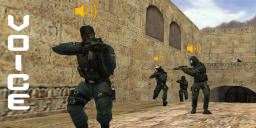
Voice Chat Manager. This plugin extends the standard voice chat system in CS 1.6 and adds new chat types for communication, as well as administrative features.
New Voice Chat Types
The plugin adds 3 new types of voice chat, each with its own features:
Admin Voice Chat (+adminvoice)
Only administrators with the specified access flag can hear and speak
Bind example: bind f6 +adminvoice
Announcement Voice Mode (+advoice)
Temporarily mutes all other players so the admin can make an announcement without interruptions
If players try to interrupt the admin, they receive a chat warning and a sound notification is played (if the VTC module is installed)
Bind example: bind f7 +advoice
Team Voice Chat (+teamvoice)
Only players on the same team can hear each other
Includes an option where living players cannot hear dead players
Bind example: bind f8 +teamvoice
Features
Everything is configured as usual via the config file. You can enable only the features you need for your server.
Allow voice communication after death for a set amount of time. Useful for servers where living players do not hear dead players. After death, a player can still relay information to their teammates for a short period.
Living players stop hearing dead players when only one player remains alive. Prevents dead players from distracting the last surviving player during crucial moments of the round. A chat notification is shown indicating that living players no longer hear dead players until the end of the round.
Ability to disable different voice chat types at specific times. Use the Cvar On Map plugin or a similar tool to change the voicechat_disable cvar when needed, for example during voting or warmup. If voice chat is disabled, players will receive a notification (if the VTC module is installed).
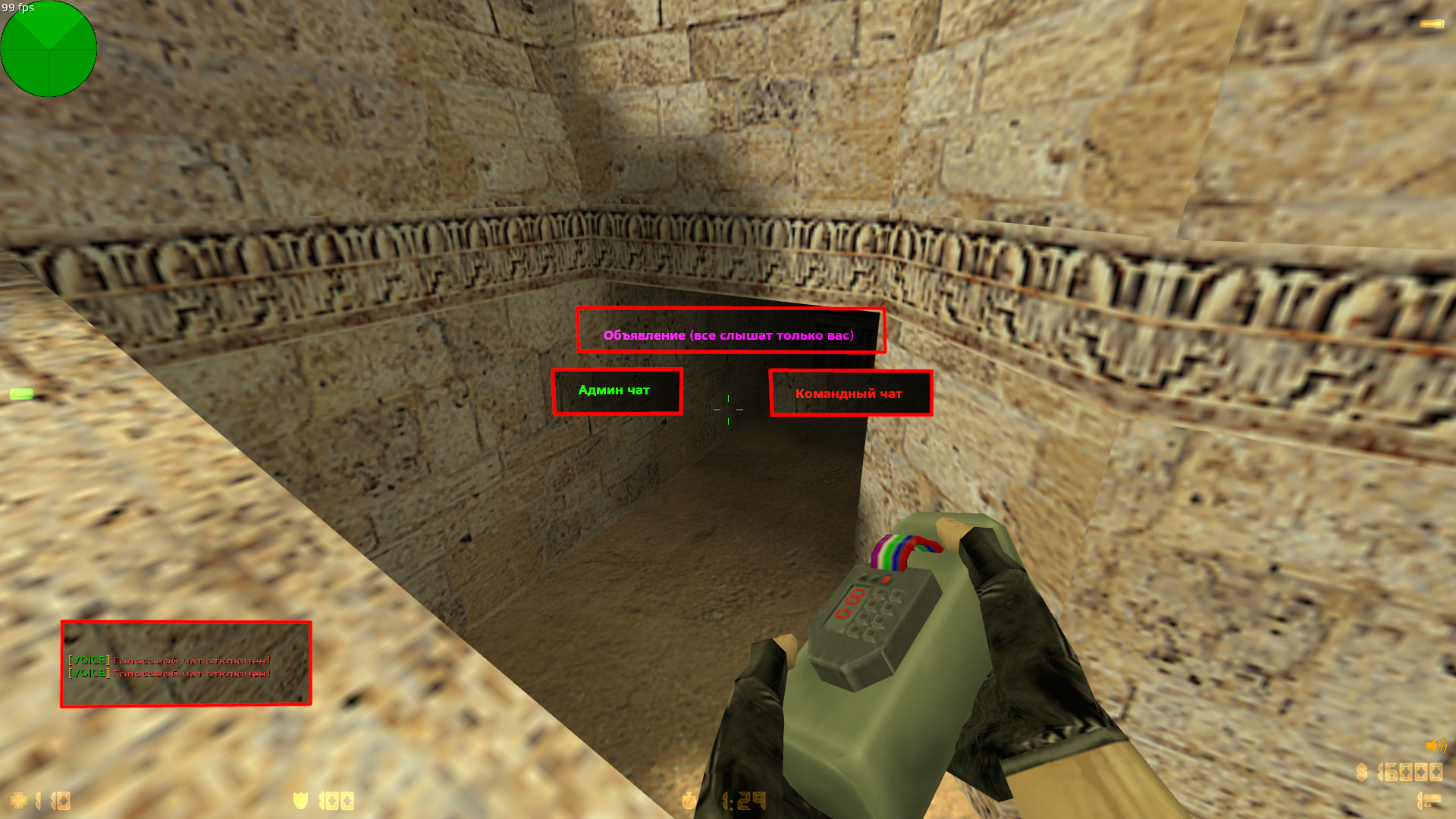
HUD indicators for voice chat modes. When using voice chat, the player will see a HUD message showing the active chat mode, preventing confusion. The appearance is fully configurable in the config file.
26.06.28 - обновить .amxx и .cfg
- изменен квар voicechat_last_alive, теперь там указывается через сколько секунд после того, как останется один игрок, включится функция
- работает как с ReAPI так и без него

26.05.24 - релиз
Category
Server
To see the plugin in action, go to the "Find a server with this plugin" section in the menu
// RU: Для перевода файлов плагина используйте серверную консольную команду: fg_lang
// Лицензионный ключ вводить в файл amxmodx/data/fg_keys.ini (если файла нет, он создастся сам при рестарте/смены карты сервера)


// Включить ведение логов (для отладки)
//	0 - отключить
//	1 - включить
//	2 - подробный лог
voicechat_debug "0"

// Флаг доступа к голосовому чату админов
// Слышать будут игроки с указанным флагом
// Команда: +adminvoice
//	0 - отключить
voicechat_admin "i"

// Флаг доступа к функции голосовых объявлений
// Когда админ начинает говорить, голосовой чат остальных игроков временно блокируется (чтобы сообщение было хорошо слышно и его нельзя было перебить)
// Команда: +advoice
//	0 - отключить
voicechat_ad "l"

// Звук, который будет проигрываться, если игрок начнет говорить в чат, когда говорит админ (+advoice)
// Требуется модуль VTC
//	"" - отключить
voicechat_speak "barney/youtalkmuch.wav"

// Командный голосовой чат
// Команда: +teamvoice
//	1 - включить
//	0 - отключить
voicechat_team "1"

// Режим голосового общения для командного чата
//	0 - живые игроки слышат только живых, мертвые только мертвых
//	1 - все игроки команды слышат друг друга
voicechat_alltalk_team "1"

// Когда в живых остается только один игрок, живые больше не слышат мертвых.
// Укажите, через сколько секунд после того, как останется один игрок, включится эта функция
//	0 - отключить
//	N - кол-во секунд
voicechat_last_alive "0"


// Разрешить игрокам говорить в голосовой чат после смерти
// Например, если у вас стоит режим sv_alltalk 0, когда живые игроки не слышат мертвых
// Укажите время (в секундах), в течение которого игрок может говорить после смерти
//	0 - функция отключена
voicechat_dead_info "0"


// Отключить голосовой чат
// Можно временно выключать голосовой чат всем игрокам в нужное игровое событие
// Удобно использовать для этого плагин Cvar On Map
//	0 - по умолчанию (все чаты включены)
//	a - отключить стандартный голосовой чат (+voicerecord)
//	b - отключить админский чат (+adminvoice)
//	c - отключить объявления (+advoice)
//	d - отключить командный чат (+teamvoice)
voicechat_disable "0"


// Показывать игроку HUD сообщение, в какой чат он говорит
// Закомментируйте квар, чтобы отключить
//
// "R G B  X Y  EFFECTS  FXTIME  HOLDTIME  FADEINTIME  FADEOUTTIME  CHANNEL  TYPE"
// 	R G B - цвет в данном формате (255 69 0)
//		-1 -1 -1 - случайный цвет
//		-2 -2 -2 - цвет команды
// 	X Y - координаты (0.01 0.16)
// 	EFFECT - эффект сообщения (2)
// 		0 - стандарт
// 		1 - мерцание
// 		2 - печатает буквы по очереди
// 	FXTIME - время блеска во втором эффекте (0.5)
// 	HOLDTIME - время удержания сообщения на экране (2.0)
// 	FADEINTIME - скорость блеска во втором эффекте (0.01)
// 	FADEOUTTIME - плавное исчезновение сообщения (0.2)
// 	CHANNEL - канал, используется только для hud, от 1 до 4 или -1 (-1)
// 	TYPE - 1:hud 2:DHUD
// 	ALPHA - прозрачность для первого и второго эффекта (0)
// 	R2 G2 B2 - цвет блеска в первом и втором эффекте (0 255 0)
voicechat_hud_admin "0 255 0    -1.0 0.4  1  0.5  2.0  0.01  0.2  4  1  0  255 0 0"
voicechat_hud_ad    "255 0 255  -1.0 0.4  1  0.5  2.0  0.01  0.2  4  1  0  255 255 255"
voicechat_hud_team  "-2 -2 -2   -1.0 0.4  2  0.5  2.0  0.01  0.2  4  1  0  0 255 0"
[ru]
VOICECHAT_LAST_ON         = !tОстался один игрок! !gЖивые перестают слышать мертвых до конца раунда!
VOICECHAT_HUD_ADMIN       = Админ чат
VOICECHAT_HUD_AD          = Объявление (все слышат только вас)
VOICECHAT_HUD_TEAM        = Командный чат
VOICECHAT_CHAT_ADMIN      = !n[!gVOICE!n] !tВас не слышно, пока говорит администратор!
VOICECHAT_DISABLE_DEFAULT = !n[!gVOICE!n] !tГолосовой чат отключен!
VOICECHAT_DISABLE_ADMIN   = !n[!gVOICE!n] !tАдмин чат отключен!
VOICECHAT_DISABLE_AD      = !n[!gVOICE!n] !tГолосовой чат объявлений отключен!
VOICECHAT_DISABLE_TEAM    = !n[!gVOICE!n] !tКомандный чат отключен!

[en]
VOICECHAT_LAST_ON         = !tOne player left! !gAlive players can no longer hear the dead until the end of the round!
VOICECHAT_HUD_ADMIN       = Admin chat
VOICECHAT_HUD_AD          = Announcement (everyone hears only you)
VOICECHAT_HUD_TEAM        = Team chat
VOICECHAT_CHAT_ADMIN      = !n[!gVOICE!n] !tYou cannot be heard while the administrator is speaking!
VOICECHAT_DISABLE_DEFAULT = !n[!gVOICE!n] !tVoice chat is disabled!
VOICECHAT_DISABLE_ADMIN   = !n[!gVOICE!n] !tAdmin chat is disabled!
VOICECHAT_DISABLE_AD      = !n[!gVOICE!n] !tAnnouncement voice chat is disabled!
VOICECHAT_DISABLE_TEAM    = !n[!gVOICE!n] !tTeam chat is disabled!

[bg]
VOICECHAT_LAST_ON         = !tОстана само един играч! !gЖивите вече не чуват мъртвите до края на рунда!
VOICECHAT_HUD_ADMIN       = Админ чат
VOICECHAT_HUD_AD          = Съобщение (всички чуват само вас)
VOICECHAT_HUD_TEAM        = Отборен чат
VOICECHAT_CHAT_ADMIN      = !n[!gVOICE!n] !tНе ви чуват, докато администраторът говори!
VOICECHAT_DISABLE_DEFAULT = !n[!gVOICE!n] !tГласовият чат е изключен!
VOICECHAT_DISABLE_ADMIN   = !n[!gVOICE!n] !tАдмин чатът е изключен!
VOICECHAT_DISABLE_AD      = !n[!gVOICE!n] !tГласовият чат за съобщения е изключен!
VOICECHAT_DISABLE_TEAM    = !n[!gVOICE!n] !tОтборният чат е изключен!

[cz]
VOICECHAT_LAST_ON         = !tZůstal poslední hráč! !gŽiví už neslyší mrtvé do konce kola!
VOICECHAT_HUD_ADMIN       = Admin chat
VOICECHAT_HUD_AD          = Oznámení (všichni slyší pouze vás)
VOICECHAT_HUD_TEAM        = Týmový chat
VOICECHAT_CHAT_ADMIN      = !n[!gVOICE!n] !tNejste slyšet, dokud mluví administrátor!
VOICECHAT_DISABLE_DEFAULT = !n[!gVOICE!n] !tHlasový chat je vypnutý!
VOICECHAT_DISABLE_ADMIN   = !n[!gVOICE!n] !tAdmin chat je vypnutý!
VOICECHAT_DISABLE_AD      = !n[!gVOICE!n] !tHlasový chat oznámení je vypnutý!
VOICECHAT_DISABLE_TEAM    = !n[!gVOICE!n] !tTýmový chat je vypnutý!

[pl]
VOICECHAT_LAST_ON         = !tZostał ostatni gracz! !gŻywi nie słyszą martwych do końca rundy!
VOICECHAT_HUD_ADMIN       = Czat admina
VOICECHAT_HUD_AD          = Ogłoszenie (wszyscy słyszą tylko ciebie)
VOICECHAT_HUD_TEAM        = Czat drużynowy
VOICECHAT_CHAT_ADMIN      = !n[!gVOICE!n] !tNie słychać cię, gdy administrator mówi!
VOICECHAT_DISABLE_DEFAULT = !n[!gVOICE!n] !tCzat głosowy jest wyłączony!
VOICECHAT_DISABLE_ADMIN   = !n[!gVOICE!n] !tCzat admina jest wyłączony!
VOICECHAT_DISABLE_AD      = !n[!gVOICE!n] !tCzat głosowy ogłoszeń jest wyłączony!
VOICECHAT_DISABLE_TEAM    = !n[!gVOICE!n] !tCzat drużynowy jest wyłączony!

[ro]
VOICECHAT_LAST_ON         = !tA rămas un singur jucător! !gCei vii nu îi mai aud pe cei morți până la sfârșitul rundei!
VOICECHAT_HUD_ADMIN       = Chat admin
VOICECHAT_HUD_AD          = Anunț (toți te aud doar pe tine)
VOICECHAT_HUD_TEAM        = Chat de echipă
VOICECHAT_CHAT_ADMIN      = !n[!gVOICE!n] !tNu poți fi auzit cât timp vorbește administratorul!
VOICECHAT_DISABLE_DEFAULT = !n[!gVOICE!n] !tChatul vocal este dezactivat!
VOICECHAT_DISABLE_ADMIN   = !n[!gVOICE!n] !tChatul admin este dezactivat!
VOICECHAT_DISABLE_AD      = !n[!gVOICE!n] !tChatul vocal pentru anunțuri este dezactivat!
VOICECHAT_DISABLE_TEAM    = !n[!gVOICE!n] !tChatul de echipă este dezactivat!

[sr]
VOICECHAT_LAST_ON         = !tОстао је само један играч! !gЖиви више не чују мртве до краја рунде!
VOICECHAT_HUD_ADMIN       = Админ чат
VOICECHAT_HUD_AD          = Објава (сви чују само вас)
VOICECHAT_HUD_TEAM        = Тимски чат
VOICECHAT_CHAT_ADMIN      = !n[!gVOICE!n] !tНе чују вас док администратор говори!
VOICECHAT_DISABLE_DEFAULT = !n[!gVOICE!n] !tГласовни чат је онемогућен!
VOICECHAT_DISABLE_ADMIN   = !n[!gVOICE!n] !tАдмин чат је онемогућен!
VOICECHAT_DISABLE_AD      = !n[!gVOICE!n] !tГласовни чат за објаве је онемогућен!
VOICECHAT_DISABLE_TEAM    = !n[!gVOICE!n] !tТимски чат је онемогућен!

[tr]
VOICECHAT_LAST_ON         = !tSon bir oyuncu kaldı! !gCanlılar raund sonuna kadar ölüleri duyamaz!
VOICECHAT_HUD_ADMIN       = Admin sohbeti
VOICECHAT_HUD_AD          = Duyuru (herkes sadece sizi duyar)
VOICECHAT_HUD_TEAM        = Takım sohbeti
VOICECHAT_CHAT_ADMIN      = !n[!gVOICE!n] !tYönetici konuşurken sesiniz duyulmaz!
VOICECHAT_DISABLE_DEFAULT = !n[!gVOICE!n] !tSesli sohbet devre dışı!
VOICECHAT_DISABLE_ADMIN   = !n[!gVOICE!n] !tAdmin sohbeti devre dışı!
VOICECHAT_DISABLE_AD      = !n[!gVOICE!n] !tDuyuru sesli sohbeti devre dışı!
VOICECHAT_DISABLE_TEAM    = !n[!gVOICE!n] !tTakım sohbeti devre dışı!

[ua]
VOICECHAT_LAST_ON         = !tЗалишився один гравець! !gЖиві більше не чують мертвих до кінця раунду!
VOICECHAT_HUD_ADMIN       = Адмін чат
VOICECHAT_HUD_AD          = Оголошення (усі чують лише вас)
VOICECHAT_HUD_TEAM        = Командний чат
VOICECHAT_CHAT_ADMIN      = !n[!gVOICE!n] !tВас не чути, поки говорить адміністратор!
VOICECHAT_DISABLE_DEFAULT = !n[!gVOICE!n] !tГолосовий чат вимкнено!
VOICECHAT_DISABLE_ADMIN   = !n[!gVOICE!n] !tАдмін чат вимкнено!
VOICECHAT_DISABLE_AD      = !n[!gVOICE!n] !tГолосовий чат оголошень вимкнено!
VOICECHAT_DISABLE_TEAM    = !n[!gVOICE!n] !tКомандний чат вимкнено!

[kk]
VOICECHAT_LAST_ON         = !tСоңғы ойыншы қалды! !gТірілер раунд соңына дейін өлгендерді естімейді!
VOICECHAT_HUD_ADMIN       = Әкімші чаты
VOICECHAT_HUD_AD          = Хабарландыру (бәрі тек сізді естиді)
VOICECHAT_HUD_TEAM        = Командалық чат
VOICECHAT_CHAT_ADMIN      = !n[!gVOICE!n] !tӘкімші сөйлеп тұрған кезде сіз естілмейсіз!
VOICECHAT_DISABLE_DEFAULT = !n[!gVOICE!n] !tДыбыстық чат өшірілген!
VOICECHAT_DISABLE_ADMIN   = !n[!gVOICE!n] !tӘкімші чаты өшірілген!
VOICECHAT_DISABLE_AD      = !n[!gVOICE!n] !tХабарландыру дыбыстық чаты өшірілген!
VOICECHAT_DISABLE_TEAM    = !n[!gVOICE!n] !tКомандалық чат өшірілген!

[de]
VOICECHAT_LAST_ON         = !tNur noch ein Spieler übrig! !gLebende können die Toten bis zum Ende der Runde nicht mehr hören!
VOICECHAT_HUD_ADMIN       = Admin-Chat
VOICECHAT_HUD_AD          = Ankündigung (alle hören nur dich)
VOICECHAT_HUD_TEAM        = Team-Chat
VOICECHAT_CHAT_ADMIN      = !n[!gVOICE!n] !tDu bist nicht hörbar, solange der Administrator spricht!
VOICECHAT_DISABLE_DEFAULT = !n[!gVOICE!n] !tSprachchat ist deaktiviert!
VOICECHAT_DISABLE_ADMIN   = !n[!gVOICE!n] !tAdmin-Chat ist deaktiviert!
VOICECHAT_DISABLE_AD      = !n[!gVOICE!n] !tAnkündigungs-Sprachchat ist deaktiviert!
VOICECHAT_DISABLE_TEAM    = !n[!gVOICE!n] !tTeam-Chat ist deaktiviert!

[es]
VOICECHAT_LAST_ON         = !t¡Queda un solo jugador! !g¡Los vivos dejan de escuchar a los muertos hasta el final de la ronda!
VOICECHAT_HUD_ADMIN       = Chat de admin
VOICECHAT_HUD_AD          = Anuncio (todos solo te escuchan a ti)
VOICECHAT_HUD_TEAM        = Chat de equipo
VOICECHAT_CHAT_ADMIN      = !n[!gVOICE!n] !t¡No se te escucha mientras habla el administrador!
VOICECHAT_DISABLE_DEFAULT = !n[!gVOICE!n] !t¡El chat de voz está deshabilitado!
VOICECHAT_DISABLE_ADMIN   = !n[!gVOICE!n] !t¡El chat de admin está deshabilitado!
VOICECHAT_DISABLE_AD      = !n[!gVOICE!n] !t¡El chat de voz de anuncios está deshabilitado!
VOICECHAT_DISABLE_TEAM    = !n[!gVOICE!n] !t¡El chat de equipo está deshabilitado!

[fr]
VOICECHAT_LAST_ON         = !tIl ne reste qu'un joueur ! !gLes vivants n'entendent plus les morts jusqu'à la fin du round !
VOICECHAT_HUD_ADMIN       = Chat admin
VOICECHAT_HUD_AD          = Annonce (tout le monde n'entend que vous)
VOICECHAT_HUD_TEAM        = Chat d'équipe
VOICECHAT_CHAT_ADMIN      = !n[!gVOICE!n] !tVous n'êtes pas audible pendant que l'administrateur parle !
VOICECHAT_DISABLE_DEFAULT = !n[!gVOICE!n] !tLe chat vocal est désactivé !
VOICECHAT_DISABLE_ADMIN   = !n[!gVOICE!n] !tLe chat admin est désactivé !
VOICECHAT_DISABLE_AD      = !n[!gVOICE!n] !tLe chat vocal des annonces est désactivé !
VOICECHAT_DISABLE_TEAM    = !n[!gVOICE!n] !tLe chat d'équipe est désactivé !

[it]
VOICECHAT_LAST_ON         = !tÈ rimasto un solo giocatore! !gI vivi non sentono più i morti fino alla fine del round!
VOICECHAT_HUD_ADMIN       = Chat admin
VOICECHAT_HUD_AD          = Annuncio (tutti sentono solo te)
VOICECHAT_HUD_TEAM        = Chat di squadra
VOICECHAT_CHAT_ADMIN      = !n[!gVOICE!n] !tNon sei udibile mentre parla l'amministratore!
VOICECHAT_DISABLE_DEFAULT = !n[!gVOICE!n] !tLa chat vocale è disattivata!
VOICECHAT_DISABLE_ADMIN   = !n[!gVOICE!n] !tLa chat admin è disattivata!
VOICECHAT_DISABLE_AD      = !n[!gVOICE!n] !tLa chat vocale annunci è disattivata!
VOICECHAT_DISABLE_TEAM    = !n[!gVOICE!n] !tLa chat di squadra è disattivata!

[pt]
VOICECHAT_LAST_ON         = !tResta apenas um jogador! !gOs vivos deixam de ouvir os mortos até o fim da rodada!
VOICECHAT_HUD_ADMIN       = Chat admin
VOICECHAT_HUD_AD          = Anúncio (todos ouvem apenas você)
VOICECHAT_HUD_TEAM        = Chat da equipe
VOICECHAT_CHAT_ADMIN      = !n[!gVOICE!n] !tVocê não pode ser ouvido enquanto o administrador fala!
VOICECHAT_DISABLE_DEFAULT = !n[!gVOICE!n] !tO chat de voz está desativado!
VOICECHAT_DISABLE_ADMIN   = !n[!gVOICE!n] !tO chat admin está desativado!
VOICECHAT_DISABLE_AD      = !n[!gVOICE!n] !tO chat de voz de anúncios está desativado!
VOICECHAT_DISABLE_TEAM    = !n[!gVOICE!n] !tO chat da equipe está desativado!

[bn]
VOICECHAT_LAST_ON         = !tমাত্র একজন খেলোয়াড় বাকি আছে! !gরাউন্ড শেষ না হওয়া পর্যন্ত জীবিতরা মৃতদের শুনতে পাবে না!
VOICECHAT_HUD_ADMIN       = অ্যাডমিন চ্যাট
VOICECHAT_HUD_AD          = ঘোষণা (সবাই শুধু আপনাকেই শুনবে)
VOICECHAT_HUD_TEAM        = টিম চ্যাট
VOICECHAT_CHAT_ADMIN      = !n[!gVOICE!n] !tঅ্যাডমিন কথা বলার সময় আপনাকে শোনা যাবে না!
VOICECHAT_DISABLE_DEFAULT = !n[!gVOICE!n] !tভয়েস চ্যাট বন্ধ আছে!
VOICECHAT_DISABLE_ADMIN   = !n[!gVOICE!n] !tঅ্যাডমিন চ্যাট বন্ধ আছে!
VOICECHAT_DISABLE_AD      = !n[!gVOICE!n] !tঘোষণার ভয়েস চ্যাট বন্ধ আছে!
VOICECHAT_DISABLE_TEAM    = !n[!gVOICE!n] !tটিম চ্যাট বন্ধ আছে!

[hi]
VOICECHAT_LAST_ON         = !tकेवल एक खिलाड़ी बचा है! !gराउंड खत्म होने तक जीवित खिलाड़ी मृत खिलाड़ियों को नहीं सुन सकते!
VOICECHAT_HUD_ADMIN       = एडमिन चैट
VOICECHAT_HUD_AD          = घोषणा (सभी केवल आपको सुनते हैं)
VOICECHAT_HUD_TEAM        = टीम चैट
VOICECHAT_CHAT_ADMIN      = !n[!gVOICE!n] !tजब तक एडमिन बोल रहा है, आपकी आवाज़ नहीं सुनी जाएगी!
VOICECHAT_DISABLE_DEFAULT = !n[!gVOICE!n] !tवॉइस चैट बंद है!
VOICECHAT_DISABLE_ADMIN   = !n[!gVOICE!n] !tएडमिन चैट बंद है!
VOICECHAT_DISABLE_AD      = !n[!gVOICE!n] !tघोषणा वॉइस चैट बंद है!
VOICECHAT_DISABLE_TEAM    = !n[!gVOICE!n] !tटीम चैट बंद है!