You can log in to our site only via STEAM. If you don’t have a STEAM account, please register a free one on the official site steamcommunity.com, then click the button below to log in. Logged-in users have access to many features that make browsing our store more convenient. To purchase plugins, change your IP, or recover a key, logging in is not required.
By logging in to our website, you agree to the terms of our Privacy Policy
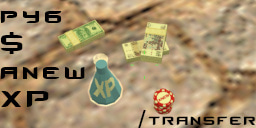
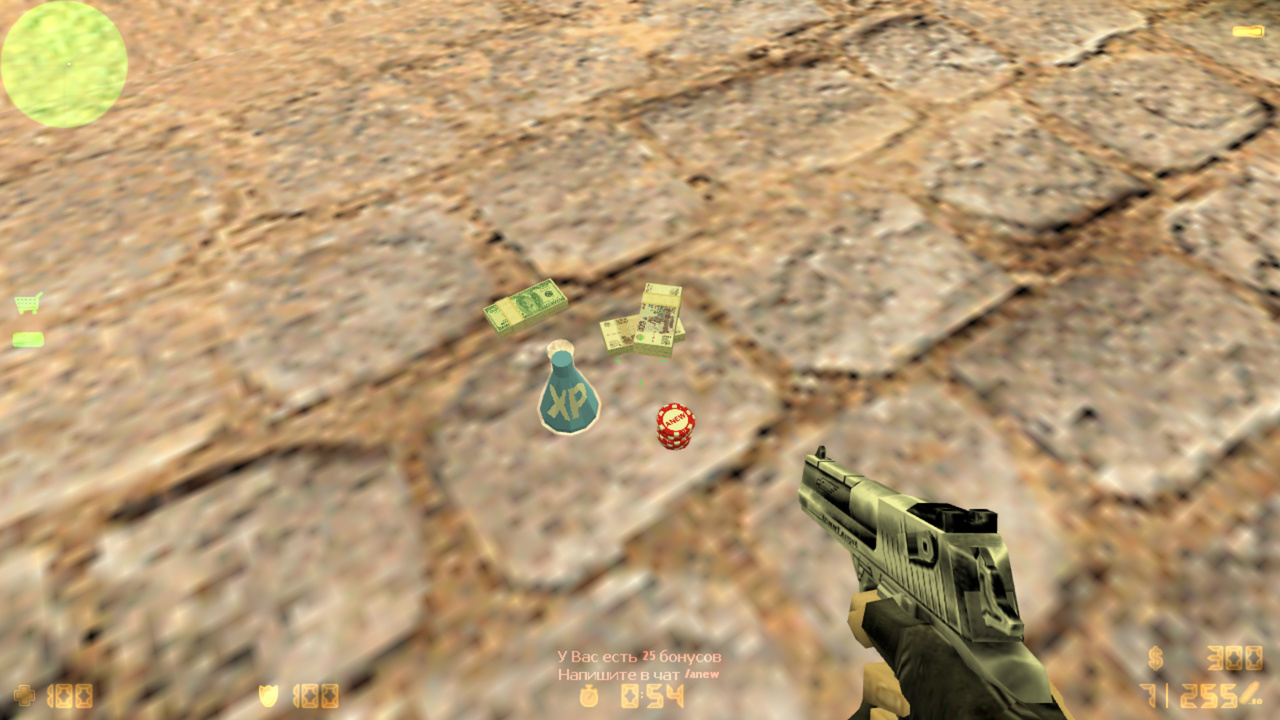
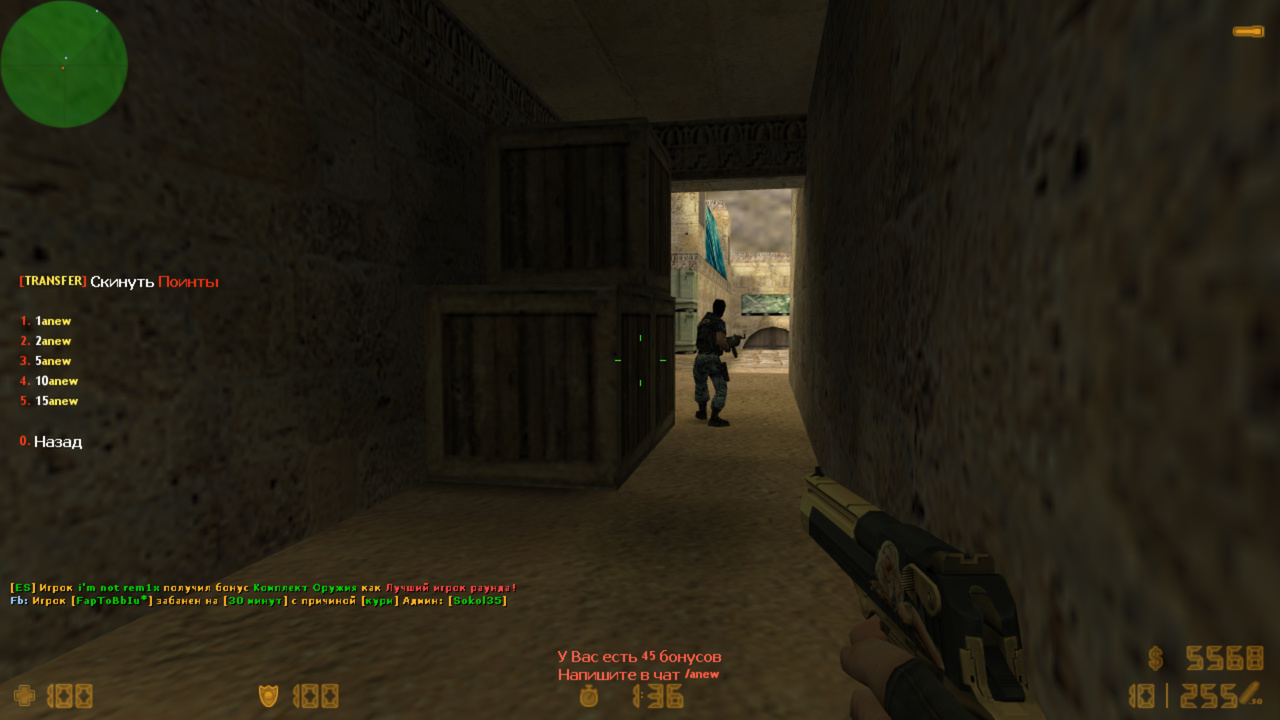
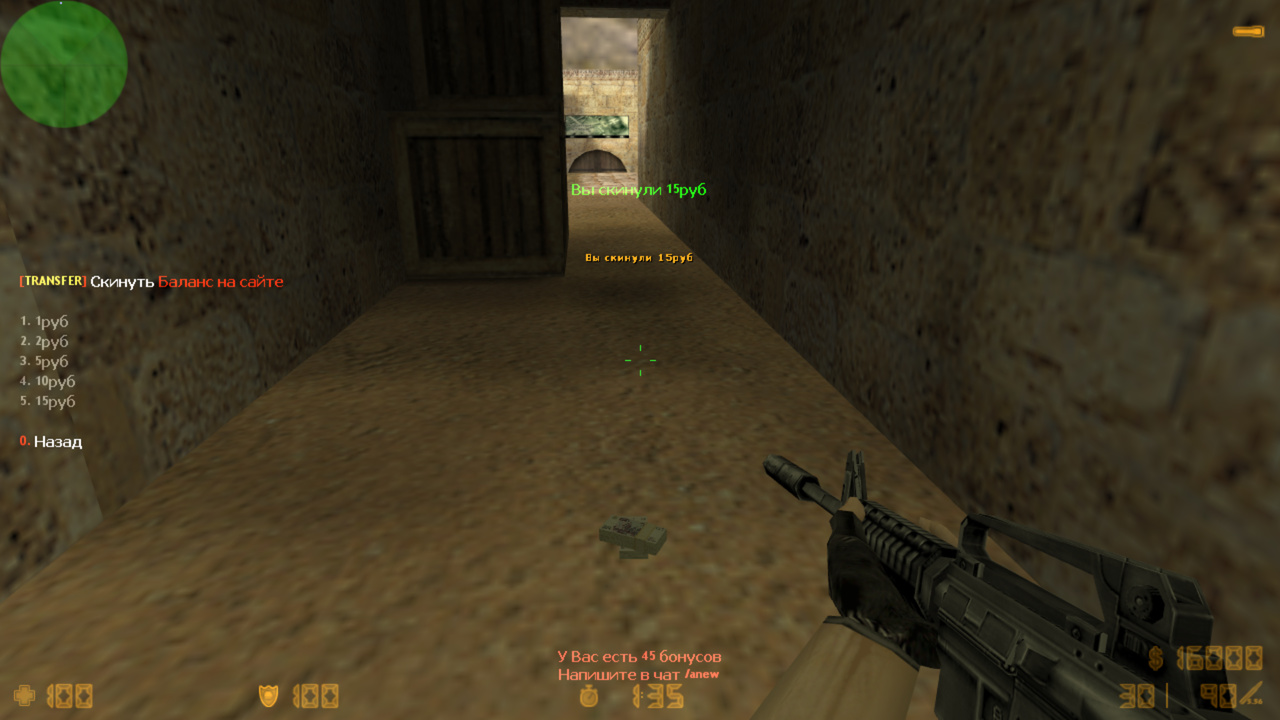
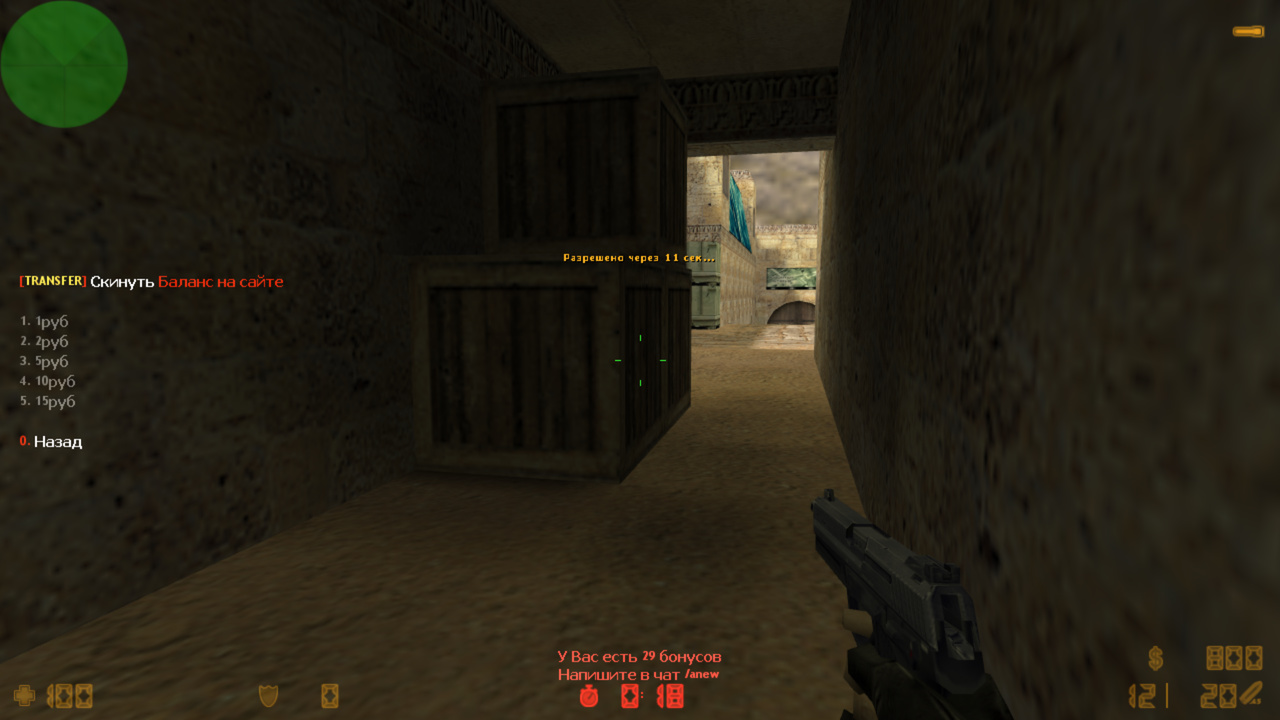
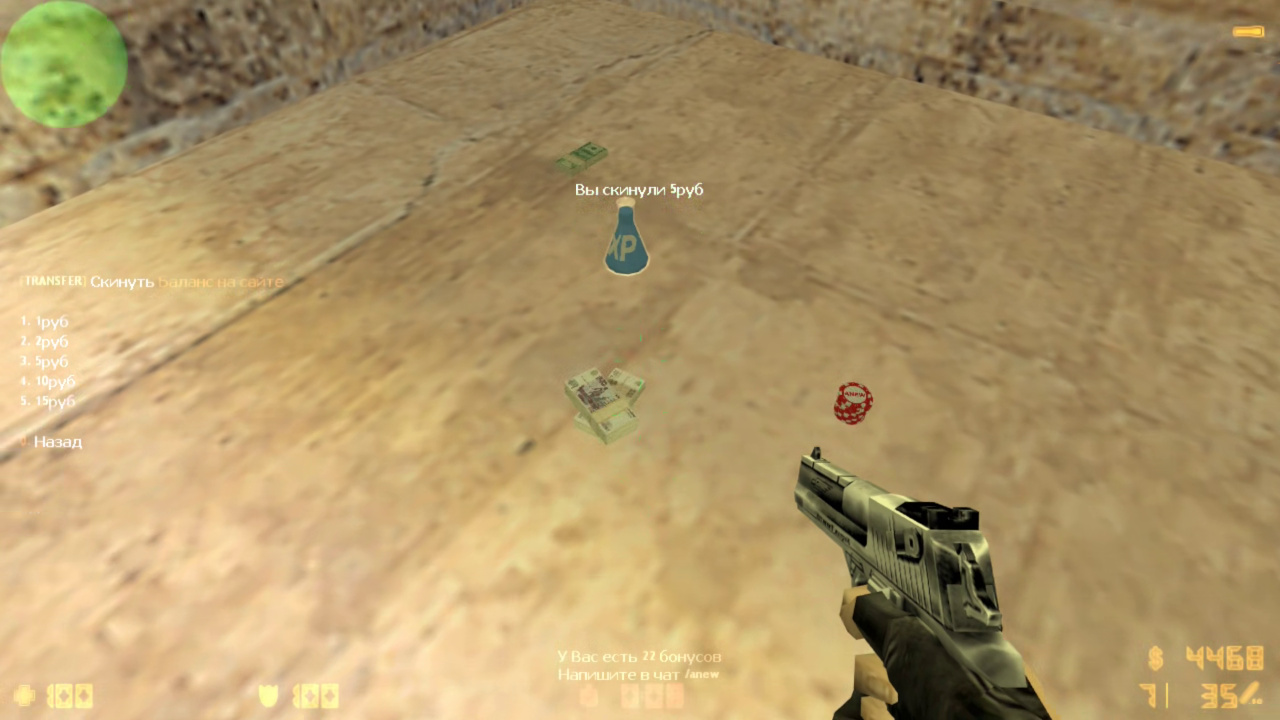
This plugin adds the ability to transfer to other players money, /anew points, Army Ranks Ultimate experience, and GameCMS site balance. But it works differently from other similar plugins—it’s more realistic. The player drops an item on the ground as a nice model, and another player picks it up (just like weapon drops normally work).
How does it work?
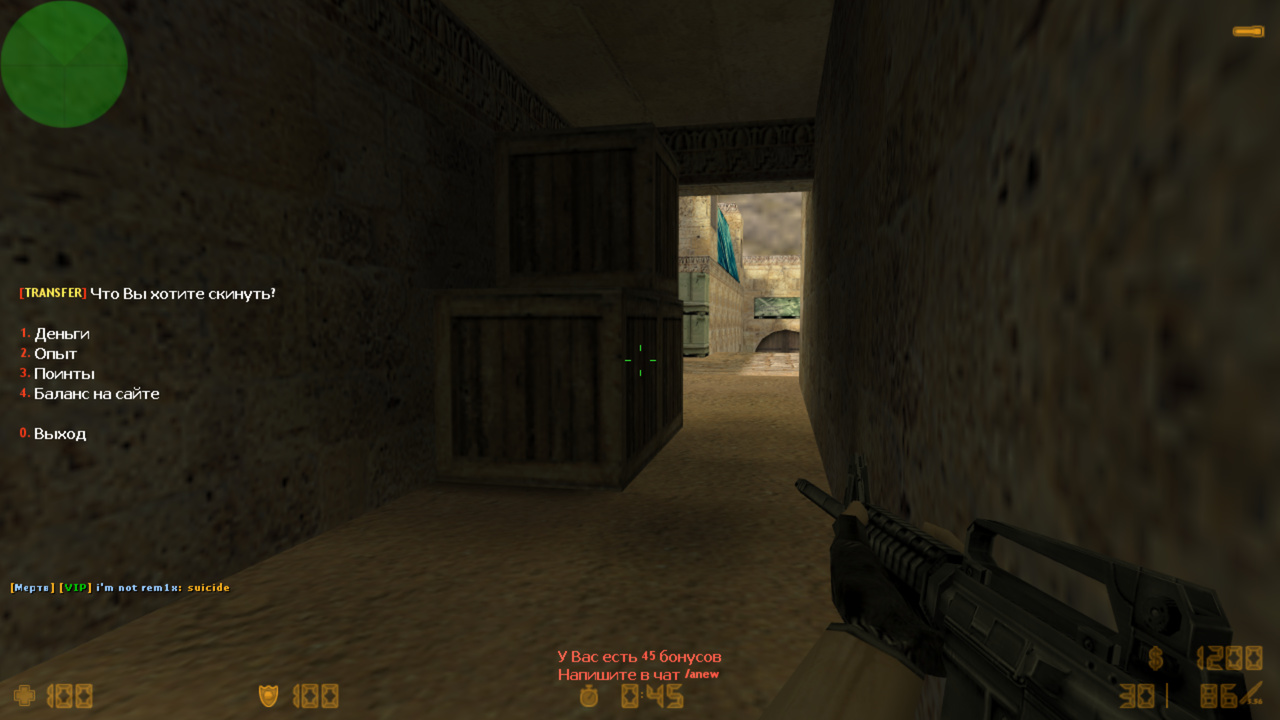
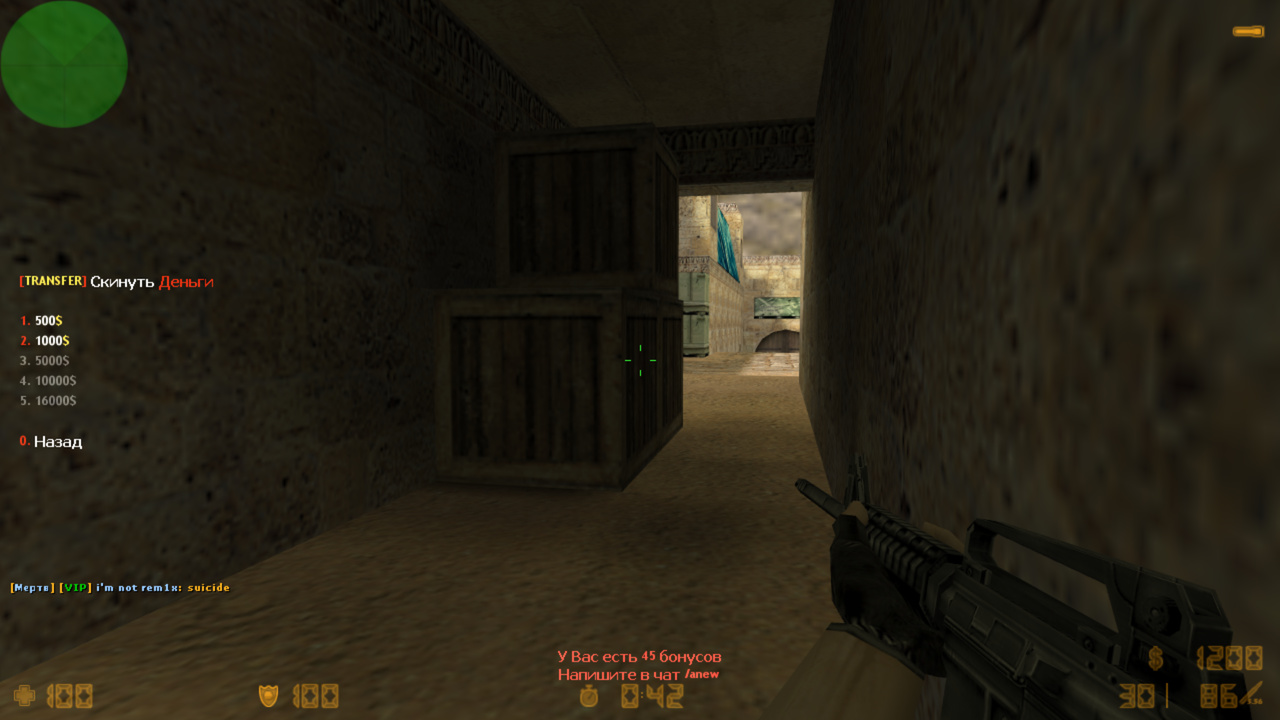
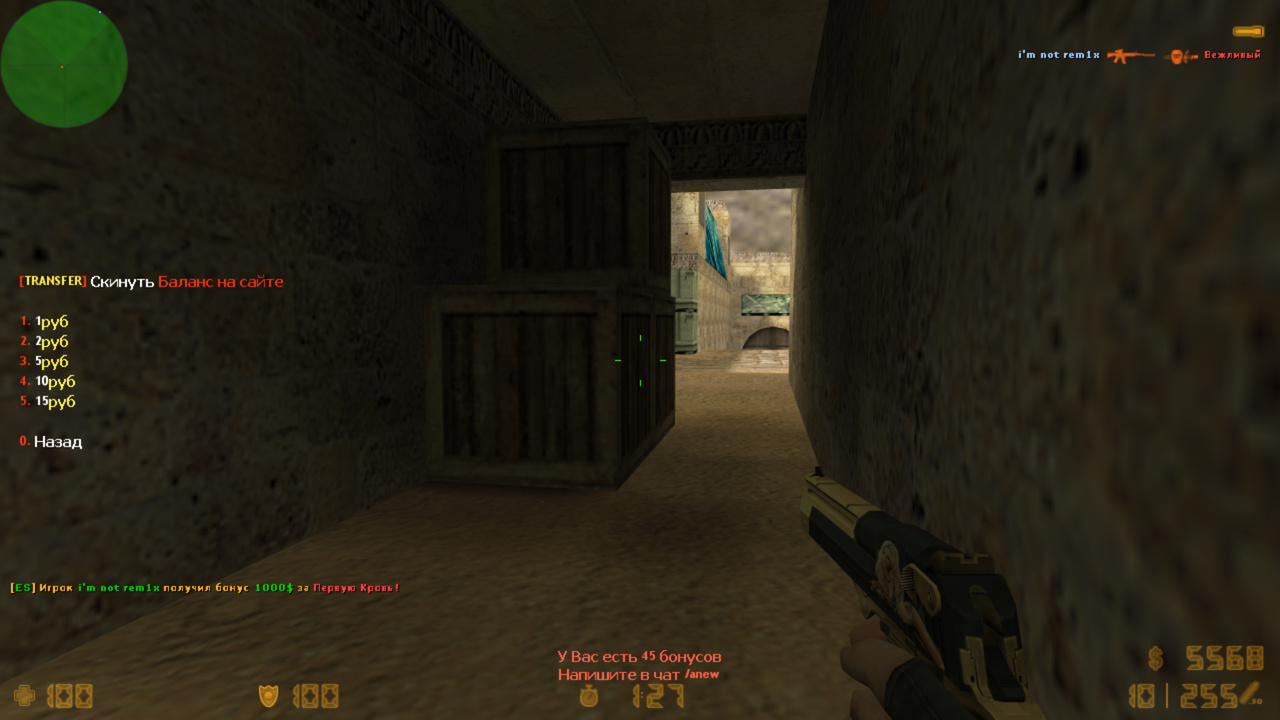
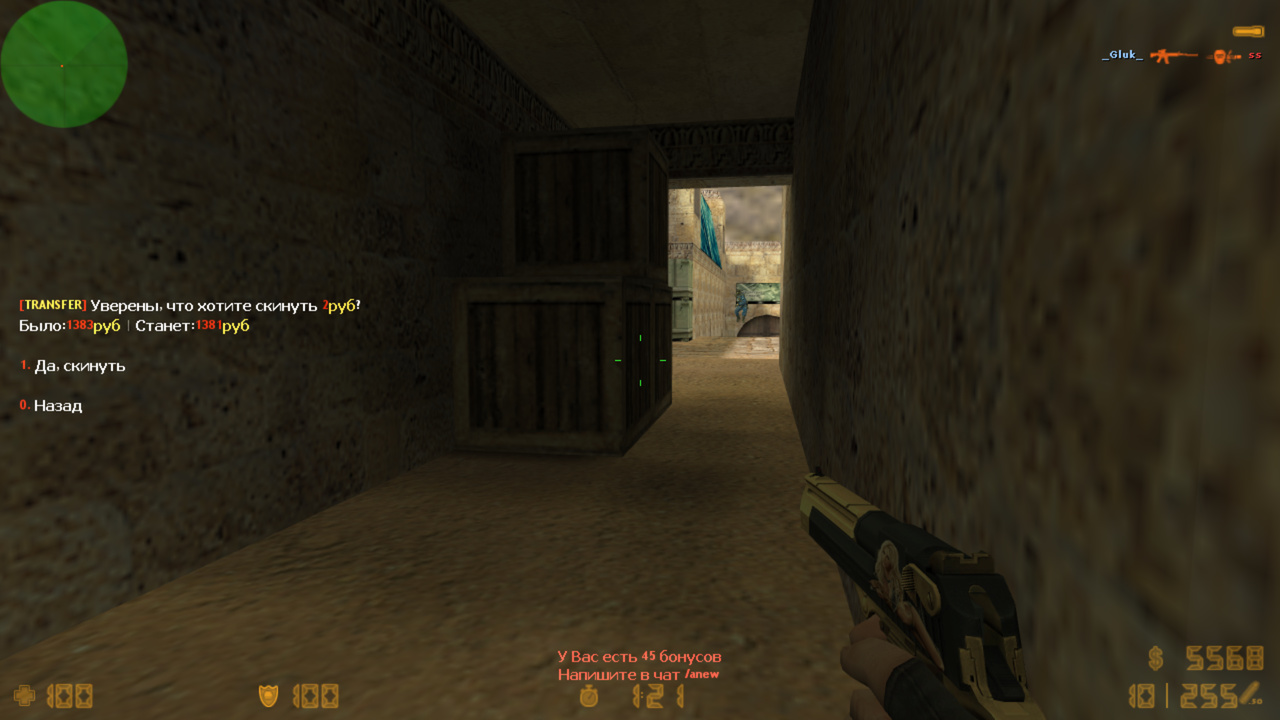
Type /transfer in chat (or use the console command transfer_menu), select, for example, experience, and choose the amount to drop. The item is then dropped on the ground, notifications appear, logs are written, sounds are played, etc. As usual, the plugin has extensive functionality and flexible configuration.
4 built-in drop types. As mentioned above: $, /anew points, XP, and GameCMS currency. But you can add many more 😀 details below.
Simple API. Using natives and forwards, you can add any other drop type. The include file explains everything in detail and has a fully working example of adding a "health" drop. The plugin for that is just 50 lines. Fun to run around dropping your own health, but it wasn’t included in the main plugin—you can easily add it if you want.
Logs. Very important—logs record exactly who dropped or picked up what, and how much they had before and after. This helps in case of disputes.
Menu. You can flexibly configure behavior, for example enable or disable a confirmation menu, or make the menu close after dropping an item.
Protection from exploiters. Some players might try to abuse site registration bonuses (e.g., 30 rubles) by repeatedly dropping them to one person. Not possible! Each drop type has its own settings to prevent abuse. For example, you cannot drop rubles if your balance would fall below 50. Check the config to adjust this for your server.
Models. Very lightweight, look beautiful and realistic. You can replace them with your own.
VIP-only access. You can restrict drop access by flags, GameCMS services, or allow everyone.
Glow effect. You can highlight dropped items with a color to make them more visible. Disabled by default—just uncomment the corresponding cvar.
Sounds. Can also be changed. Default sounds are standard game sounds, so clients don’t need to download extra files.
26.01.29 - обновить ВСЕ ФАЙЛЫ
- релиз бета версии
25.01.26BETA - обновить .amxx
- исправлено чтение lang файла (баг прошлой версии)
24.10.10BETA - обновить ВСЕ ФАЙЛЫ
- обновлено ядро плагина
- добавлена полная мультиязычность, даже в конфигах (серверная команда fg_lang)
22.12.08BETA - обновить .amxx
- обновлено ядро
- добавлено уведомление, когда игрок не зареген на сайте и пытается взять деньги

21.03.25 - релиз
Category
Server
To see the plugin in action, go to the "Find a server with this plugin" section in the menu
This plugin has a discount on your second purchase.
If you have already bought this plugin before, you will get it for less for the second and any additional server!
// RU: Для перевода файлов плагина используйте серверную консольную команду: fg_lang
// Лицензионный ключ вводить в файл amxmodx/data/fg_keys.ini (если файла нет, он создастся сам при рестарте/смены карты сервера)


// Включить запись логов?
// Будут записаны все действия от плагина(кто скинул, кто подобрал) в файл amxmodx/logs/transfer_rbs/TRANSFERYYYYMMDD.log
transfer_logs "1"

// Звук при дропе
// Можно использовать только .wav файлы
// Закомментируйте квар для отключения
// Полный путь до звука:
//	cstrike/sound/папка/звук.wav - звук будет закачан клиенту
//	valve/sound/папка/звук.wav - стандартные звуки, есть у всех клиентов, поэтому закачиваться не будет
transfer_sound_drop "valve/sound/items/weapondrop1.wav"
// Тоже самое, только при взятии
transfer_sound_pickup "valve/sound/items/gunpickup2.wav"

// Какие сообщения писать при дропе?
//	"a" - в чате
//	"b" - по центру экрана
//	"c" - HUD
transfer_msg_drop "bc"
// Тоже самое, только при взятии
transfer_msg_pickup "bc"

// Поведение меню при дропе
//	"a" - вернется на главный экран
//	"b" - останется на текущем экране
//	"c" - закроется
//	"d" - показывать меню подтверждения дропа?
transfer_menu_type "bd"

// Настройка худа
// r g b  x y  time dhud
//	r g b - цвет
//	x y - координаты
//	time - как долго будет исчезать сообщение
//	type - тип худа
//		0 - отключить худ
//		1 - hud (обычный)
//		2 - DHUD (жирный текст)
transfer_hud "0 255 0  -1.0 0.25  6.0  1"

// Запретить весь /transfer, чье звание меньше этого (требуется Army Ranks Ultimate)
//	"0" - разрешить с любого звания
//	"1" - разрешить со звания курсант
//	"2" - разрешить со звания рядовой и т.д.
transfer_army "0"

// Запретить весь /transfer, если общее кол-во фрагов в стате игрока меньше этого
//	"0" - разрешить всем
transfer_frags "0"


/////////////////////////
// ОБЫЧНЫЕ ДЕНЬГИ В КС //
/////////////////////////

// Значения для дропа (будут отображаться в меню)
// Закомментируйте для отключения этого типа дропа
transfer_money_items "500 1000 5000 10000 16000"

// Флаг игрока, который может скидывать деньги
//	"0" - можно всем.
//	"gamecms:_transfer_money" - по услуги в gamecms
transfer_money_access "0"

// Время в секундах, в течении которого нельзя скидывать повторный дроп (чтоб не спамили)
//	"0" - без ограничений
transfer_money_block "0"

// Сколько минимум единиц должно остаться у игрока после после дропа?
//	"0" - не меньше нуля
transfer_money_min "0"

// Сколько максимум единиц можно дропнуть за карту
//	"0" - без ограничений
transfer_money_max "50000"

// Свечение объекта в формате RGB
// Закомментировать для отключения
//transfer_money_glow "255 255 255"

// Путь до модели
transfer_money_model "models/transfer_rbs/money.mdl"


/////////////////////////////////////////////////////////////////
// ОПЫТ (требуется плагин Army Ranks Ultimate и CsStats MySQL) //
/////////////////////////////////////////////////////////////////

// Значения для дропа (будут отображаться в меню)
// Закомментируйте для отключения этого типа дропа
transfer_xp_items "10 20 50 100 200"

// Флаг игрока, который может скидывать опыт
//	"0" - можно всем.
//	"gamecms:_transfer_xp" - по услуги в gamecms
transfer_xp_access "t"

// Время в секундах, в течении которого нельзя скидывать повторный дроп (чтоб не спамили)
//	"0" - без ограничений
transfer_xp_block "1"

// Сколько минимум единиц должно остаться у игрока после после дропа?
// В данном кваре имеется ввиду, какой номер уровня игрока должен быть, чтобы можно было скидывать опыт
// В любом случае, не получится скинуть столько опыта, чтобы звание скинулось на предыдущее
//	"0" - любое звание
//	"1" - курсант
//	"2" - рядовой и т.д.
transfer_xp_min "5"

// Сколько максимум единиц можно дропнуть за карту
//	"0" - без ограничений
transfer_xp_max "500"

// Свечение объекта в формате RGB
// Закомментировать для отключения
//transfer_xp_glow "255 255 255"

// Путь до модели
transfer_xp_model "models/transfer_rbs/xp.mdl"


////////////////////////////////////////////////////////////////////
// ПОИНТЫ /anew (требуется Army Ranks Ultimate или BonusMenu RBS) //
////////////////////////////////////////////////////////////////////

// Значения для дропа (будут отображаться в меню)
// Закомментируйте для отключения этого типа дропа
transfer_anew_items "1 2 5 10 15"

// Флаг игрока, который может скидывать поинты
//	"0" - можно всем.
//	"gamecms:_transfer_anew" - по услуги в gamecms
transfer_anew_access "0"

// Время в секундах, в течении которого нельзя скидывать повторный дроп (чтоб не спамили)
//	"0" - без ограничений
transfer_anew_block "0"

// Сколько минимум единиц должно остаться у игрока после после дропа?
//	"0" - не меньше нуля
transfer_anew_min "10"

// Сколько максимум единиц можно дропнуть за карту
//	"0" - без ограничений
transfer_anew_max "50"

// Свечение объекта в формате RGB
// Закомментировать для отключения
//transfer_anew_glow "255 255 255"

// Путь до модели
transfer_anew_model "models/transfer_rbs/anew.mdl"


////////////////////////////////////////////////////////////////////////////
// Деньги с баланса юзера на сайте gamecms (требуется плагин GameCMS API) //
////////////////////////////////////////////////////////////////////////////

// Значения для дропа (будут отображаться в меню)
// Закомментируйте для отключения этого типа дропа
//transfer_balance_items "1 2 5 10 15"

// Флаг игрока, который может скидывать поинты
//	"0" - можно всем.
//	"gamecms:_transfer_balance" - по услуги в gamecms
transfer_balance_access "0"

// Время в секундах, в течении которого нельзя скидывать повторный дроп (чтоб не спамили)
//	"0" - без ограничений
transfer_balance_block "30"

// Сколько минимум единиц должно остаться у игрока после после дропа?
//	"0" - не меньше нуля
transfer_balance_min "50"

// Сколько максимум единиц можно дропнуть за карту
//	"0" - без ограничений
transfer_balance_max "100"

// Свечение объекта в формате RGB
// Закомментировать для отключения
//transfer_balance_glow "255 255 255"

// Путь до модели
transfer_balance_model "models/transfer_rbs/balance.mdl"


// При включенном кваре, плагин будет записывать в личный кабинет юзера на сайте GameCMS информацию об изменении баланса
// При первом запуске сервера, он добавит в таблицу `money__actions_types` необходимые строки, изменить их можно в ланг файле TRANSFER_GAMECMS_*
// ВНИМАНИЕ! При включении этого лога, обязательно установите ограничение в квар transfer_balance_block, чтобы сократить кол-во запросов к БД
transfer_gamecms_logs "0"


//////////////////////////////////////////////////////////////
// С помощью нативов, можно добавить другие дропы           //
// Например опыт в каком ни будь стороннем плагине          //
// Более подробно расписано в инклуде transfer_rbs.inc      //
//////////////////////////////////////////////////////////////
[ru]
TRANSFER_TAG = !n[!gTRANSFER!n]
TRANSFER_ALIVE = !tДоступно только для живых!
TRANSFER_ARMY = Требуется минимум звание %s!
TRANSFER_ACCESS = Недостаточно прав!
TRANSFER_FRAGS = Требуется набрать минимум %d фрагов!
TRANSFER_BLOCK = Разрешено через %d сек...
TRANSFER_MAX = За карту нельзя скидывать больше %L
TRANSFER_MAIN_TITLE = \r[\yTRANSFER\r]\w Что Вы хотите скинуть?
TRANSFER_MAIN_ITEM = %L
TRANSFER_MAIN_EXIT = Выход
TRANSFER_SUB_BACK = Назад
TRANSFER_SUB_TITLE = \r[\yTRANSFER\r]\w Скинуть \r%L
TRANSFER_CONFIRM_TITLE = \r[\yTRANSFER\r]\w Уверены, что хотите скинуть \r%L\w?
TRANSFER_CONFIRM_INFO = \wБыло:\r%L \d| \wСтанет:\r%L
TRANSFER_GAMECMS_DROP = Дропнул
TRANSFER_GAMECMS_PICKUP = Подобрал
TRANSFER_CONFIRM_YES = Да, скинуть
TRANSFER_DROP_CHAT = !n[!gTRANSFER!n] Вы скинули %L
TRANSFER_DROP_CENTER = Вы скинули %L
TRANSFER_DROP_HUD = Вы скинули %L
TRANSFER_PICKUP_CHAT = !n[!gTRANSFER!n] Вы подобрали %L
TRANSFER_PICKUP_HUD = Вы подобрали %L
TRANSFER_PICKUP_CENTER = Вы подобрали %L
TRANSFER_NAME_MONEY = Деньги
TRANSFER_LACK_MONEY = Недостаточно денег! Должно остаться минимум %d$!
TRANSFER_MENU_MONEY = %d\y$
TRANSFER_CHAT_MONEY = !g%d!n$
TRANSFER_LACK_XP = У Вас недостаточно опыта!
TRANSFER_LOSS_XP = Вы потеряете звание, если поставите столько опыта!
TRANSFER_ACCE_XP = Разрешено только со звания %s!
TRANSFER_NAME_XP = Опыт
TRANSFER_CHAT_XP = !g%d!nXP
TRANSFER_NAME_ANEW = Поинты
TRANSFER_LACK_ANEW = Недостаточно поинтов! Должно остаться минимум %danew!
TRANSFER_MENU_XP = %d\yXP
TRANSFER_MENU_ANEW = %d\yanew
TRANSFER_CHAT_ANEW = !g%d!nanew
TRANSFER_NAME_BALANCE = Баланс на сайте
TRANSFER_LOSS_BALANCE = Вы не зарегистрированы на сайте!
TRANSFER_LACK_BALANCE = Недостаточно денег на балансе! Должно остаться минимум %dруб!
TRANSFER_MENU_BALANCE = %d\yруб
TRANSFER_CHAT_BALANCE = !g%d!nруб
TRANSFER_LOADED_TYPES = Загружено %d дропов
TRANSFER_NOT_CREATE = Не удалось создать объект
TRANSFER_ERROR_BAL_MIN = Не удалось списать средства с баланса GameCMS!
TRANSFER_ERROR_BAL_PLUS = Не удалось пополнить средства на баланс GameCMS!
TRANSFER_WAS = было
TRANSFER_NOW = стало
TRANSFER_NOW_NOT = стало бы
TRANSFER_DROPPED = дропнул
TRANSFER_NOT_DROPPED = НЕ УДАЛОСЬ ДРОПНУТЬ
TRANSFER_PICKUP = подобрал
[en]
TRANSFER_TAG = !n[!gTRANSFER!n]
TRANSFER_ALIVE = !tAvailable only to the living!
TRANSFER_ARMY = Minimum %s rank required!
TRANSFER_ACCESS = Insufficient rights!
TRANSFER_FRAGS = Requires at least %d frags!
TRANSFER_BLOCK = Allowed in %d seconds...
TRANSFER_MAX = You cannot transfer more than %L per card
TRANSFER_MAIN_TITLE = \r[\yTRANSFER\r]\w What do you want to send?
TRANSFER_MAIN_ITEM = %L
TRANSFER_MAIN_EXIT = Exit
TRANSFER_SUB_BACK = Back
TRANSFER_SUB_TITLE = \r[\yTRANSFER\r]\w Drop \r%L
TRANSFER_CONFIRM_TITLE = \r[\yTRANSFER\r]\w Are you sure you want to drop \r%L\w?
TRANSFER_CONFIRM_INFO = \wPreviously:\r%L \d| \wBecomes:\r%L
TRANSFER_GAMECMS_DROP = Dropped
TRANSFER_GAMECMS_PICKUP = Picked up
TRANSFER_CONFIRM_YES = Yes, reset
TRANSFER_DROP_CHAT = !n[!gTRANSFER!n] You dropped %L
TRANSFER_DROP_CENTER = You dropped %L
TRANSFER_DROP_HUD = You dropped %L
TRANSFER_PICKUP_CHAT = !n[!gTRANSFER!n] You picked up %L
TRANSFER_PICKUP_HUD = You picked up %L
TRANSFER_PICKUP_CENTER = You have picked up %L
TRANSFER_NAME_MONEY = Money
TRANSFER_LACK_MONEY = Not enough money! There should be at least %d$ left!
TRANSFER_MENU_MONEY = %d\y$
TRANSFER_CHAT_MONEY = !g%d!n$
TRANSFER_LACK_XP = You don't have enough experience!
TRANSFER_LOSS_XP = You will lose your title if you put in that much experience!
TRANSFER_ACCE_XP = Allowed only from rank %s!
TRANSFER_NAME_XP = Experience
TRANSFER_CHAT_XP = !g%d!nXP
TRANSFER_NAME_ANEW = Points
TRANSFER_LACK_ANEW = Not enough points! There should be at least %danew left!
TRANSFER_MENU_XP = %d\yXP
TRANSFER_MENU_ANEW = %d\yanew
TRANSFER_CHAT_ANEW = !g%d!nanew
TRANSFER_NAME_BALANCE = Balance on the site
TRANSFER_LOSS_BALANCE = You are not registered on the site!
TRANSFER_LACK_BALANCE = Not enough money on balance! There should be at least %drub left!
TRANSFER_MENU_BALANCE = %d\y$
TRANSFER_CHAT_BALANCE = !g%d!n$
TRANSFER_LOADED_TYPES = Loaded %d drops
TRANSFER_NOT_CREATE = Failed to create object
TRANSFER_ERROR_BAL_MIN = Failed to debit funds from GameCMS balance!
TRANSFER_ERROR_BAL_PLUS = Failed to top up GameCMS balance!
TRANSFER_WAS = was
TRANSFER_NOW = now
TRANSFER_NOW_NOT = would become
TRANSFER_DROPPED = dropped
TRANSFER_NOT_DROPPED = COULD NOT DROPPED
TRANSFER_PICKUP = picked up
[bg]
TRANSFER_TAG = !n[!gTRANSFER!n]
TRANSFER_ALIVE = !tДостъпно само за живите!
TRANSFER_ARMY = Изисква се минимум %s ранг!
TRANSFER_ACCESS = Недостатъчни права!
TRANSFER_FRAGS = Изисква поне %d фрагмента!
TRANSFER_BLOCK = Разрешено след %d секунди...
TRANSFER_MAX = Не можете да прехвърляте повече от %L на карта
TRANSFER_MAIN_TITLE = \r[\yTRANSFER\r]\w Какво искате да изпратите?
TRANSFER_MAIN_ITEM = %L
TRANSFER_MAIN_EXIT = Изход
TRANSFER_SUB_BACK = Назад
TRANSFER_SUB_TITLE = \r[\yTRANSFER\r]\w Пускане \r%L
TRANSFER_CONFIRM_TITLE = \r[\yTRANSFER\r]\w Сигурни ли сте, че искате да пуснете \r%L\w?
TRANSFER_CONFIRM_INFO = \wПредишно:\r%L \d| \wСтава:\r%L
TRANSFER_GAMECMS_DROP = Отпадна
TRANSFER_GAMECMS_PICKUP = Взети
TRANSFER_CONFIRM_YES = Да, нулиране
TRANSFER_DROP_CHAT = !n[!gTRANSFER!n] Изпуснахте %L
TRANSFER_DROP_CENTER = Изпуснахте %L
TRANSFER_DROP_HUD = Изпуснахте %L
TRANSFER_PICKUP_CHAT = !n[!gTRANSFER!n] Взехте %L
TRANSFER_PICKUP_HUD = Взехте %L
TRANSFER_PICKUP_CENTER = Взехте %L
TRANSFER_NAME_MONEY = Пари
TRANSFER_LACK_MONEY = Няма достатъчно пари! Трябва да останат поне %d$!
TRANSFER_MENU_MONEY = %d\y$
TRANSFER_CHAT_MONEY = !g%d!n$
TRANSFER_LACK_XP = Нямате достатъчно опит!
TRANSFER_LOSS_XP = Ще загубите титлата си, ако вложите толкова много опит!
TRANSFER_ACCE_XP = Разрешено само от ранг %s!
TRANSFER_NAME_XP = Опит
TRANSFER_CHAT_XP = !g%d!nXP
TRANSFER_NAME_ANEW = Точки
TRANSFER_LACK_ANEW = Няма достатъчно точки! Трябва да останат поне %danew!
TRANSFER_MENU_XP = %d\yXP
TRANSFER_MENU_ANEW = %d\yanew
TRANSFER_CHAT_ANEW = !g%d!nanew
TRANSFER_NAME_BALANCE = Баланс на сайта
TRANSFER_LOSS_BALANCE = Нямате регистрация в сайта!
TRANSFER_LACK_BALANCE = Няма достатъчно пари в баланса! Трябва да остане поне %drub!
TRANSFER_MENU_BALANCE = %d\y$
TRANSFER_CHAT_BALANCE = !g%d!n$
TRANSFER_LOADED_TYPES = Заредени %d капки
TRANSFER_NOT_CREATE = Неуспешно създаване на обект
TRANSFER_ERROR_BAL_MIN = Неуспешно дебитиране на средства от баланса на GameCMS!
TRANSFER_ERROR_BAL_PLUS = Неуспешно допълване на баланса на GameCMS!
TRANSFER_WAS = беше
TRANSFER_NOW = сега
TRANSFER_NOW_NOT = ще стане
TRANSFER_DROPPED = отпадна
TRANSFER_NOT_DROPPED = НЕ МОЖЕ ДА ИЗПУСНЕ
TRANSFER_PICKUP = взето
[cz]
TRANSFER_TAG = !n[!gTRANSFER!n]
TRANSFER_ALIVE = !tDostupné pouze pro živé!
TRANSFER_ARMY = Je vyžadována minimální hodnost %s!
TRANSFER_ACCESS = Nedostatečná práva!
TRANSFER_FRAGS = Vyžaduje alespoň %d fragů!
TRANSFER_BLOCK = Povoleno za %d sekund...
TRANSFER_MAX = Nemůžete převést více než %L na kartu
TRANSFER_MAIN_TITLE = \r[\yTRANSFER\r]\w Co chcete odeslat?
TRANSFER_MAIN_ITEM = %L
TRANSFER_MAIN_EXIT = Konec
TRANSFER_SUB_BACK = Zpět
TRANSFER_SUB_TITLE = \r[\yTRANSFER\r]\w Zahodit \r%L
TRANSFER_CONFIRM_TITLE = \r[\yTRANSFER\r]\w Opravdu chcete zahodit \r%L\w?
TRANSFER_CONFIRM_INFO = \wDříve:\r%L \d| \wStává se:\r%L
TRANSFER_GAMECMS_DROP = Zahozen
TRANSFER_GAMECMS_PICKUP = Zvednuto
TRANSFER_CONFIRM_YES = Ano, resetovat
TRANSFER_DROP_CHAT = !n[!gTRANSFER!n] Ztratili jste %L
TRANSFER_DROP_CENTER = Zahodili jste %L
TRANSFER_DROP_HUD = Zahodili jste %L
TRANSFER_PICKUP_CHAT = !n[!gTRANSFER!n] Vyzvedli jste %L
TRANSFER_PICKUP_HUD = Vyzvedli jste %L
TRANSFER_PICKUP_CENTER = Vyzvedli jste %L
TRANSFER_NAME_MONEY = Peníze
TRANSFER_LACK_MONEY = Nedostatek peněz! Mělo by zůstat alespoň %d$!
TRANSFER_MENU_MONEY = %d\y$
TRANSFER_CHAT_MONEY = !g%d!n$
TRANSFER_LACK_XP = Nemáte dostatek zkušeností!
TRANSFER_LOSS_XP = Pokud vložíte tolik zkušeností, přijdete o svůj titul!
TRANSFER_ACCE_XP = Povoleno pouze od hodnosti %s!
TRANSFER_NAME_XP = Zkušenost
TRANSFER_CHAT_XP = !g%d!nXP
TRANSFER_NAME_ANEW = body
TRANSFER_LACK_ANEW = Nedostatek bodů! Mělo by zůstat alespoň %danew!
TRANSFER_MENU_XP = %d\yXP
TRANSFER_MENU_ANEW = %d\yanew
TRANSFER_CHAT_ANEW = !g%d!nanew
TRANSFER_NAME_BALANCE = Zůstatek na webu
TRANSFER_LOSS_BALANCE = Nejste registrováni na stránce!
TRANSFER_LACK_BALANCE = Nedostatek peněz na zůstatku! Mělo by zůstat alespoň %drub!
TRANSFER_MENU_BALANCE = %d\y$
TRANSFER_CHAT_BALANCE = !g%d!n$
TRANSFER_LOADED_TYPES = Načteno %d poklesů
TRANSFER_NOT_CREATE = Nepodařilo se vytvořit objekt
TRANSFER_ERROR_BAL_MIN = Nepodařilo se odečíst prostředky ze zůstatku GameCMS!
TRANSFER_ERROR_BAL_PLUS = Nepodařilo se dobít zůstatek GameCMS!
TRANSFER_WAS = byl
TRANSFER_NOW = nyní
TRANSFER_NOW_NOT = by se stalo
TRANSFER_DROPPED = zahozen
TRANSFER_NOT_DROPPED = NELZE UKONČIT
TRANSFER_PICKUP = vyzvednuto
[pl]
TRANSFER_TAG = !n[!gTRANSFER!n]
TRANSFER_ALIVE = !tDostępne tylko dla żywych!
TRANSFER_ARMY = Wymagana minimalna ranga %s!
TRANSFER_ACCESS = Niewystarczające uprawnienia!
TRANSFER_FRAGS = Wymaga co najmniej %d fragów!
TRANSFER_BLOCK = Dozwolone za %d sekund...
TRANSFER_MAX = Nie możesz przenieść więcej niż %L na kartę
TRANSFER_MAIN_TITLE = \r[\yTRANSFER\r]\w Co chcesz wysłać?
TRANSFER_MAIN_ITEM = %L
TRANSFER_MAIN_EXIT = Wyjdź
TRANSFER_SUB_BACK = Wstecz
TRANSFER_SUB_TITLE = \r[\yTRANSFER\r]\w Upuść \r%L
TRANSFER_CONFIRM_TITLE = \r[\yTRANSFER\r]\w Czy na pewno chcesz porzucić \r%L\w?
TRANSFER_CONFIRM_INFO = \wPoprzednio:\r%L \d| \wStaje się:\r%L
TRANSFER_GAMECMS_DROP = Upuszczone
TRANSFER_GAMECMS_PICKUP = Odebrano
TRANSFER_CONFIRM_YES = Tak, zresetuj
TRANSFER_DROP_CHAT = !n[!gTRANSFER!n] Upuściłeś %L
TRANSFER_DROP_CENTER = Upuściłeś %L
TRANSFER_DROP_HUD = Upuściłeś %L
TRANSFER_PICKUP_CHAT = !n[!gTRANSFER!n] Odebrałeś %L
TRANSFER_PICKUP_HUD = Podniosłeś %L
TRANSFER_PICKUP_CENTER = Odebrałeś %L
TRANSFER_NAME_MONEY = Pieniądze
TRANSFER_LACK_MONEY = Za mało pieniędzy! Powinno zostać co najmniej %d$!
TRANSFER_MENU_MONEY = %d\y$
TRANSFER_CHAT_MONEY = !g%d!n$
TRANSFER_LACK_XP = Nie masz wystarczającego doświadczenia!
TRANSFER_LOSS_XP = Stracisz tytuł, jeśli włożysz w to tyle doświadczenia!
TRANSFER_ACCE_XP = Dozwolone tylko od rangi %s!
TRANSFER_NAME_XP = Doświadczenie
TRANSFER_CHAT_XP = !g%d!nXP
TRANSFER_NAME_ANEW = Punkty
TRANSFER_LACK_ANEW = Za mało punktów! Powinno zostać przynajmniej %danew!
TRANSFER_MENU_XP = %d\yXP
TRANSFER_MENU_ANEW = %d\yanew
TRANSFER_CHAT_ANEW = !g%d!nanew
TRANSFER_NAME_BALANCE = Saldo na stronie
TRANSFER_LOSS_BALANCE = Nie jesteś zarejestrowany na stronie!
TRANSFER_LACK_BALANCE = Za mało środków na saldzie! Powinno pozostać co najmniej %drubu!
TRANSFER_MENU_BALANCE = %d\y$
TRANSFER_CHAT_BALANCE = !g%d!n$
TRANSFER_LOADED_TYPES = Załadowano %d kropli
TRANSFER_NOT_CREATE = Nie udało się utworzyć obiektu
TRANSFER_ERROR_BAL_MIN = Nie udało się pobrać środków z salda GameCMS!
TRANSFER_ERROR_BAL_PLUS = Nie udało się doładować salda GameCMS!
TRANSFER_WAS = był
TRANSFER_NOW = teraz
TRANSFER_NOW_NOT = stałby się
TRANSFER_DROPPED = usunięty
TRANSFER_NOT_DROPPED = NIE MOŻNA UPUŚCIĆ
TRANSFER_PICKUP = odebrane
[ro]
TRANSFER_TAG = !n[!gTRANSFER!n]
TRANSFER_ALIVE = !tDisponibil numai pentru cei vii!
TRANSFER_ARMY = Este necesar un rang minim %s!
TRANSFER_ACCESS = Drepturi insuficiente!
TRANSFER_FRAGS = Necesită cel puțin %d fragmente!
TRANSFER_BLOCK = Permis în %d secunde...
TRANSFER_MAX = Nu puteți transfera mai mult de %L pe card
TRANSFER_MAIN_TITLE = \r[\yTRANSFER\r]\w Ce vrei să trimiți?
TRANSFER_MAIN_ITEM = %L
TRANSFER_MAIN_EXIT = Ieșire
TRANSFER_SUB_BACK = Înapoi
TRANSFER_SUB_TITLE = \r[\yTRANSFER\r]\w Drop \r%L
TRANSFER_CONFIRM_TITLE = \r[\yTRANSFER\r]\w Sigur vrei să renunți la \r%L\w?
TRANSFER_CONFIRM_INFO = \wAnterior:\r%L \d| \wDevine:\r%L
TRANSFER_GAMECMS_DROP = Scăpat
TRANSFER_GAMECMS_PICKUP = Ridicat
TRANSFER_CONFIRM_YES = Da, resetați
TRANSFER_DROP_CHAT = !n[!gTRANSFER!n] Ai renunțat la %L
TRANSFER_DROP_CENTER = Ați scăpat de %L
TRANSFER_DROP_HUD = Ați scăpat de %L
TRANSFER_PICKUP_CHAT = !n[!gTRANSFER!n] Ai luat %L
TRANSFER_PICKUP_HUD = Ai ridicat %L
TRANSFER_PICKUP_CENTER = Ați ridicat %L
TRANSFER_NAME_MONEY = Bani
TRANSFER_LACK_MONEY = Nu sunt suficienți bani! Ar trebui să rămână cel puțin %d$!
TRANSFER_MENU_MONEY = %d\y$
TRANSFER_CHAT_MONEY = !g%d!n$
TRANSFER_LACK_XP = Nu aveți suficientă experiență!
TRANSFER_LOSS_XP = Îți vei pierde titlul dacă vei acumula atât de multă experiență!
TRANSFER_ACCE_XP = Permis numai de la rangul %s!
TRANSFER_NAME_XP = Experiență
TRANSFER_CHAT_XP = !g%d!nXP
TRANSFER_NAME_ANEW = Puncte
TRANSFER_LACK_ANEW = Nu sunt suficiente puncte! Ar trebui să rămână cel puțin %danew!
TRANSFER_MENU_XP = %d\yXP
TRANSFER_MENU_ANEW = %d\yanew
TRANSFER_CHAT_ANEW = !g%d!nanew
TRANSFER_NAME_BALANCE = Sold pe site
TRANSFER_LOSS_BALANCE = Nu sunteți înregistrat pe site!
TRANSFER_LACK_BALANCE = Nu sunt suficienți bani în sold! Ar trebui să rămână cel puțin %drub!
TRANSFER_MENU_BALANCE = %d\y$
TRANSFER_CHAT_BALANCE = !g%d!n$
TRANSFER_LOADED_TYPES = %d picături încărcate
TRANSFER_NOT_CREATE = Nu s-a putut crea obiectul
TRANSFER_ERROR_BAL_MIN = Nu s-au putut debita fonduri din soldul GameCMS!
TRANSFER_ERROR_BAL_PLUS = Nu s-a reușit încărcarea soldului GameCMS!
TRANSFER_WAS = a fost
TRANSFER_NOW = acum
TRANSFER_NOW_NOT = ar deveni
TRANSFER_DROPPED = scăpat
TRANSFER_NOT_DROPPED = NU S-A PUTEA SCHIPAR
TRANSFER_PICKUP = preluat
[sr]
TRANSFER_TAG = !n[!gTRANSFER!n]
TRANSFER_ALIVE = !tДоступно само за живе!
TRANSFER_ARMY = Потребан минимални ранг %s!
TRANSFER_ACCESS = Недовољна права!
TRANSFER_FRAGS = Захтева најмање %d фрагова!
TRANSFER_BLOCK = Дозвољено за %d секунди...
TRANSFER_MAX = Не можете пренети више од %L по картици
TRANSFER_MAIN_TITLE = \r[\yTRANSFER\r]\w Шта желите да пошаљете?
TRANSFER_MAIN_ITEM = %L
TRANSFER_MAIN_EXIT = Излаз
TRANSFER_SUB_BACK = Назад
TRANSFER_SUB_TITLE = \r[\yTRANSFER\r]\w Испусти \r%L
TRANSFER_CONFIRM_TITLE = \r[\yTRANSFER\r]\w Да ли сте сигурни да желите да одбаците \r%L\w?
TRANSFER_CONFIRM_INFO = \wПретходно:\r%L \d| \wПостаје:\r%L
TRANSFER_GAMECMS_DROP = Испуштено
TRANSFER_GAMECMS_PICKUP = Преузето
TRANSFER_CONFIRM_YES = Да, ресетујте
TRANSFER_DROP_CHAT = !n[!gTRANSFER!n] Испустили сте %L
TRANSFER_DROP_CENTER = Избацили сте %L
TRANSFER_DROP_HUD = Избацили сте %L
TRANSFER_PICKUP_CHAT = !n[!gTRANSFER!n] Покупили сте %L
TRANSFER_PICKUP_HUD = Покупили сте %L
TRANSFER_PICKUP_CENTER = Покупили сте %L
TRANSFER_NAME_MONEY = Новац
TRANSFER_LACK_MONEY = Нема довољно новца! Требало би да остане најмање %d$!
TRANSFER_MENU_MONEY = %d\y$
TRANSFER_CHAT_MONEY = !g%d!n$
TRANSFER_LACK_XP = Немате довољно искуства!
TRANSFER_LOSS_XP = Изгубићете титулу ако уложите толико искуства!
TRANSFER_ACCE_XP = Дозвољено само са ранга %s!
TRANSFER_NAME_XP = Искуство
TRANSFER_CHAT_XP = !g%d!nXP
TRANSFER_NAME_ANEW = Поени
TRANSFER_LACK_ANEW = Нема довољно поена! Требало би да остане најмање %danew!
TRANSFER_MENU_XP = %d\yXP
TRANSFER_MENU_ANEW = %d\yanew
TRANSFER_CHAT_ANEW = !g%d!nanew
TRANSFER_NAME_BALANCE = Стање на сајту
TRANSFER_LOSS_BALANCE = Нисте регистровани на сајту!
TRANSFER_LACK_BALANCE = Нема довољно новца на рачуну! Требало би да остане најмање % друб!
TRANSFER_MENU_BALANCE = %d\y$
TRANSFER_CHAT_BALANCE = !g%d!n$
TRANSFER_LOADED_TYPES = Учитано %d капи
TRANSFER_NOT_CREATE = Креирање објекта није успело
TRANSFER_ERROR_BAL_MIN = Задуживање средстава са GameCMS стања није успело!
TRANSFER_ERROR_BAL_PLUS = Неуспешно допуњавање GameCMS стања!
TRANSFER_WAS = био је
TRANSFER_NOW = сада
TRANSFER_NOW_NOT = би постао
TRANSFER_DROPPED = испуштено
TRANSFER_NOT_DROPPED = НИЈЕ МОГЛО ИСПУШТЕНО
TRANSFER_PICKUP = преузето
[tr]
TRANSFER_TAG = !n[!gTRANSFER!n]
TRANSFER_ALIVE = !tYalnızca yaşayanlar tarafından kullanılabilir!
TRANSFER_ARMY = Minimum %s rütbe gerekli!
TRANSFER_ACCESS = Yetersiz haklar!
TRANSFER_FRAGS = En az %d parça gerektirir!
TRANSFER_BLOCK = %d saniye içinde izin veriliyor...
TRANSFER_MAX = Kart başına %L'den fazlasını aktaramazsınız
TRANSFER_MAIN_TITLE = \r[\yTRANSFER\r]\w Ne göndermek istiyorsunuz?
TRANSFER_MAIN_ITEM = %L
TRANSFER_MAIN_EXIT = Çıkış
TRANSFER_SUB_BACK = Geri
TRANSFER_SUB_TITLE = \r[\yTRANSFER\r]\w Bırak \r%L
TRANSFER_CONFIRM_TITLE = \r[\yTRANSFER\r]\w \r%L\w'yi bırakmak istediğinizden emin misiniz?
TRANSFER_CONFIRM_INFO = \wÖnceden:\r%L \d| \wŞuna dönüşür:\r%L
TRANSFER_GAMECMS_DROP = Bırakıldı
TRANSFER_GAMECMS_PICKUP = Alındı
TRANSFER_CONFIRM_YES = Evet, sıfırla
TRANSFER_DROP_CHAT = !n[!gTRANSFER!n] %L'yi düşürdünüz
TRANSFER_DROP_CENTER = %L'yi düşürdünüz
TRANSFER_DROP_HUD = %L'yi düşürdünüz
TRANSFER_PICKUP_CHAT = !n[!gTRANSFER!n] %L'yi aldınız
TRANSFER_PICKUP_HUD = %L'yi aldınız
TRANSFER_PICKUP_CENTER = %L'yi aldınız
TRANSFER_NAME_MONEY = Para
TRANSFER_LACK_MONEY = Yeterli para yok! En az %d$ kalmalı!
TRANSFER_MENU_MONEY = %d\y$
TRANSFER_CHAT_MONEY = !g%d!n$
TRANSFER_LACK_XP = Yeterli tecrübeniz yok!
TRANSFER_LOSS_XP = Bu kadar deneyim koyarsanız unvanınızı kaybedeceksiniz!
TRANSFER_ACCE_XP = Yalnızca %s rütbesinden itibaren izin veriliyor!
TRANSFER_NAME_XP = Deneyim
TRANSFER_CHAT_XP = !g%d!nXP
TRANSFER_NAME_ANEW = Puanlar
TRANSFER_LACK_ANEW = Yeterli puan yok! En azından %danew kalmış olmalı!
TRANSFER_MENU_XP = %d\yXP
TRANSFER_MENU_ANEW = %d\yanew
TRANSFER_CHAT_ANEW = !g%d!nanew
TRANSFER_NAME_BALANCE = Sitedeki bakiye
TRANSFER_LOSS_BALANCE = Siteye kayıtlı değilsiniz!
TRANSFER_LACK_BALANCE = Bakiyede yeterli para yok! En azından %drub kalmış olmalı!
TRANSFER_MENU_BALANCE = %d\y$
TRANSFER_CHAT_BALANCE = !g%d!n$
TRANSFER_LOADED_TYPES = %d damla yüklendi
TRANSFER_NOT_CREATE = Nesne oluşturulamadı
TRANSFER_ERROR_BAL_MIN = GameCMS bakiyesinden para çekme işlemi başarısız oldu!
TRANSFER_ERROR_BAL_PLUS = GameCMS bakiyesi doldurulamadı!
TRANSFER_WAS = idi
TRANSFER_NOW = şimdi
TRANSFER_NOW_NOT = olur
TRANSFER_DROPPED = bırakıldı
TRANSFER_NOT_DROPPED = BIRAKILAMAZ
TRANSFER_PICKUP = alındı
[ua]
TRANSFER_TAG = !n[!gTRANSFER!n]
TRANSFER_ALIVE = !tДоступно лише для живих!
TRANSFER_ARMY = Потрібен мінімум звання %s!
TRANSFER_ACCESS = Недостатньо прав!
TRANSFER_FRAGS = Потрібно набрати мінімум %d фрагів!
TRANSFER_BLOCK = Дозволено через %d сек...
TRANSFER_MAX = За карту не можна скидати більше %L
TRANSFER_MAIN_TITLE = \r[\yTRANSFER\r]\w Що Ви хочете скинути?
TRANSFER_MAIN_ITEM = %L
TRANSFER_MAIN_EXIT = Вихід
TRANSFER_SUB_BACK = Назад
TRANSFER_SUB_TITLE = \r[\yTRANSFER\r]\w Скинути \r%L
TRANSFER_CONFIRM_TITLE = \r[\yTRANSFER\r]\w Впевнені, що хочете скинути \r%L\w?
TRANSFER_CONFIRM_INFO = \wБуло:\r%L \d| \wСтане:\r%L
TRANSFER_GAMECMS_DROP = Клопнув
TRANSFER_GAMECMS_PICKUP = Підібрав
TRANSFER_CONFIRM_YES = Так, скинути
TRANSFER_DROP_CHAT = !n[!gTRANSFER!n] Ви скинули %L
TRANSFER_DROP_CENTER = Ви скинули %L
TRANSFER_DROP_HUD = Ви скинули %L
TRANSFER_PICKUP_CHAT = !n[!gTRANSFER!n] Ви підібрали %L
TRANSFER_PICKUP_HUD = Ви вибрали %L
TRANSFER_PICKUP_CENTER = Ви вибрали %L
TRANSFER_NAME_MONEY = Гроші
TRANSFER_LACK_MONEY = Недостатньо грошей! Повинно залишитися щонайменше %d$!
TRANSFER_MENU_MONEY = %d\y$
TRANSFER_CHAT_MONEY = !g%d!n$
TRANSFER_LACK_XP = У Вас недостатньо досвіду!
TRANSFER_LOSS_XP = Ви втратите звання, якщо поставите стільки досвіду!
TRANSFER_ACCE_XP = Дозволено лише зі званням %s!
TRANSFER_NAME_XP = Досвід
TRANSFER_CHAT_XP = !g%d!nXP
TRANSFER_NAME_ANEW = Поінти
TRANSFER_LACK_ANEW = Недостатньо поінтів! Повинно залишитися щонайменше %danew!
TRANSFER_MENU_XP = %d\yXP
TRANSFER_MENU_ANEW = %d\yanew
TRANSFER_CHAT_ANEW = !g%d!nanew
TRANSFER_NAME_BALANCE = Баланс на сайті
TRANSFER_LOSS_BALANCE = Ви не зареєстровані на сайті!
TRANSFER_LACK_BALANCE = Недостатньо грошей на балансі! Повинно залишитися щонайменше %dруб!
TRANSFER_MENU_BALANCE = %d\y$
TRANSFER_CHAT_BALANCE = !g%d!n$
TRANSFER_LOADED_TYPES = Завантажено %d дропів
TRANSFER_NOT_CREATE = Не вдалося створити об'єкт
TRANSFER_ERROR_BAL_MIN = Не вдалося списати гроші з балансу GameCMS!
TRANSFER_ERROR_BAL_PLUS = Не вдалося поповнити кошти на баланс GameCMS!
TRANSFER_WAS = було
TRANSFER_NOW = стало
TRANSFER_NOW_NOT = стало б
TRANSFER_DROPPED = дропнув
TRANSFER_NOT_DROPPED = НЕ ВДАЛОСЯ ДРОПНУТИ
TRANSFER_PICKUP = підібрав
[kk]
TRANSFER_TAG = !n[!gTRANSFER!n]
TRANSFER_ALIVE = !tТек тірілерге ғана қолжетімді!
TRANSFER_ARMY = Ең аз %s дәреже қажет!
TRANSFER_ACCESS = Құқықтар жеткіліксіз!
TRANSFER_FRAGS = Кемінде %d фрагмент қажет!
TRANSFER_BLOCK = %d секундтан кейін рұқсат етіледі...
TRANSFER_MAX = Әр картаға %L артық аудара алмайсыз
TRANSFER_MAIN_TITLE = \r[\yTRANSFER\r]\w Нені жібергіңіз келеді?
TRANSFER_MAIN_ITEM = %L
TRANSFER_MAIN_EXIT = Шығу
TRANSFER_SUB_BACK = Артқа
TRANSFER_SUB_TITLE = \r[\yTRANSFER\r]\w Drop \r%L
TRANSFER_CONFIRM_TITLE = \r[\yTRANSFER\r]\w \r%L\w жібергіңіз келетініне сенімдісіз бе?
TRANSFER_CONFIRM_INFO = \wБұрын:\r%L \d| \wболады:\r%L
TRANSFER_GAMECMS_DROP = Түсірілді
TRANSFER_GAMECMS_PICKUP = алынды
TRANSFER_CONFIRM_YES = Иә, қалпына келтіріңіз
TRANSFER_DROP_CHAT = !n[!gTRANSFER!n] Сіз %L жібердіңіз
TRANSFER_DROP_CENTER = Сіз %L жібердіңіз
TRANSFER_DROP_HUD = Сіз %L жібердіңіз
TRANSFER_PICKUP_CHAT = !n[!gTRANSFER!n] Сіз %L алдыңыз
TRANSFER_PICKUP_HUD = Сіз %L алдыңыз
TRANSFER_PICKUP_CENTER = %L алдыңыз
TRANSFER_NAME_MONEY = Ақша
TRANSFER_LACK_MONEY = Ақша жеткіліксіз! Кемінде %d$ қалуы керек!
TRANSFER_MENU_MONEY = %d\y$
TRANSFER_CHAT_MONEY = !g%d!n$
TRANSFER_LACK_XP = Сізде тәжірибе жеткіліксіз!
TRANSFER_LOSS_XP = Егер сіз осынша тәжірибе жинасаңыз, атағыңыздан айырыласыз!
TRANSFER_ACCE_XP = Тек %s дәрежесінен рұқсат етілген!
TRANSFER_NAME_XP = Тәжірибе
TRANSFER_CHAT_XP = !g%d!nXP
TRANSFER_NAME_ANEW = Ұпайлар
TRANSFER_LACK_ANEW = Ұпайлар жеткіліксіз! Кем дегенде %danew қалуы керек!
TRANSFER_MENU_XP = %d\yXP
TRANSFER_MENU_ANEW = %d\yanew
TRANSFER_CHAT_ANEW = !g%d!nanew
TRANSFER_NAME_BALANCE = Сайттағы теңгерім
TRANSFER_LOSS_BALANCE = Сіз сайтта тіркелмегенсіз!
TRANSFER_LACK_BALANCE = Баланстағы ақша жеткіліксіз! Кем дегенде %drub қалуы керек!
TRANSFER_MENU_BALANCE = %d\y$
TRANSFER_CHAT_BALANCE = !g%d!n$
TRANSFER_LOADED_TYPES = %d тамшы жүктелді
TRANSFER_NOT_CREATE = Нысан жасау сәтсіз аяқталды
TRANSFER_ERROR_BAL_MIN = GameCMS балансынан қаражат есептен шығарылмады!
TRANSFER_ERROR_BAL_PLUS = GameCMS балансын толтыру сәтсіз аяқталды!
TRANSFER_WAS = болды
TRANSFER_NOW = қазір
TRANSFER_NOW_NOT = болады
TRANSFER_DROPPED = тасталды
TRANSFER_NOT_DROPPED = ТҮСІРІЛМЕЙДІ
TRANSFER_PICKUP = алынды
[de]
TRANSFER_TAG = !n[!gTRANSFER!n]
TRANSFER_ALIVE = !tNur für die Lebenden verfügbar!
TRANSFER_ARMY = Mindestrang %s erforderlich!
TRANSFER_ACCESS = Unzureichende Rechte!
TRANSFER_FRAGS = Erfordert mindestens %d Frags!
TRANSFER_BLOCK = Erlaubt in %d Sekunden...
TRANSFER_MAX = Sie können nicht mehr als %L pro Karte übertragen
TRANSFER_MAIN_TITLE = \r[\yTRANSFER\r]\w Was möchten Sie senden?
TRANSFER_MAIN_ITEM = %L
TRANSFER_MAIN_EXIT = Beenden
TRANSFER_SUB_BACK = Zurück
TRANSFER_SUB_TITLE = \r[\yTRANSFER\r]\w Drop \r%L
TRANSFER_CONFIRM_TITLE = \r[\yTRANSFER\r]\w Sind Sie sicher, dass Sie \r%L\w löschen möchten?
TRANSFER_CONFIRM_INFO = \wZuvor:\r%L \d| \wWird:\r%L
TRANSFER_GAMECMS_DROP = Verworfen
TRANSFER_GAMECMS_PICKUP = Abgeholt
TRANSFER_CONFIRM_YES = Ja, zurückgesetzt
TRANSFER_DROP_CHAT = !n[!gTRANSFER!n] Du hast %L fallen lassen
TRANSFER_DROP_CENTER = Du hast %L fallen gelassen
TRANSFER_DROP_HUD = Du hast %L fallen gelassen
TRANSFER_PICKUP_CHAT = !n[!gTRANSFER!n] Du hast %L abgeholt
TRANSFER_PICKUP_HUD = Du hast %L abgeholt
TRANSFER_PICKUP_CENTER = Du hast %L abgeholt
TRANSFER_NAME_MONEY = Geld
TRANSFER_LACK_MONEY = Nicht genug Geld! Es sollten noch mindestens %d$ übrig sein!
TRANSFER_MENU_MONEY = %d\y$
TRANSFER_CHAT_MONEY = !g%d!n$
TRANSFER_LACK_XP = Du hast nicht genug Erfahrung!
TRANSFER_LOSS_XP = Du verlierst deinen Titel, wenn du so viel Erfahrung einbringst!
TRANSFER_ACCE_XP = Nur ab Rang %s erlaubt!
TRANSFER_NAME_XP = Erfahrung
TRANSFER_CHAT_XP = !g%d!nXP
TRANSFER_NAME_ANEW = Punkte
TRANSFER_LACK_ANEW = Nicht genügend Punkte! Es sollten noch mindestens %danew übrig sein!
TRANSFER_MENU_XP = %d\yXP
TRANSFER_MENU_ANEW = %d\yanew
TRANSFER_CHAT_ANEW = !g%d!nanew
TRANSFER_NAME_BALANCE = Guthaben auf der Website
TRANSFER_LOSS_BALANCE = Sie sind nicht auf der Website registriert!
TRANSFER_LACK_BALANCE = Nicht genügend Guthaben vorhanden! Es sollten noch mindestens %drub übrig sein!
TRANSFER_MENU_BALANCE = %d\y$
TRANSFER_CHAT_BALANCE = !g%d!n$
TRANSFER_LOADED_TYPES = %d Drops geladen
TRANSFER_NOT_CREATE = Objekt konnte nicht erstellt werden
TRANSFER_ERROR_BAL_MIN = Geld konnte nicht vom GameCMS-Guthaben abgebucht werden!
TRANSFER_ERROR_BAL_PLUS = GameCMS-Guthaben konnte nicht aufgeladen werden!
TRANSFER_WAS = war
TRANSFER_NOW = jetzt
TRANSFER_NOW_NOT = würde werden
TRANSFER_DROPPED = gelöscht
TRANSFER_NOT_DROPPED = KONNTE NICHT GELÖSCHT WERDEN
TRANSFER_PICKUP = abgeholt
[es]
TRANSFER_TAG = !n[!gTRANSFER!n]
TRANSFER_ALIVE = !tDisponible sólo para los vivos!
TRANSFER_ARMY = Se requiere rango mínimo de %s!
TRANSFER_ACCESS = Derechos insuficientes!
TRANSFER_FRAGS = Requiere al menos %d fragmentos!
TRANSFER_BLOCK = Permitido en %d segundos...
TRANSFER_MAX = No puedes transferir más de %L por tarjeta
TRANSFER_MAIN_TITLE = \r[\yTRANSFER\r]\w Qué quieres enviar?
TRANSFER_MAIN_ITEM = %L
TRANSFER_MAIN_EXIT = Salir
TRANSFER_SUB_BACK = Atrás
TRANSFER_SUB_TITLE = \r[\yTRANSFER\r]\w Soltar \r%L
TRANSFER_CONFIRM_TITLE = \r[\yTRANSFER\r]\w Estás seguro de que deseas eliminar \r%L\w?
TRANSFER_CONFIRM_INFO = \wAnteriormente:\r%L \d| \wSe convierte en:\r%L
TRANSFER_GAMECMS_DROP = Eliminado
TRANSFER_GAMECMS_PICKUP = Recogido
TRANSFER_CONFIRM_YES = Sí, restablecer
TRANSFER_DROP_CHAT = !n[!gTRANSFER!n] Dejaste %L
TRANSFER_DROP_CENTER = Dejaste %L
TRANSFER_DROP_HUD = Dejaste caer %L
TRANSFER_PICKUP_CHAT = !n[!gTRANSFER!n] Recogiste %L
TRANSFER_PICKUP_HUD = Recogiste %L
TRANSFER_PICKUP_CENTER = Has recogido %L
TRANSFER_NAME_MONEY = Dinero
TRANSFER_LACK_MONEY = No hay suficiente dinero! Debería quedar al menos %d$!
TRANSFER_MENU_MONEY = %d\y$
TRANSFER_CHAT_MONEY = !g%d!n$
TRANSFER_LACK_XP = No tienes suficiente experiencia!
TRANSFER_LOSS_XP = Perderás tu título si acumulas tanta experiencia!
TRANSFER_ACCE_XP = Permitido sólo desde el rango %s!
TRANSFER_NAME_XP = Experiencia
TRANSFER_CHAT_XP = !g%d!nXP
TRANSFER_NAME_ANEW = Puntos
TRANSFER_LACK_ANEW = No hay suficientes puntos! Debería quedar al menos %danew!
TRANSFER_MENU_XP = %d\yXP
TRANSFER_MENU_ANEW = %d\yanew
TRANSFER_CHAT_ANEW = !g%d!nanew
TRANSFER_NAME_BALANCE = Saldo en el sitio
TRANSFER_LOSS_BALANCE = No estás registrado en el sitio!
TRANSFER_LACK_BALANCE = No hay suficiente dinero en el saldo! Debería quedar al menos %drub!
TRANSFER_MENU_BALANCE = %d\y$
TRANSFER_CHAT_BALANCE = !g%d!n$
TRANSFER_LOADED_TYPES = %d gotas cargadas
TRANSFER_NOT_CREATE = Error al crear el objeto
TRANSFER_ERROR_BAL_MIN = Error al debitar fondos del saldo de GameCMS!
TRANSFER_ERROR_BAL_PLUS = Error al recargar el saldo de GameCMS!
TRANSFER_WAS = era
TRANSFER_NOW = ahora
TRANSFER_NOW_NOT = se convertiría en
TRANSFER_DROPPED = eliminado
TRANSFER_NOT_DROPPED = NO SE PUDO BORRAR
TRANSFER_PICKUP = recogido
[fr]
TRANSFER_TAG = !n[!gTRANSFER!n]
TRANSFER_ALIVE = !tDisponible uniquement pour les vivants!
TRANSFER_ARMY = Rang %s minimum requis!
TRANSFER_ACCESS = Droits insuffisants!
TRANSFER_FRAGS = Nécessite au moins %d frags!
TRANSFER_BLOCK = Autorisé dans %d secondes...
TRANSFER_MAX = Vous ne pouvez pas transférer plus de %L par carte
TRANSFER_MAIN_TITLE = \r[\yTRANSFER\r]\w Que souhaitez-vous envoyer?
TRANSFER_MAIN_ITEM = %L
TRANSFER_MAIN_EXIT = Quitter
TRANSFER_SUB_BACK = Retour
TRANSFER_SUB_TITLE = \r[\yTRANSFER\r]\w Supprimer \r%L
TRANSFER_CONFIRM_TITLE = \r[\yTRANSFER\r]\w Êtes-vous sûr de vouloir supprimer \r%L\w?
TRANSFER_CONFIRM_INFO = \wPrécédemment:\r%L \d| \wDevient:\r%L
TRANSFER_GAMECMS_DROP = Abandonné
TRANSFER_GAMECMS_PICKUP = Récupéré
TRANSFER_CONFIRM_YES = Oui, réinitialiser
TRANSFER_DROP_CHAT = !n[!gTRANSFER!n] Vous avez laissé tomber %L
TRANSFER_DROP_CENTER = Vous avez laissé tomber %L
TRANSFER_DROP_HUD = Vous avez laissé tomber %L
TRANSFER_PICKUP_CHAT = !n[!gTRANSFER!n] Vous avez récupéré %L
TRANSFER_PICKUP_HUD = Vous avez récupéré %L
TRANSFER_PICKUP_CENTER = Vous avez récupéré %L
TRANSFER_NAME_MONEY = Argent
TRANSFER_LACK_MONEY = Pas assez d'argent! Il devrait rester au moins %d$!
TRANSFER_MENU_MONEY = %d\y$
TRANSFER_CHAT_MONEY = !g%d!n$
TRANSFER_LACK_XP = Vous n'avez pas assez d'expérience!
TRANSFER_LOSS_XP = Vous perdrez votre titre si vous mettez autant d'expérience!
TRANSFER_ACCE_XP = Autorisé uniquement à partir du rang %s !
TRANSFER_NAME_XP = Expérience
TRANSFER_CHAT_XP = !g%d!nXP
TRANSFER_NAME_ANEW = Points
TRANSFER_LACK_ANEW = Pas assez de points! Il devrait rester au moins %danew!
TRANSFER_MENU_XP = %d\yXP
TRANSFER_MENU_ANEW = %d\yanew
TRANSFER_CHAT_ANEW = !g%d!nanew
TRANSFER_NAME_BALANCE = Solde sur le site
TRANSFER_LOSS_BALANCE = Vous n'êtes pas inscrit sur le site !
TRANSFER_LACK_BALANCE = Pas assez d'argent sur le solde! Il devrait rester au moins %drub!
TRANSFER_MENU_BALANCE = %d\y$
TRANSFER_CHAT_BALANCE = !g%d!n$
TRANSFER_LOADED_TYPES = %d gouttes chargées
TRANSFER_NOT_CREATE = Échec de la création de l'objet
TRANSFER_ERROR_BAL_MIN = Échec du débit des fonds du solde GameCMS!
TRANSFER_ERROR_BAL_PLUS = Échec du rechargement du solde GameCMS!
TRANSFER_WAS = était
TRANSFER_NOW = maintenant
TRANSFER_NOW_NOT = deviendrait
TRANSFER_DROPPED = abandonné
TRANSFER_NOT_DROPPED = NE PEUT PAS ÊTRE SUPPRIMÉ
TRANSFER_PICKUP = récupéré
[it]
TRANSFER_TAG = !n[!gTRANSFER!n]
TRANSFER_ALIVE = !tDisponibile solo per i vivi!
TRANSFER_ARMY = Grado minimo richiesto: %s!
TRANSFER_ACCESS = Diritti insufficienti!
TRANSFER_FRAGS = Richiede almeno %d frammenti!
TRANSFER_BLOCK = Consentito in %d secondi...
TRANSFER_MAX = Non puoi trasferire più di %L per carta
TRANSFER_MAIN_TITLE = \r[\yTRANSFER\r]\w Cosa vuoi inviare?
TRANSFER_MAIN_ITEM = %L
TRANSFER_MAIN_EXIT = Esci
TRANSFER_SUB_BACK = Indietro
TRANSFER_SUB_TITLE = \r[\yTRANSFER\r]\w Rilascia \r%L
TRANSFER_CONFIRM_TITLE = \r[\yTRANSFER\r]\w Sei sicuro di voler eliminare \r%L\w?
TRANSFER_CONFIRM_INFO = \wIn precedenza:\r%L \d| \wDiventa:\r%L
TRANSFER_GAMECMS_DROP = Eliminato
TRANSFER_GAMECMS_PICKUP = Ritirato
TRANSFER_CONFIRM_YES = Sì, reimposta
TRANSFER_DROP_CHAT = !n[!gTRANSFER!n] Hai eliminato %L
TRANSFER_DROP_CENTER = Hai eliminato %L
TRANSFER_DROP_HUD = Hai eliminato %L
TRANSFER_PICKUP_CHAT = !n[!gTRANSFER!n] Hai raccolto %L
TRANSFER_PICKUP_HUD = Hai raccolto %L
TRANSFER_PICKUP_CENTER = Hai raccolto %L
TRANSFER_NAME_MONEY = Denaro
TRANSFER_LACK_MONEY = Soldi insufficienti! Dovrebbero esserne rimasti almeno %d$!
TRANSFER_MENU_MONEY = %d\y$
TRANSFER_CHAT_MONEY = !g%d!n$
TRANSFER_LACK_XP = Non hai abbastanza esperienza!
TRANSFER_LOSS_XP = Perderai il tuo titolo se metti così tanta esperienza!
TRANSFER_ACCE_XP = Consentito solo dal rango %s!
TRANSFER_NAME_XP = Esperienza
TRANSFER_CHAT_XP = !g%d!nXP
TRANSFER_NAME_ANEW = Punti
TRANSFER_LACK_ANEW = Punti insufficienti! Dovrebbero esserci almeno %danew rimasti!
TRANSFER_MENU_XP = %d\yXP
TRANSFER_MENU_ANEW = %d\yanew
TRANSFER_CHAT_ANEW = !g%d!nanew
TRANSFER_NAME_BALANCE = Saldo sul sito
TRANSFER_LOSS_BALANCE = Non sei registrato sul sito!
TRANSFER_LACK_BALANCE = Soldi insufficienti in saldo! Dovrebbe esserci almeno %drub rimasto!
TRANSFER_MENU_BALANCE = %d\y$
TRANSFER_CHAT_BALANCE = !g%d!n$
TRANSFER_LOADED_TYPES = %d gocce caricate
TRANSFER_NOT_CREATE = Impossibile creare l'oggetto
TRANSFER_ERROR_BAL_MIN = Impossibile addebitare fondi dal saldo GameCMS!
TRANSFER_ERROR_BAL_PLUS = Impossibile ricaricare il saldo GameCMS!
TRANSFER_WAS = era
TRANSFER_NOW = adesso
TRANSFER_NOW_NOT = diventerebbe
TRANSFER_DROPPED = eliminato
TRANSFER_NOT_DROPPED = IMPOSSIBILE ELIMINARE
TRANSFER_PICKUP = ritirato
[pt]
TRANSFER_TAG = !n[!gTRANSFER!n]
TRANSFER_ALIVE = !tDisponível apenas para os vivos!
TRANSFER_ARMY = Classificação mínima de %s necessária!
TRANSFER_ACCESS = Direitos insuficientes!
TRANSFER_FRAGS = Requer pelo menos %d frags!
TRANSFER_BLOCK = Permitido em %d segundos...
TRANSFER_MAX = Você não pode transferir mais de %L por cartão
TRANSFER_MAIN_TITLE = \r[\yTRANSFER\r]\w O que você deseja enviar?
TRANSFER_MAIN_ITEM = %L
TRANSFER_MAIN_EXIT = Sair
TRANSFER_SUB_BACK = Voltar
TRANSFER_SUB_TITLE = \r[\yTRANSFER\r]\w Soltar \r%L
TRANSFER_CONFIRM_TITLE = \r[\yTRANSFER\r]\w Tem certeza de que deseja descartar \r%L\w?
TRANSFER_CONFIRM_INFO = \wAnteriormente:\r%L \d| \wTorna-se:\r%L
TRANSFER_GAMECMS_DROP = Caiu
TRANSFER_GAMECMS_PICKUP = Recolhido
TRANSFER_CONFIRM_YES = Sim, redefinir
TRANSFER_DROP_CHAT = !n[!gTRANSFER!n] Você derrubou %L
TRANSFER_DROP_CENTER = Você derrubou %L
TRANSFER_DROP_HUD = Você derrubou %L
TRANSFER_PICKUP_CHAT = !n[!gTRANSFER!n] Você pegou %L
TRANSFER_PICKUP_HUD = Você pegou %L
TRANSFER_PICKUP_CENTER = Você pegou %L
TRANSFER_NAME_MONEY = Dinheiro
TRANSFER_LACK_MONEY = Não há dinheiro suficiente! Deve haver pelo menos %d$ sobrando!
TRANSFER_MENU_MONEY = %d\y$
TRANSFER_CHAT_MONEY = !g%d!n$
TRANSFER_LACK_XP = Você não tem experiência suficiente!
TRANSFER_LOSS_XP = Você perderá seu título se investir tanta experiência!
TRANSFER_ACCE_XP = Permitido apenas no rank %s!
TRANSFER_NAME_XP = Experiência
TRANSFER_CHAT_XP = !g%d!nXP
TRANSFER_NAME_ANEW = Pontos
TRANSFER_LACK_ANEW = Pontos insuficientes! Deve haver pelo menos %danew sobrando!
TRANSFER_MENU_XP = %d\yXP
TRANSFER_MENU_ANEW = %d\yanew
TRANSFER_CHAT_ANEW = !g%d!nanew
TRANSFER_NAME_BALANCE = Saldo no site
TRANSFER_LOSS_BALANCE = Você não está cadastrado no site!
TRANSFER_LACK_BALANCE = Não há dinheiro suficiente no saldo! Deve haver pelo menos %drub sobrando!
TRANSFER_MENU_BALANCE = %d\y$
TRANSFER_CHAT_BALANCE = !g%d!n$
TRANSFER_LOADED_TYPES = %d gotas carregadas
TRANSFER_NOT_CREATE = Falha ao criar objeto
TRANSFER_ERROR_BAL_MIN = Falha ao debitar fundos do saldo do GameCMS!
TRANSFER_ERROR_BAL_PLUS = Falha ao recarregar o saldo do GameCMS!
TRANSFER_WAS = foi
TRANSFER_NOW = agora
TRANSFER_NOW_NOT = se tornaria
TRANSFER_DROPPED = descartado
TRANSFER_NOT_DROPPED = NÃO POSSÍVEL DEIXAR
TRANSFER_PICKUP = retirado
[bn]
TRANSFER_TAG = !n[!gTRANSFER!n]
TRANSFER_ALIVE = !t শুধুমাত্র জীবিতদের জন্য উপলব্ধ!
TRANSFER_ARMY = ন্যূনতম %s র্যাঙ্ক প্রয়োজন!
TRANSFER_ACCESS = অপর্যাপ্ত অধিকার!
TRANSFER_FRAGS = কমপক্ষে %d ফ্র্যাগ প্রয়োজন!
TRANSFER_BLOCK = %d সেকেন্ডের মধ্যে অনুমোদিত...
TRANSFER_MAX = আপনি প্রতি কার্ডে %L এর বেশি স্থানান্তর করতে পারবেন না
TRANSFER_MAIN_TITLE = \r[\yTRANSFER\r]\w আপনি কি পাঠাতে চান?
TRANSFER_MAIN_ITEM = %L
TRANSFER_MAIN_EXIT = প্রস্থান করুন
TRANSFER_SUB_BACK = পিছনে
TRANSFER_SUB_TITLE = \r[\yTRANSFER\r]\w ড্রপ \r%L
TRANSFER_CONFIRM_TITLE = \r[\yTRANSFER\r]\w আপনি কি নিশ্চিত \r%L\w ড্রপ করতে চান?
TRANSFER_CONFIRM_INFO = \w পূর্বে:\r%L \d| \wহয়ে যায়:\r%L
TRANSFER_GAMECMS_DROP = বাদ দেওয়া হয়েছে
TRANSFER_GAMECMS_PICKUP = তোলা হয়েছে
TRANSFER_CONFIRM_YES = হ্যাঁ, রিসেট করুন
TRANSFER_DROP_CHAT = !n[!gTRANSFER!n] আপনি %L বাদ দিয়েছেন
TRANSFER_DROP_CENTER = আপনি %L কমে গেছেন
TRANSFER_DROP_HUD = আপনি %L বাদ দিয়েছেন
TRANSFER_PICKUP_CHAT = !n[!gTRANSFER!n] আপনি %L তুলেছেন
TRANSFER_PICKUP_HUD = আপনি %L তুলেছেন
TRANSFER_PICKUP_CENTER = আপনি %L তুলেছেন
TRANSFER_NAME_MONEY = টাকা
TRANSFER_LACK_MONEY = পর্যাপ্ত টাকা নেই! অন্তত %d$ বাকি থাকতে হবে!
TRANSFER_MENU_MONEY = %d\y$
TRANSFER_CHAT_MONEY = !g%d!n$৷
TRANSFER_LACK_XP = আপনার যথেষ্ট অভিজ্ঞতা নেই!
TRANSFER_LOSS_XP = আপনি যদি এত বেশি অভিজ্ঞতা রাখেন তাহলে আপনি আপনার শিরোনাম হারাবেন!
TRANSFER_ACCE_XP = শুধুমাত্র %s র্যাঙ্ক থেকে অনুমোদিত!
TRANSFER_NAME_XP = অভিজ্ঞতা
TRANSFER_CHAT_XP = !g%d!nXP
TRANSFER_NAME_ANEW = পয়েন্ট
TRANSFER_LACK_ANEW = পর্যাপ্ত পয়েন্ট নয়! অন্তত %danew বাকি থাকতে হবে!
TRANSFER_MENU_XP = %d\yXP
TRANSFER_MENU_ANEW = %d\yanew
TRANSFER_CHAT_ANEW = !g%d!nanew
TRANSFER_NAME_BALANCE = সাইটে ব্যালেন্স
TRANSFER_LOSS_BALANCE = আপনি সাইটে নিবন্ধিত নন!
TRANSFER_LACK_BALANCE = ব্যালেন্সে পর্যাপ্ত টাকা নেই! অন্তত %dড্রাব বাকি থাকতে হবে!
TRANSFER_MENU_BALANCE = %d\y$
TRANSFER_CHAT_BALANCE = !g%d!n$
TRANSFER_LOADED_TYPES = লোড হয়েছে %d ড্রপ
TRANSFER_NOT_CREATE = অবজেক্ট তৈরি করতে ব্যর্থ
TRANSFER_ERROR_BAL_MIN = GameCMS ব্যালেন্স থেকে তহবিল ডেবিট করতে ব্যর্থ!
TRANSFER_ERROR_BAL_PLUS = গেমসিএমএস ব্যালেন্স টপ আপ করতে ব্যর্থ!
TRANSFER_WAS = ছিল
TRANSFER_NOW = এখন
TRANSFER_NOW_NOT = হয়ে যাবে
TRANSFER_DROPPED = বাদ দেওয়া হয়েছে
TRANSFER_NOT_DROPPED = বাদ যায়নি
TRANSFER_PICKUP = তোলা হয়েছে
[hi]
TRANSFER_TAG = !n[!gTRANSFER!n]
TRANSFER_ALIVE = !tकेवल जीवित लोगों के लिए उपलब्ध!
TRANSFER_ARMY = न्यूनतम %s रैंक आवश्यक!
TRANSFER_ACCESS = अपर्याप्त अधिकार!
TRANSFER_FRAGS = कम से कम %d फ़्रैग की आवश्यकता है!
TRANSFER_BLOCK = %d सेकंड में अनुमति...
TRANSFER_MAX = आप प्रति कार्ड %L से अधिक ट्रांसफ़र नहीं कर सकते
TRANSFER_MAIN_TITLE = \r[\yTRANSFER\r]\w आप क्या भेजना चाहते हैं?
TRANSFER_MAIN_ITEM = %L
TRANSFER_MAIN_EXIT = बाहर निकलें
TRANSFER_SUB_BACK = वापस
TRANSFER_SUB_TITLE = \r[\yTRANSFER\r]\w ड्रॉप \r%L
TRANSFER_CONFIRM_TITLE = \r[\yTRANSFER\r]\w क्या आप वाकई \r%L\w को छोड़ना चाहते हैं?
TRANSFER_CONFIRM_INFO = \wपहले:\r%L \d| \wबन जाता है:\r%L
TRANSFER_GAMECMS_DROP = गिरा दिया गया
TRANSFER_GAMECMS_PICKUP = उठाया गया
TRANSFER_CONFIRM_YES = हाँ, रीसेट करें
TRANSFER_DROP_CHAT = !n[!gTRANSFER!n] आपने %L गिरा दिया
TRANSFER_DROP_CENTER = आपने %L गिरा दिया
TRANSFER_DROP_HUD = आपने %L गिरा दिया
TRANSFER_PICKUP_CHAT = !n[!gTRANSFER!n] आपने %L उठाया
TRANSFER_PICKUP_HUD = आपने %L उठाया
TRANSFER_PICKUP_CENTER = आपने %L उठा लिया है
TRANSFER_NAME_MONEY = पैसा
TRANSFER_LACK_MONEY = पर्याप्त धन नहीं! कम से कम %d$ तो बचा रहना चाहिए!
TRANSFER_MENU_MONEY = %d\y$
TRANSFER_CHAT_MONEY = !g%d!n$
TRANSFER_LACK_XP = आपके पास पर्याप्त अनुभव नहीं है!
TRANSFER_LOSS_XP = यदि आपने इतना अनुभव लगाया तो आप अपना पद खो देंगे!
TRANSFER_ACCE_XP = केवल रैंक %s से अनुमति!
TRANSFER_NAME_XP = अनुभव
TRANSFER_CHAT_XP = !g%d!nXP
TRANSFER_NAME_ANEW = अंक
TRANSFER_LACK_ANEW = पर्याप्त अंक नहीं! कम से कम %danew तो बचा रहना चाहिए!
TRANSFER_MENU_XP = %d\yXP
TRANSFER_MENU_ANEW = %d\yanew
TRANSFER_CHAT_ANEW = !g%d!nanew
TRANSFER_NAME_BALANCE = साइट पर संतुलन
TRANSFER_LOSS_BALANCE = आप साइट पर पंजीकृत नहीं हैं!
TRANSFER_LACK_BALANCE = शेष राशि पर पर्याप्त पैसा नहीं! कम से कम %d रूबल बचे रहने चाहिए!
TRANSFER_MENU_BALANCE = %d\y$
TRANSFER_CHAT_BALANCE = !g%d!n$
TRANSFER_LOADED_TYPES = लोड किया गया %d ड्रॉप्स
TRANSFER_NOT_CREATE = ऑब्जेक्ट बनाने में विफल
TRANSFER_ERROR_BAL_MIN = GameCMS बैलेंस से धनराशि डेबिट करने में विफल!
TRANSFER_ERROR_BAL_PLUS = GameCMS बैलेंस टॉप अप करने में विफल!
TRANSFER_WAS = था
TRANSFER_NOW = अभी
TRANSFER_NOW_NOT = हो जायेगा
TRANSFER_DROPPED = गिरा दिया गया
TRANSFER_NOT_DROPPED = गिराया नहीं जा सका
TRANSFER_PICKUP = उठाया गया
/* RU:Transfer RBS Functions
*
* by SKAJIbnEJIb
*
* This file is provided as is (no warranties).
*/

#if defined _transfer_rbs_included
	#endinput
#endif
#define _transfer_rbs_included


#define TRANSFER_MONEY		0 // обычные деньги в кс
#define TRANSFER_XP			1 // опыт арми ранкс
#define TRANSFER_ANEW		2 // поинты /anew
#define TRANSFER_BALANCE	3 // баланс GameCMS
#define TRANSFER_DEFAULT	4 // кол-во стандартных дропов

#define TRANSFER_MAX		9 // максимальное кол-во дропов не должно превышать 9-ти!

#define TRANSFER_ERROR_SUCCESS	0	// если все нормально
#define TRANSFER_ERROR_LACK		1	// если не хватает средств(основной плагин напишет сообщение в чат)
#define TRANSFER_ERROR_OTHER	-1	// другая ошибка, сами напишите свое сообщение в чат, дроп при этом не сделается


#if defined TRANSFER_RECURSION
	#undef _transfer_rbs_included
	#endinput
#endif


// Вызывается перед проверками на дроп
//	id - айди игрока
//	type - тип дропа (константы TRANSFER_* или добавленный тип нативом transfer_custom_add)
//	value - значение
//	post - до или после события
//	res - если проверки прошли успешно, то вернет 1
// В этом форварде можно делает собственные проверки, и в случае необходимости заблочить дроп return PLUGIN_HANDLED
forward transfer_player_check(id, type, value, post=0, res);

// Вызывается перед списанием средств
//	id - айди игрока
//	type - тип дропа (константы TRANSFER_* или добавленный тип нативом transfer_custom_add)
//	value - значение
//	post - до или после события
//	res - вернет 1 если все успешно списалось
// В этом форварде можно делает собственные проверки, и в случае необходимости заблочить дроп return PLUGIN_HANDLED
forward transfer_player_set(id, type, value, post=0, res);

// Вызывается после всех проверок и списаний средств, прямо перед дропом
//	id - айди игрока
//	type - тип дропа (константы TRANSFER_* или добавленный тип нативом transfer_custom_add)
//	value - значение
//	post - до или после события
forward transfer_player_drop(id, type, value, post=0);

// Вызывается при взятии дропа
//	id - айди игрока
//	type - тип дропа (константы TRANSFER_* или добавленный тип нативом transfer_custom_add)
//	value - значение
//	post - до или после события
forward transfer_player_pickup(id, type, value, post=0);


// Добавляет новый тип дропа
//	cvar_ident - идентификатор для кваров(потом в transfer_rbs.cfg вписать квары transfer_идентификатор_* для добавления значений)
//	lang_name - идентификатор для ланг файла TRANSFER_NAME_*
//	lang_lack - идентификатор для ланг файла TRANSFER_LACK_*
//	lang_menu - идентификатор для ланг файла TRANSFER_MENU_*
//	lang_chat - идентификатор для ланг файла TRANSFER_CHAT_*
// идентификаторы для ланг файла потом нужно будет вписать в transfer_rbs.txt, аналогично тем что там уже есть
// вызывать натив нужно в plugin_precache, при этом, плагин использующий этот натив, должен стоять выше transfer_rbs.amxx в plugins.ini
//
// Возвращаемые значения
//	type - вернет айди нового типа
//	-1 - ошибка (превышено кол-во типов, максимум 9 можно включая стандартные)
//	-2 - ошибка (выполняется натив слишком поздно, нужно основной плагин transfer_rbs.amxx поставить ниже в plugins.ini)
native transfer_custom_add(cvar_ident[], lang_name[], lang_lack[], lang_menu[], lang_chat[]);

// Вызывается когда игрок дропнул не стандартный тип (добавленный нативом transfer_custom_add)
// Соответственно в этом событии нужно производить функцию отнятия value
//	id - айди игрока, что сделал дроп
//	type - тип дропа (получили его нативом transfer_custom_add)
//	value - значение дропа
//	data[2] - нужно для логов
//		[0] - в эту ячейку записать сколько было
//		[1] - в эту ячейку записать сколько стало
//		это нужно для логов, например игрок дропнул опыт AES, в [0] надо записать сколько опыта у него было,
//		а в [1] записать сколько стало после отнятия value
//	post
//		0 - во время проверок
//		1 - после успешных проверок, непосредственно перед дропом
// Возвращать TRANSFER_ERROR_*
forward transfer_custom_drop(id, type, value, data[2], post);

// Вызывается когда игрок поднял не стандартный тип дропа (только для типов добавленных через transfer_custom_add)
// Соответственно тут нужно будет добавить игроку value
//	id - айди игрока, кто поднял дроп
//	owner - айди игрока, что скинул этот дроп
//	type - тип дропа (получили его нативом transfer_custom_add)
//	value - значение дропа
//	data[2] - нужно для логов
//		[0] - в эту ячейку записать сколько было
//		[1] - в эту ячейку записать сколько стало
//		это нужно для логов, например игрок поднял опыт AES, в [0] надо записать сколько опыта у него было,
//		а в [1] записать сколько стало после прибавления value
// Что возвращать в return
//	PLUGIN_HANDLED если хотите заблокировать запись в лог
forward transfer_custom_pickup(id, owner, type, value, data[2]);

// Вызовется как только плагин прочитает квары
//	items - кол-во значений для дропа
//	access - значение квара transfer_*_access
//	glow - значение квара transfer_*_glow
//	block - значение квара transfer_*_block
//	min - значение квара transfer_*_min
//	max - значение квара transfer_*_max
//	model - значение квара transfer_*_model
forward transfer_custom_cvars(type, items[9], access[], glow[3], block, min, max, model[]);


// Пример плагина для добавления кастомных дропов
/*
#include <amxmodx>
#include <fakemeta>
#include <transfer_rbs.inc>

new g_TypeHealth, g_MinHealth;
public plugin_init()
{
	register_plugin("Transfer Addons", "1.0", "SKAJIbnEJIb")
}
public plugin_precache()
{
	g_TypeHealth = transfer_custom_add("health", "TRANSFER_NAME_HEALTH", "TRANSFER_LACK_HEALTH", "TRANSFER_MENU_HEALTH", "TRANSFER_CHAT_HEALTH");
	// Добавляем в конфиг transfer_rbs.cfg новые квары:
	//	transfer_health_items "5 10 20 40"
	//	transfer_health_access "0"
	//	transfer_health_block "0"
	//	transfer_health_min "0"
	//	transfer_health_max "0"
	//	transfer_health_glow "255 255 255"
	//	transfer_health_model "models/chick.mdl"
	// Добавляем новые идентификаторы в ланг файл
	//	TRANSFER_NAME_HEALTH	= Жизни
	//	TRANSFER_LACK_HEALTH	= У Вас недостаточно жизней!
	//	TRANSFER_MENU_HEALTH	= %d\yHP
	//	TRANSFER_CHAT_HEALTH	= !g%d!nHP
}
public transfer_custom_cvars(type, items[9], access[], glow[3], block, min, max, model[])
{
	if (type==g_TypeHealth) { g_MinHealth=min; } // узнаем значение transfer_health_min, если вызывается тип дропа жизни
}
public transfer_custom_drop(id, type, value, data[2], post) // Игрок делает дроп
{
	if (type==g_TypeHealth) // если вызывается тип дропа жизни
	{
		data[0]=fm_get_user_health(id); // было жизней
		data[1]=data[0]-value; // станет жизней
		if (data[1] <= g_MinHealth) { return TRANSFER_ERROR_LACK; } // не хватает жизней для дропа, возвращаем TRANSFER_ERROR_LACK, чтоб основной плагин уведомил игрока об этом
		if (post) // если вызывается пост событие, значит предыдущие проверки проверки успешно, нужно отнять жизни
		{
			fm_set_user_health(id, data[1]); // отняли у игрока жизни
		}
	}
	return TRANSFER_ERROR_SUCCESS;
}
public transfer_custom_pickup(id, owner, type, value, data[2]) // Игрок поднял дроп
{
	if (type==g_TypeHealth) // если вызывается тип жизни
	{
		data[0]=fm_get_user_health(id); // было жизней
		data[1]=data[0]+value; // станет жизней
		fm_set_user_health(id, data[1]); // прибавили жизни игроку
	}
}
stock fm_set_user_health(index, health) { health > 0 ? set_pev(index, pev_health, float(health)) : dllfunc(DLLFunc_ClientKill, index); return 1; }
stock fm_get_user_health(id) { return pev(id, pev_health); }
*/