FG Menu

FG Menu – is a type of player list menu used in many of our plugins. This menu makes it very convenient and fast to perform actions on players.

Features

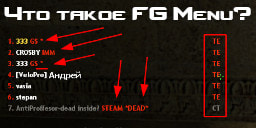
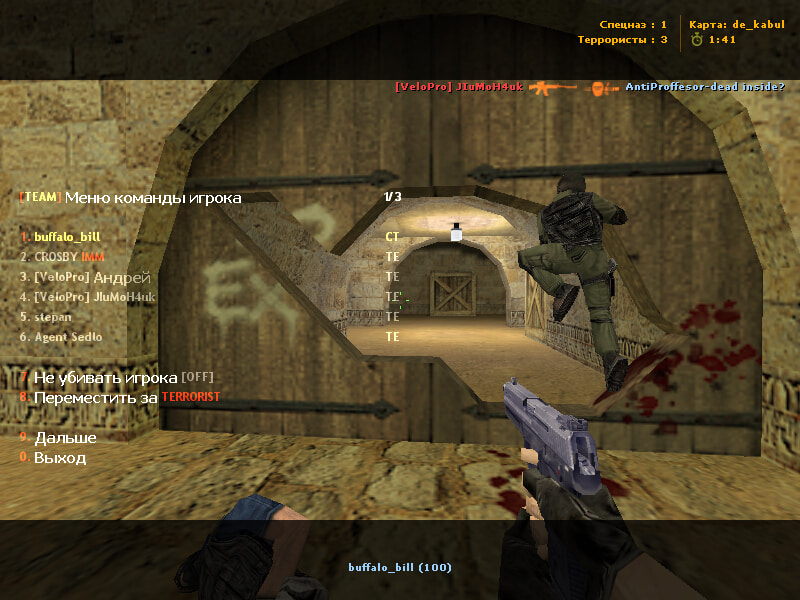
  • Sorting. Players in the menu are sorted exactly like in the TAB scoreboard. Sorting is by frags and divided by teams. First, terrorists sorted by frags, then CTs sorted by frags, then spectators, also by frags. This makes it very easy to quickly find the player you need.
  • Team. The right column in the menu shows the player’s team:
    • TE (red) – Terrorist
    • CT (yellow) – Counter-Terrorist
    • SP (white) – Spectator
  • First item. Very convenient feature:
    • If dead: The first item in the menu duplicates the player you are observing. For example, if you are spectating a cheater, you know it’s time to ban them 😊. Open the menu, and the first item will be that player—no need to search, a couple of clicks and they are banned.
    • If alive: The first item duplicates the player on whom the last action was performed. For example, you slapped a camper, and they are back. Open the Slap/Slay menu, and the first item will be that same player.
    • Auto-update: The first item automatically updates when switching between players in spectator mode.
  • STEAM. Displays “STEAM” for Steam players.
  • GsClient. Also shows players using GS Client (requires authemu module).
  • HLTV and BOT. Displays HLTV and bots.
  • Immune players. Displays “IMM” for players with immunity.
  • Players with flags. Any player with at least one flag (excluding flag “z”) will have an asterisk *.
  • Lightweight. Despite its full functionality, the menu is very light on server resources. Fast and convenient, widely used, but a separate page with explanations is being created only now 😊.


Which plugins include this menu?
On the main store page, click the "FG Menu" button.

Settings
To change cvars, enter them in amxx.cfg. No need to do this if default settings are fine.

  • amx_menu_first "1/0" – enable or disable duplicating the player as the first menu item (default: enabled)
  • amx_menu_steam "1/0" – enable or disable displaying “STEAM” for Steam players (default: enabled)
  • amx_menu_gsclient "1/0" – enable or disable displaying “GS” for GS Client players (default: enabled)

Similar plugins


ECD Helper, MOTD RBS, AdminCmd RBS, AMXBans RBS, Screen Player, Ultimate GAG, AdminChat RBS, Blind RBS, WeaponMenu RBS
fg_menu
Author SKAJIbnEJIb
Category INFORMATION
Discuss on the forum 👀
Order installation from a specialist

Configuration files


amxx.cfg
FG Menu screen0
FG Menu screen1
FG Menu screen2
FG Menu screen3
FG Menu screen4
FG Menu screen5
FG Menu screen0
FG Menu screen1
FG Menu screen2
FG Menu screen3
FG Menu screen4
FG Menu screen5