You can log in to our site only via STEAM. If you don’t have a STEAM account, please register a free one on the official site steamcommunity.com, then click the button below to log in. Logged-in users have access to many features that make browsing our store more convenient. To purchase plugins, change your IP, or recover a key, logging in is not required.
By logging in to our website, you agree to the terms of our Privacy Policy
Allows you to create an unlimited number of different menus for both admins and regular players. With its help you can create, for example, submenus for AmxModMenu RBS, or simply a set of menus for an admin. CVAR menus, config menus, etc. It is limited only by your imagination and, of course, by the functionality of other plugins whose commands this one will use. A complete replacement for the standard plugin cmdmenu.amxx
Features and Capabilities
Full replacement of the standard cmdmenu.amxx. All menus are no longer scattered across files but are conveniently stored in a single cmdmenu_rbs.ini. Many additional features have been added, and we have even optimized this already lightweight plugin.
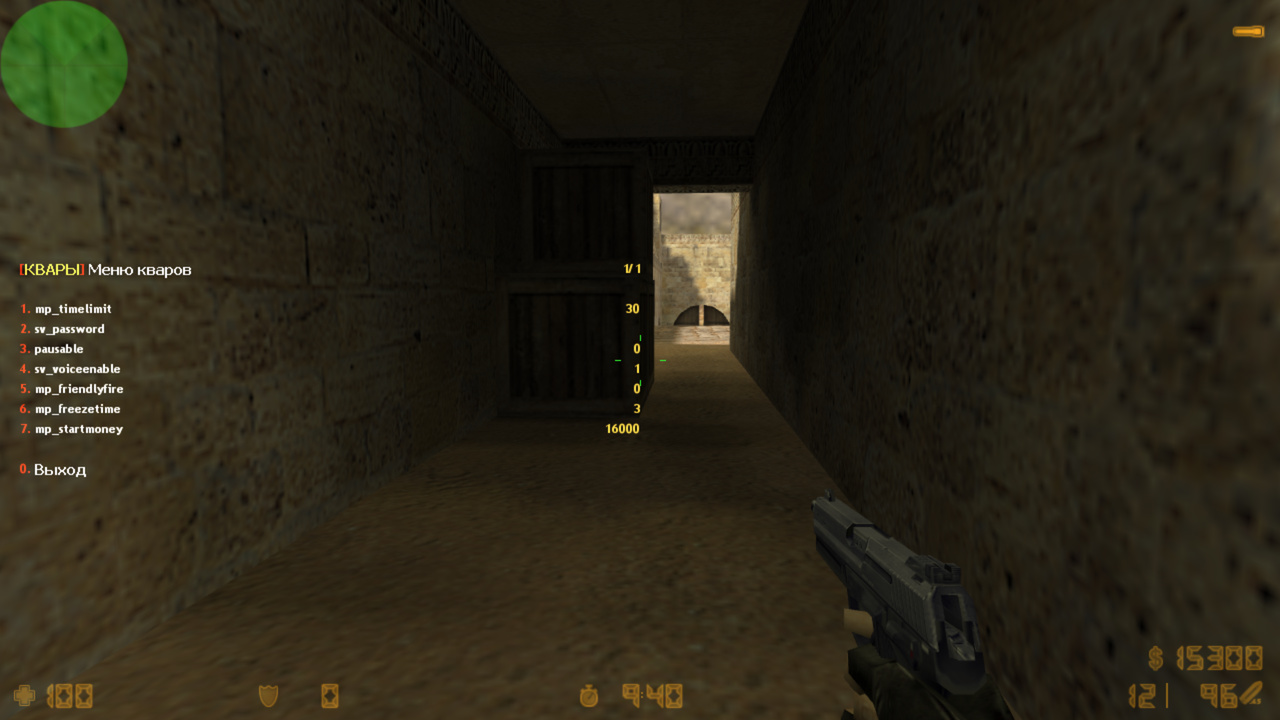
Beautiful design. As with all our plugins, we slightly improve the plain white menus to make them more visually appealing.
Unlimited number of menus. You can create as many menus as you need. The plugin already includes 4 standard menus that were originally present in cmdmenu.amxx; you can use them as examples to create your own.
Convenience. We tried to explain the workflow and creation process as clearly as possible. Previously, creating a custom menu required writing a plugin; now it is enough to add something in the config and change the map.
How does it actually work? It is extremely simple. When adding an item to a menu, you specify a console command that will be executed either in the server console, the admin’s console, or... let’s go through the options:
a) The command is executed in the server console. For example, to restart a round, you need to enter the command sv_restart 1 in the server console.
b) The command is executed from the player’s console. For example, take the blind_menu command from the Blind RBS plugin. If an admin enters it in their console, a menu will open. To avoid memorizing all these admin menus, you can create a menu that launches them. A very convenient feature - highly recommended.
c) The command is executed for all players. This feature was designed specifically for amx_speechmenu. It is a sound menu; not sure why it was included in AMXX by default, but maybe someone needs it or can build something similar.
d) Return to the menu. This flag prevents the menu from closing after selecting an item. Use it where you find it necessary.
e) Execute for all players bypassing protection. The Ostrog method. The same as "c", but using a different function.
f) CVAR change. Slightly changes the menu type, designed for convenient server CVAR management.
g) LOGS. One of the most important server features is logging. Different situations may occur, and only log files show when, who, and how. Simply enable this flag for any menu item you want to log.
h) Access for T only. (see menu examples in the config)
i) Access for CT only.
j) Access for SP only.
k) Available only to alive players.
l) Available only to dead players.
Sound loading. If you add your own sounds to amx_speechmenu or anywhere else, they are automatically downloaded to the client. No hassle at all.
Menu and item access. You can flexibly configure access to the menu itself via flags, and even to each individual item. This ensures that important menu items cannot be used by regular admins or VIPs.
All players
abc - player with these flags
a,b,c - if the player has at least one of these flags
STEAM - available only to Steam players
GSCLIENT - available only to GSClient users
STEAM_0:0:12345678 - available only to the specified Steam ID
123.123.123.123 - available only to the specified IP
nick:Player - available only to the specified nickname
gamecms:_service - available only to users who purchased the _service in GameCMS
army:2 - available only for the specified Army Ranks Ultimate level
After installing the plugin, you can remove the old cmdmenu.amxx and the configuration files: cmds.ini, configs.ini, speech.ini, and cvars.ini. They are no longer needed 💪
26.07.05BETA - обновить .amxx - исправлена замена переменных в строке 26.06.30BETA - обновить .amxx - исправлена ошибка обратной совместимости со старым конфигом 26.06.14BETA - обновить .amxx - исправлена ошибка доступа по STEAMID 26.06.07BETA - обновить ВСЕ ФАЙЛЫ - обновлено ядро плагина - добавлена полная мультиязычность, даже в конфигах (серверная команда fg_lang) - исправление мелких недочетов - добавлены переменные %authid%, %ip%, %id%, #%userid%, %name% - добавлен доступ к командам только для CT или только для T - добавлена настройка доступа к меню и к командам по значениям: STEAM, GSCLIENT, STEAMID, IP, gamecms:_service - исправлен перевод строки символом "\n" - добавлен автоматический показ меню в начале раунда - добавлен автоматический показ меню при спавне - добавлена say команда для вызова меню - добавлена проверка на уже открытые меню - добавлено ограничение в секундах от начала раунда - не делает запись в cmdaccess.ini, флаги настраиваются теперь только в .ini - добавлен вызов функций из других плагинов
20.06.06 - обновить .amxx - исправили ошибку с разделителем в меню
// RU: Для перевода файлов плагина используйте серверную консольную команду: fg_lang
// Лицензионный ключ вводить в файл amxmodx/data/fg_keys.ini (если файла нет, он создастся сам при рестарте/смены карты сервера)


// Все настройки производятся в cmdmenu_rbs.ini
; RU: Для перевода файлов плагина используйте серверную консольную команду: fg_lang
; Добавление различных меню
; Плагин полностью заменяет стандартный cmdmenu.amxx и файлы cmds.ini, configs.ini, speech.ini и cvars.ini можно удалить


; ПЕРВАЯ СТРОКА - создание меню и ее настройки
; Формат: [command_menu] "access" "title_menu" "description" "say_menu" "type_menu"
;	[command_menu]
;		какой консольной командой будет вызываться Ваше меню
;	"access"
;		какой игрок сможет открыть данное меню
;		"" - разрешено всем
;		"abc" - игрок с этими флагами
;		"a,b,c" - если у игрока есть хотя бы один из этих флагов
;		"STEAM" - будет доступен только steam игрокам
;		"GSCLIENT" - будет доступен только игрокам с gsclient
;		"STEAM_0:0:12345678" - будет доступен для указанного STEAM ID
;		"123.123.123.123" - будет доступен для указанного IP
;		"nick:Player" - будет доступен для указанного Ника
;		"gamecms:_service" - будет доступен у кого куплена в GameCMS услуга _service (подробнее в документации)
;		"army:2" - доступно только с указанного уровня Army Ranks Ultimate
;	"title_menu"
;		что будет написано в шапке меню
;	"description"
;		нужно для отображения в amx_help
;	"say_menu"
;		какой чат-комадой будет вызываться меню (можно не указывать)
;	"type_menu"
;		дополнительные настройки меню (можно комбинировать)
;		"" - можно просто оставить пустым
;		"a" - автоматический показ меню в начале раунда всем, у кого есть доступ к нему
;		"b" - автоматический показ меню при спавне игрока, если у него есть доступ
;		"c" - не открывать меню, если уже открыто другое меню (только для автоматического показа)
;		"d" - время от начала раунда, в течении которого можно использовать меню, кратно пяти секундам, пример: d15


; ВТОРАЯ И ПОСЛЕДУЮЩИЕ СТРОКИ - добавление пунктов в это меню
; Формат: "title" "command" "type" "access"
;	"title"
;		название пункта в меню
;		"\n" - символ новой строки (если нужно сделать отступ)
;	"command"
;		любая консольная команда
;		вместо "" используйте '' где это нужно, смотрите примеры в amx_speechmenu
;		можно использовать переменные, которые примут соответствующие значения игрока, вызывающего пункт в меню
;		%authid%, %ip%, %id%, #%userid%, %name%
;		можно вызывать функции из других плагинов, чтобы не отправлять команды игроку (для продвинутых юзеров), пример:
;			"ultimate_gag.amxx:cmdMuteMenu(id)"
;	"type"
;		где и как будет выполняться команда (можно комбинировать)
;		"a" - выполнить команду из консоли сервера
;		"b" - выполнить команду из консоли игрока
;		"c" - выполнить команду всем игрокам
;		"d" - вернуться назад в меню
;		"e" - выполнить команду всем игрокам в обход протектора (метод острога, можно получить бан от мониторингов)
;		"f" - смена квара (смотрите примеры в amx_cvarmenu)
;		"g" - будет писать лог в стандартные L00000000.log логи
;		"h" - доступно только для TE
;		"i" - доступно только для CT
;		"j" - доступно только для SP
;		"k" - доступно только для живых
;		"l" - доступно только для мертвых
;	"access"
;		игрок с каким флагом сможет выполнить команду
;		"" - если не указывать, то будет доступно всем, у кого есть доступ к меню
;		"abc" - игрок с этими флагами
;		"a,b,c" - если у игрока есть хотя бы один из этих флагов
;		"STEAM" - будет доступен только steam игрокам
;		"GSCLIENT" - будет доступен только игрокам с gsclient
;		"STEAM_0:0:12345678" - будет доступен для указанного STEAM ID
;		"123.123.123.123" - будет доступен для указанного IP
;		"nick:Player" - будет доступен для указанного Ника
;		"gamecms:_service" - будет доступен у кого куплена в GameCMS услуга _service (подробнее в документации)
;		"army:2" - доступно только с указанного уровня Army Ranks Ultimate


; Тестовое меню для показа возможностей плагина
; Его можно отключить, оно доступно только главному админу с флагом "l"
; Оно доступно в течение 15 секунд с начала раунда
; [command_menu]  "access" "title_menu"                          "description"  "say_menu" "type_menu"
[amx_examplemenu] "l"      "\r[\yEXAMPLE\r]\w Test menu\R%d/%d"  "test menu"    "/testmenu" "cd15"
"KNIFE Ultimate"	"weapons_give #%userid% ultimate_knife"	"ad"	"t"						; доступ на флаг "t", пошлет команду в консоль сервера, плагин ultimate_weapons в свою очередь выдаст оружие
"AWP Ultimate"		"weapons_give #%userid% ultimate_awp"	"adg"	"gamecms:_ultimate_awp"	; доступно только тем, у кого есть услуга в GameCMS _ultimate_awp и до 15 секунд от начала раунда
"AK47 For TE"		"weapons_give #%userid% ultimate_ak47"	"adgh"	""						; доступно только для TE
"M4A1 For CT"		"weapons_give #%userid% ultimate_m4a1"	"adgi"	""						; доступно только для CT
"VIP For Alive"		"say /vipmenu"							"bk"	""						; доступно только для живых
"ESP Menu"			"esp_rbs.amxx:cmdMenuESP(id)"			""		"STEAM_0:0:12345678"	; только для этого STEAMID, выполняет функцию из стороннего плагина


; Меню админских команд
; Чтобы быстро сделать рестарт раунда или открыть меню из других плагинов
; Очень удобно добавить в это меню такие команды, как: редактор респавнов, статистики, объектов и прочее
; Чтобы в нужный момент, не вспоминать, какая команда вызывает меню от такого плагина, а зайти сюда и выбрать нужный пункт
; Стандартное меню amxx
; [command_menu]  "access" "title_menu"                                      "description"           "say_menu" "type_menu"
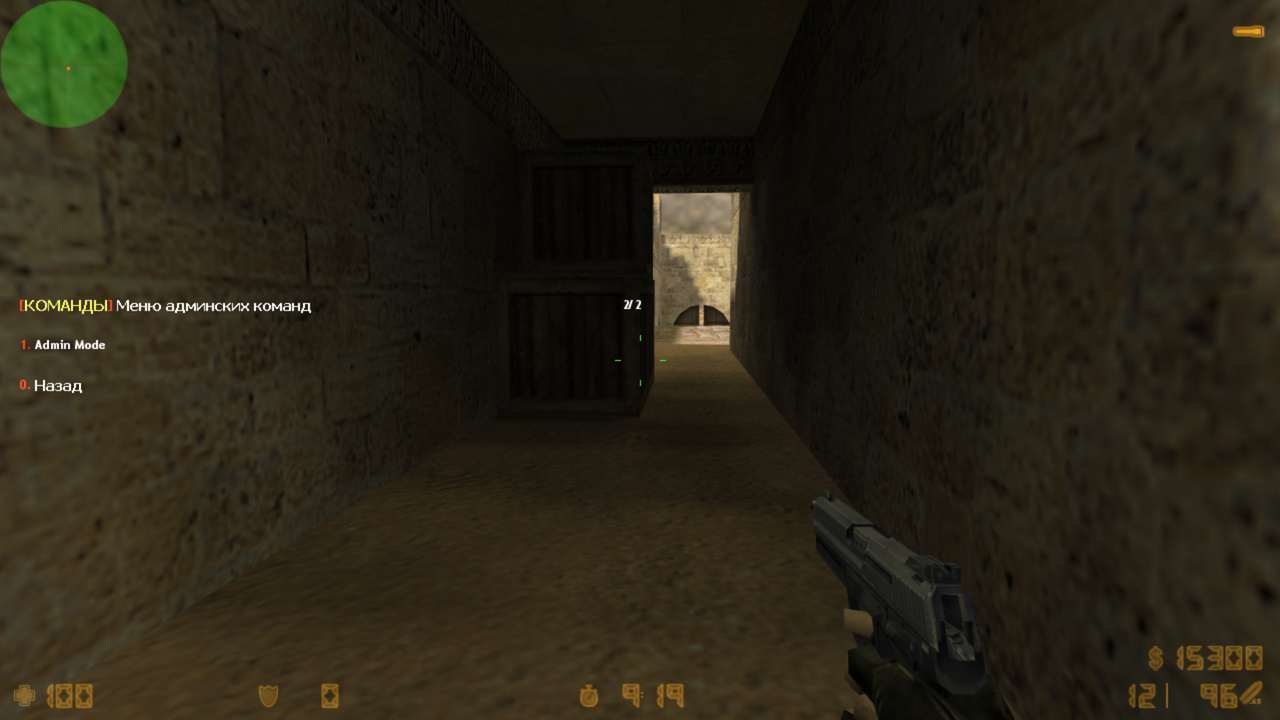
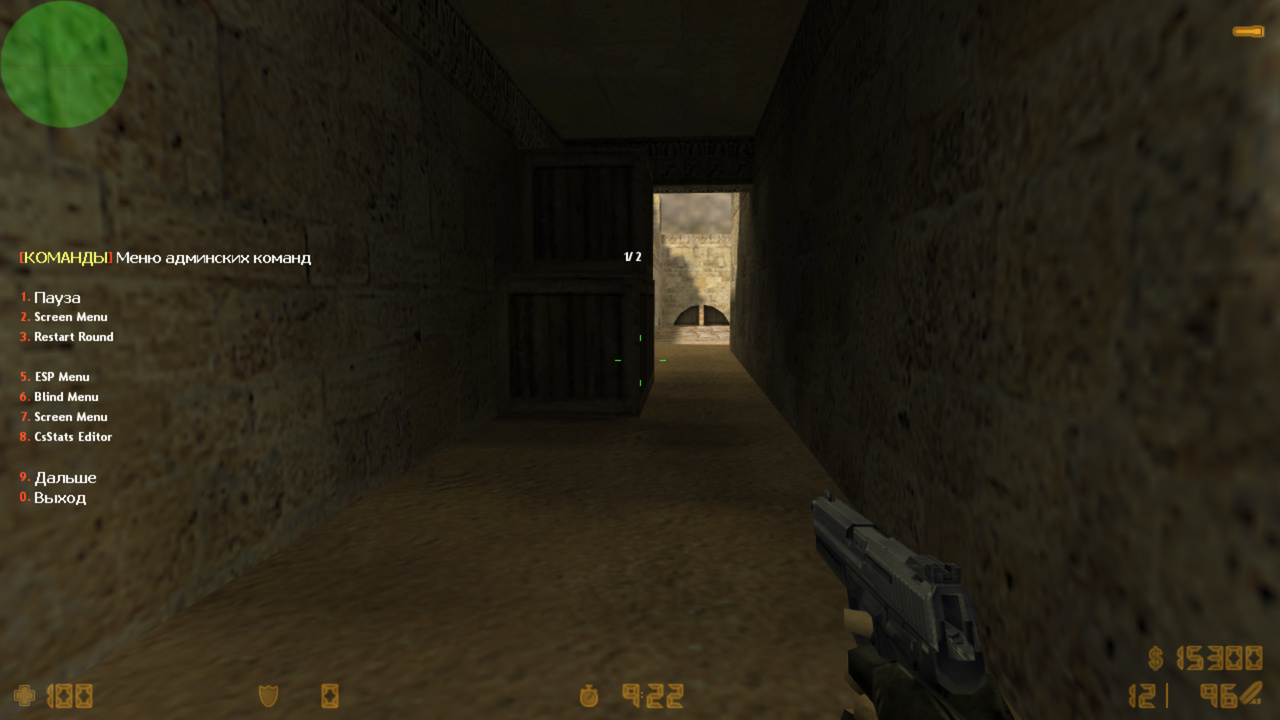
[amx_cmdmenu]     "u"      "\r[\yКОМАНДЫ\r]\w Меню админских команд\R%d/%d"  "меню админских команд" ""         "a"
"Пауза"				"amx_pause"						"adg"	"l"		; Выполнит amx_pause в консоль сервера и не закроет текущее меню, доступ только по флагу l(ADMIN_RCON)
"Screen Menu"		"screen_player"					"b"		"d"		; Выполнит эту команду в консоль админа, доступ только по флагу d(ADMIN_BAN)
"Restart Round"		"sv_restartround 1"				"ag"	"t"		; Сделает рестарт раунда, введет команду в консоль сервера, доступ только по флагу t
" "					"-"								""		""		; Разделитель (если вместо команды вписать знак "-")
"ESP Menu"			"say_team /esp"					"b"		"d"		; Выполнит эту команду в консоль админа, доступ только по флагу d(ADMIN_BAN)
;"Blind Menu"		"blind_menu"					"b"		"l"
;"Screen Menu"		"screen_player"					"b"		"d"
;" "		"-"			""	"u"
;"История банов"	"amx_banhistorymenu"			"b"		"d"
;"Ушедшие игроки"	"amx_bandisconnectedmenu"		"b"		"d"
;"Разбан Меню"		"amx_unbanmenu"					"b"		"d"
;"Бан подсети"		"amx_bansubnetmenu"				"b"		"l"
;" "		"-"			""	"u"
;"Speech Menu"		"amx_speechmenu"				"b"		"l"
;"Редактор рун"		"runes_editor"					"b"		"l"
;"Меню спавнов"		"spawn_enable 1;spawn_menu"		"b"		"l"
;"CsStats Editor"	"csstats_editor"				"b"		"l"
;"Admin Mode"		"admin_mode_menu"				"b"		"l"


; Меню для загрузки конфигов с настройками
; Например захотели поиграть ClanWar, загрузили конфиг с настройками кланвара
; Стандартное меню в amxx, мало кто им пользуется
; [command_menu] "access" "title_menu"                                  "description"       "say_menu" "type_menu"
[amx_cfgmenu]    "u"      "\r[\yКОНФИГИ\r]\w Меню конфигураций\R%d/%d"  "меню конфигураций" ""         ""
;"PUBLIC Settings"					"servercfgfile server.cfg;exec server.cfg"	"ag"	"u"
;"Clanbase"							"exec clanbase.cfg;servercfgfile \'\'"		"ag"	"u"
;"Clanbase Charges Only"			"exec clanbase_co.cfg;servercfgfile \'\'"	"ag"	"u"
;"Official CAL Match"				"exec cal.cfg;servercfgfile \'\'"			"ag"	"u"
;"ProvingGrounds Server Config"		"exec leagues/pg.cfg;servercfgfile \'\'"	"ag"	"u"
;"OGL CS Server Config"				"exec ogl.cfg;servercfgfile \'\'"			"ag"	"u"
;"OGL CS FF Server Config"			"exec ogl_ff.cfg;servercfgfile \'\'"		"ag"	"u"
;"OGL CS Advanced Server Config"	"exec ogl_adv.cfg;servercfgfile \'\'"		"ag"	"u"


; Меню звуков
; Просто воспроизводить всем играющим в консоль тот или иной звук
; Стандартное меню в AMXX, просто побаловаться
; [command_menu]  "access" "title_menu"                          "description"  "say_menu" "type_menu"
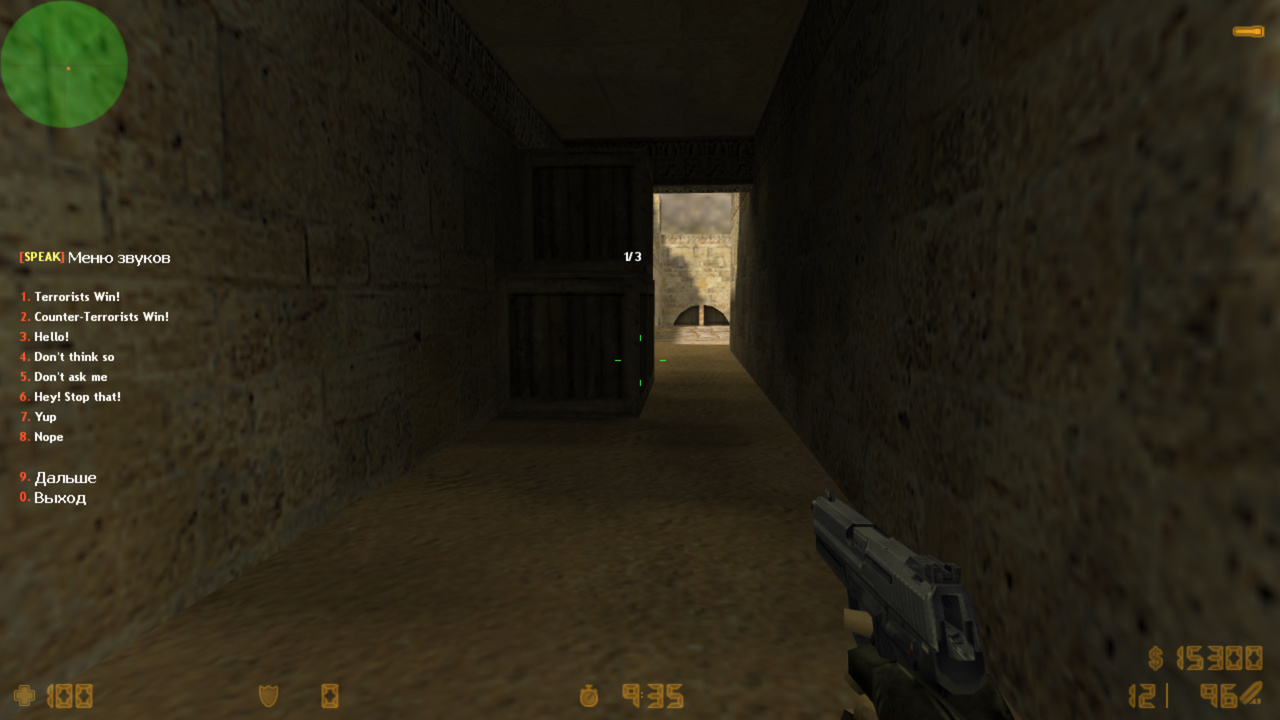
[amx_speechmenu]  "u"      "\r[\ySPEAK\r]\w Меню звуков\R%d/%d"  "меню звуков"  ""         ""
"Terrorists Win!"				"spk 'cstrike/sound/radio/terwin.wav'"				"cd"	"u"
"Counter-Terrorists Win!"		"spk 'cstrike/sound/radio/ctwin.wav'"				"cd"	"u"
"Hello!"						"spk 'valve/sound/vox/hello.wav'"					"cd"	"u"
"Don't think so"				"spk 'valve/sound/barney/dontguess.wav'"			"cd"	"u"
"Don't ask me"					"spk 'valve/sound/barney/dontaskme.wav'"			"cd"	"u"
"Hey! Stop that!"				"spk 'valve/sound/barney/donthurtem.wav'"			"cd"	"u"
"Yup"							"spk 'valve/sound/barney/yup.wav'"					"cd"	"u"
"Nope"							"spk 'valve/sound/barney/nope.wav'"					"cd"	"u"
"Maybe"							"spk 'valve/sound/barney/maybe.wav'"				"cd"	"u"
"Seeya"							"spk 'valve/sound/barney/seeya.wav'"				"cd"	"u"
"Man that sounded bad"			"spk 'valve/sound/barney/soundsbad.wav'"			"cd"	"u"
"Hello and die"					"spk 'valve/sound/vox/hello and die.wav'"			"cd"	"u"
"Move!"							"spk 'valve/sound/hgrunt/move! _comma yessir!.wav'"	"cd"	"u"
"You will definitely pay!"		"spk 'valve/sound/hgrunt/c2a2_hg_chat5a.wav'"		"cd"	"u"
"Laughter"						"spk 'valve/sound/hgrunt/c2a3_hg_laugh.wav'"		"cd"	"u"
"Silence!"						"spk 'valve/sound/hgrunt/silence!.wav'"				"cd"	"u"
"You talk too much"				"spk 'valve/sound/barney/youtalkmuch.wav'"			"cd"	"u"
"You thinkin?"					"spk 'valve/sound/barney/thinking.wav'"				"cd"	"u"
"Open fire Gordon!"				"spk 'valve/sound/barney/openfire.wav'"				"cd"	"u"
"Couldnt make a bigger mess"	"spk 'valve/sound/barney/bigmess.wav'"				"cd"	"u"
"I have a Bad feeling"			"spk 'valve/sound/barney/badfeeling.wav'"			"cd"	"u"
"Yes sir!"						"spk 'valve/sound/hgrunt/yessir!.wav'"				"cd"	"u"
"No sir"						"spk 'valve/sound/barney/nosir.wav'"				"cd"	"u"


; Меню кваров
; Удобное переключение значения кваров
; Стандартное меню amxx. Конструкция такого меню немного отличается, но, думаю, по примерам все понятно
; [command_menu]  "access"  "title_menu"                            "description"  "say_menu" "type_menu"
[amx_cvarmenu]    "g"       "\r[\yКВАРЫ\r]\w Меню кваров\y\R%d/%d"  ""             ""         ""
"mp_timelimit"			"'0' '30' '45'"				"fdg"	"g"
"sv_password"			"'' 'mypw' 'clanwarpw'"		"fdg"	"g"
"pausable"				"'0' '1'"					"fdg"	"g"
"sv_voiceenable"		"'0' '1'"					"fdg"	"g"
"mp_friendlyfire"		"'0' '1'"					"fdg"	"g"
"mp_freezetime"			"'0' '6'"					"fdg"	"g"
"mp_startmoney"			"'800' '1800' '16000'"		"fdg"	"g"
[ru]
CMDMENU_CMD_ACCESS   = У вас недостаточно прав для использования этого меню!
CMDMENU_SAY_ACCESS   = !tУ вас недостаточно прав для использования этого меню!
CMDMENU_ITEM_ACCESS  = Нет доступа
CMDMENU_TE_ACCESS    = Доступно только для TE
CMDMENU_CT_ACCESS    = Доступно только для CT
CMDMENU_SP_ACCESS    = Доступно только для SP
CMDMENU_ALIVE_ACCESS = Доступно только для живых
CMDMENU_DEAD_ACCESS  = Доступно только для мертвых

[en]
CMDMENU_CMD_ACCESS   = You do not have sufficient permissions to use this menu!
CMDMENU_SAY_ACCESS   = !tYou do not have sufficient permissions to use this menu!
CMDMENU_ITEM_ACCESS  = No access
CMDMENU_TE_ACCESS    = Available only for TE
CMDMENU_CT_ACCESS    = Available only for CT
CMDMENU_SP_ACCESS    = Available only for SP
CMDMENU_ALIVE_ACCESS = Available only for alive players
CMDMENU_DEAD_ACCESS  = Available only for dead players

[bg]
CMDMENU_CMD_ACCESS   = Нямате достатъчно права, за да използвате това меню!
CMDMENU_SAY_ACCESS   = !tНямате достатъчно права, за да използвате това меню!
CMDMENU_ITEM_ACCESS  = Няма достъп
CMDMENU_TE_ACCESS    = Достъпно само за TE
CMDMENU_CT_ACCESS    = Достъпно само за CT
CMDMENU_SP_ACCESS    = Достъпно само за SP
CMDMENU_ALIVE_ACCESS = Достъпно само за живи играчи
CMDMENU_DEAD_ACCESS  = Достъпно само за мъртви играчи

[cz]
CMDMENU_CMD_ACCESS   = Nemáte dostatečná oprávnění k použití tohoto menu!
CMDMENU_SAY_ACCESS   = !tNemáte dostatečná oprávnění k použití tohoto menu!
CMDMENU_ITEM_ACCESS  = Přístup odepřen
CMDMENU_TE_ACCESS    = Dostupné pouze pro TE
CMDMENU_CT_ACCESS    = Dostupné pouze pro CT
CMDMENU_SP_ACCESS    = Dostupné pouze pro SP
CMDMENU_ALIVE_ACCESS = Dostupné pouze pro živé hráče
CMDMENU_DEAD_ACCESS  = Dostupné pouze pro mrtvé hráče

[pl]
CMDMENU_CMD_ACCESS   = Nie masz wystarczających uprawnień do korzystania z tego menu!
CMDMENU_SAY_ACCESS   = !tNie masz wystarczających uprawnień do korzystania z tego menu!
CMDMENU_ITEM_ACCESS  = Brak dostępu
CMDMENU_TE_ACCESS    = Dostępne tylko dla TE
CMDMENU_CT_ACCESS    = Dostępne tylko dla CT
CMDMENU_SP_ACCESS    = Dostępne tylko dla SP
CMDMENU_ALIVE_ACCESS = Dostępne tylko dla żywych graczy
CMDMENU_DEAD_ACCESS  = Dostępne tylko dla martwych graczy

[ro]
CMDMENU_CMD_ACCESS   = Nu aveți suficiente drepturi pentru a utiliza acest meniu!
CMDMENU_SAY_ACCESS   = !tNu aveți suficiente drepturi pentru a utiliza acest meniu!
CMDMENU_ITEM_ACCESS  = Fără acces
CMDMENU_TE_ACCESS    = Disponibil doar pentru TE
CMDMENU_CT_ACCESS    = Disponibil doar pentru CT
CMDMENU_SP_ACCESS    = Disponibil doar pentru SP
CMDMENU_ALIVE_ACCESS = Disponibil doar pentru jucătorii vii
CMDMENU_DEAD_ACCESS  = Disponibil doar pentru jucătorii morți

[sr]
CMDMENU_CMD_ACCESS   = Немате довољно права да користите овај мени!
CMDMENU_SAY_ACCESS   = !tНемате довољно права да користите овај мени!
CMDMENU_ITEM_ACCESS  = Нема приступа
CMDMENU_TE_ACCESS    = Доступно само за TE
CMDMENU_CT_ACCESS    = Доступно само за CT
CMDMENU_SP_ACCESS    = Доступно само за SP
CMDMENU_ALIVE_ACCESS = Доступно само за живе играче
CMDMENU_DEAD_ACCESS  = Доступно само за мртве играче

[tr]
CMDMENU_CMD_ACCESS   = Bu menüyü kullanmak için yeterli yetkiniz yok!
CMDMENU_SAY_ACCESS   = !tBu menüyü kullanmak için yeterli yetkiniz yok!
CMDMENU_ITEM_ACCESS  = Erişim yok
CMDMENU_TE_ACCESS    = Yalnızca TE için kullanılabilir
CMDMENU_CT_ACCESS    = Yalnızca CT için kullanılabilir
CMDMENU_SP_ACCESS    = Yalnızca SP için kullanılabilir
CMDMENU_ALIVE_ACCESS = Yalnızca yaşayan oyuncular için kullanılabilir
CMDMENU_DEAD_ACCESS  = Yalnızca ölü oyuncular için kullanılabilir

[ua]
CMDMENU_CMD_ACCESS   = У вас недостатньо прав для використання цього меню!
CMDMENU_SAY_ACCESS   = !tУ вас недостатньо прав для використання цього меню!
CMDMENU_ITEM_ACCESS  = Немає доступу
CMDMENU_TE_ACCESS    = Доступно лише для TE
CMDMENU_CT_ACCESS    = Доступно лише для CT
CMDMENU_SP_ACCESS    = Доступно лише для SP
CMDMENU_ALIVE_ACCESS = Доступно лише для живих гравців
CMDMENU_DEAD_ACCESS  = Доступно лише для мертвих гравців

[kk]
CMDMENU_CMD_ACCESS   = Бұл мәзірді пайдалану үшін құқықтарыңыз жеткіліксіз!
CMDMENU_SAY_ACCESS   = !tБұл мәзірді пайдалану үшін құқықтарыңыз жеткіліксіз!
CMDMENU_ITEM_ACCESS  = Қолжетімділік жоқ
CMDMENU_TE_ACCESS    = Тек TE үшін қолжетімді
CMDMENU_CT_ACCESS    = Тек CT үшін қолжетімді
CMDMENU_SP_ACCESS    = Тек SP үшін қолжетімді
CMDMENU_ALIVE_ACCESS = Тек тірі ойыншылар үшін қолжетімді
CMDMENU_DEAD_ACCESS  = Тек өлген ойыншылар үшін қолжетімді

[de]
CMDMENU_CMD_ACCESS   = Sie haben nicht genügend Rechte, um dieses Menü zu verwenden!
CMDMENU_SAY_ACCESS   = !tSie haben nicht genügend Rechte, um dieses Menü zu verwenden!
CMDMENU_ITEM_ACCESS  = Kein Zugriff
CMDMENU_TE_ACCESS    = Nur für TE verfügbar
CMDMENU_CT_ACCESS    = Nur für CT verfügbar
CMDMENU_SP_ACCESS    = Nur für SP verfügbar
CMDMENU_ALIVE_ACCESS = Nur für lebende Spieler verfügbar
CMDMENU_DEAD_ACCESS  = Nur für tote Spieler verfügbar

[es]
CMDMENU_CMD_ACCESS   = ¡No tienes permisos suficientes para usar este menú!
CMDMENU_SAY_ACCESS   = !t¡No tienes permisos suficientes para usar este menú!
CMDMENU_ITEM_ACCESS  = Sin acceso
CMDMENU_TE_ACCESS    = Disponible solo para TE
CMDMENU_CT_ACCESS    = Disponible solo para CT
CMDMENU_SP_ACCESS    = Disponible solo para SP
CMDMENU_ALIVE_ACCESS = Disponible solo para jugadores vivos
CMDMENU_DEAD_ACCESS  = Disponible solo para jugadores muertos

[fr]
CMDMENU_CMD_ACCESS   = Vous n'avez pas les droits suffisants pour utiliser ce menu !
CMDMENU_SAY_ACCESS   = !tVous n'avez pas les droits suffisants pour utiliser ce menu !
CMDMENU_ITEM_ACCESS  = Aucun accès
CMDMENU_TE_ACCESS    = Disponible uniquement pour TE
CMDMENU_CT_ACCESS    = Disponible uniquement pour CT
CMDMENU_SP_ACCESS    = Disponible uniquement pour SP
CMDMENU_ALIVE_ACCESS = Disponible uniquement pour les joueurs vivants
CMDMENU_DEAD_ACCESS  = Disponible uniquement pour les joueurs morts

[it]
CMDMENU_CMD_ACCESS   = Non hai i permessi necessari per utilizzare questo menu!
CMDMENU_SAY_ACCESS   = !tNon hai i permessi necessari per utilizzare questo menu!
CMDMENU_ITEM_ACCESS  = Nessun accesso
CMDMENU_TE_ACCESS    = Disponibile solo per TE
CMDMENU_CT_ACCESS    = Disponibile solo per CT
CMDMENU_SP_ACCESS    = Disponibile solo per SP
CMDMENU_ALIVE_ACCESS = Disponibile solo per i giocatori vivi
CMDMENU_DEAD_ACCESS  = Disponibile solo per i giocatori morti

[pt]
CMDMENU_CMD_ACCESS   = Você não tem permissões suficientes para usar este menu!
CMDMENU_SAY_ACCESS   = !tVocê não tem permissões suficientes para usar este menu!
CMDMENU_ITEM_ACCESS  = Sem acesso
CMDMENU_TE_ACCESS    = Disponível apenas para TE
CMDMENU_CT_ACCESS    = Disponível apenas para CT
CMDMENU_SP_ACCESS    = Disponível apenas para SP
CMDMENU_ALIVE_ACCESS = Disponível apenas para jogadores vivos
CMDMENU_DEAD_ACCESS  = Disponível apenas para jogadores mortos

[bn]
CMDMENU_CMD_ACCESS   = এই মেনুটি ব্যবহার করার জন্য আপনার পর্যাপ্ত অনুমতি নেই!
CMDMENU_SAY_ACCESS   = !tএই মেনুটি ব্যবহার করার জন্য আপনার পর্যাপ্ত অনুমতি নেই!
CMDMENU_ITEM_ACCESS  = প্রবেশাধিকার নেই
CMDMENU_TE_ACCESS    = শুধুমাত্র TE-এর জন্য উপলব্ধ
CMDMENU_CT_ACCESS    = শুধুমাত্র CT-এর জন্য উপলব্ধ
CMDMENU_SP_ACCESS    = শুধুমাত্র SP-এর জন্য উপলব্ধ
CMDMENU_ALIVE_ACCESS = শুধুমাত্র জীবিত খেলোয়াড়দের জন্য উপলব্ধ
CMDMENU_DEAD_ACCESS  = শুধুমাত্র মৃত খেলোয়াড়দের জন্য উপলব্ধ

[hi]
CMDMENU_CMD_ACCESS   = आपके पास इस मेनू का उपयोग करने के लिए पर्याप्त अधिकार नहीं हैं!
CMDMENU_SAY_ACCESS   = !tआपके पास इस मेनू का उपयोग करने के लिए पर्याप्त अधिकार नहीं हैं!
CMDMENU_ITEM_ACCESS  = पहुंच नहीं
CMDMENU_TE_ACCESS    = केवल TE के लिए उपलब्ध
CMDMENU_CT_ACCESS    = केवल CT के लिए उपलब्ध
CMDMENU_SP_ACCESS    = केवल SP के लिए उपलब्ध
CMDMENU_ALIVE_ACCESS = केवल जीवित खिलाड़ियों के लिए उपलब्ध
CMDMENU_DEAD_ACCESS  = केवल मृत खिलाड़ियों के लिए उपलब्ध